Salvare le tue applicazioni con Veeam Kasten
Introduzione
Veeam Kasten K10 è una soluzione di backup e ripristino progettata specificamente per gli ambienti Kubernetes. Nel prodotto Managed Kubernetes di Cloud Temple, Kasten è integrato per consentirti di proteggere le tue applicazioni, ripristinare i dati quando necessario e garantire la continuità operativa.
Questo tutorial ti guiderà attraverso i passaggi di base per eseguire il backup e il ripristino di un'applicazione utilizzando Kasten.
Prerequisiti
Prima di iniziare, assicurati di disporre di quanto segue:
- Un cluster Managed Kubernetes attivo.
- L'identificativo del tuo cluster (ad esempio,
ctodev). - Un'applicazione distribuita nel tuo cluster che desideri eseguire il backup.
1. Accedere alla dashboard di Kasten
La dashboard di Kasten è accessibile tramite un URL sicuro, costruito a partire dall'identificativo del tuo cluster.
-
Costruisci l'URL di accesso: L'URL si basa sul seguente modello:
https://k10.external-secured.<identificativo>.mk.ms-cloud-temple.com/k10/Sostituisci<identificativo>con l'identificativo del tuo cluster. Ad esempio, se il tuo identificativo èctodev, l'URL sarà:https://k10.external-secured.ctodev.mk.ms-cloud-temple.com/k10/. -
Accedi all'URL nel tuo browser.
ℹ️Nota sulla sicurezza L'accesso a questo URL è limitato agli indirizzi IP pubblici che hai dichiarato. Se non riesci ad accedere, assicurati che il tuo indirizzo IP sia autorizzato contattando il supporto di Cloud Temple.
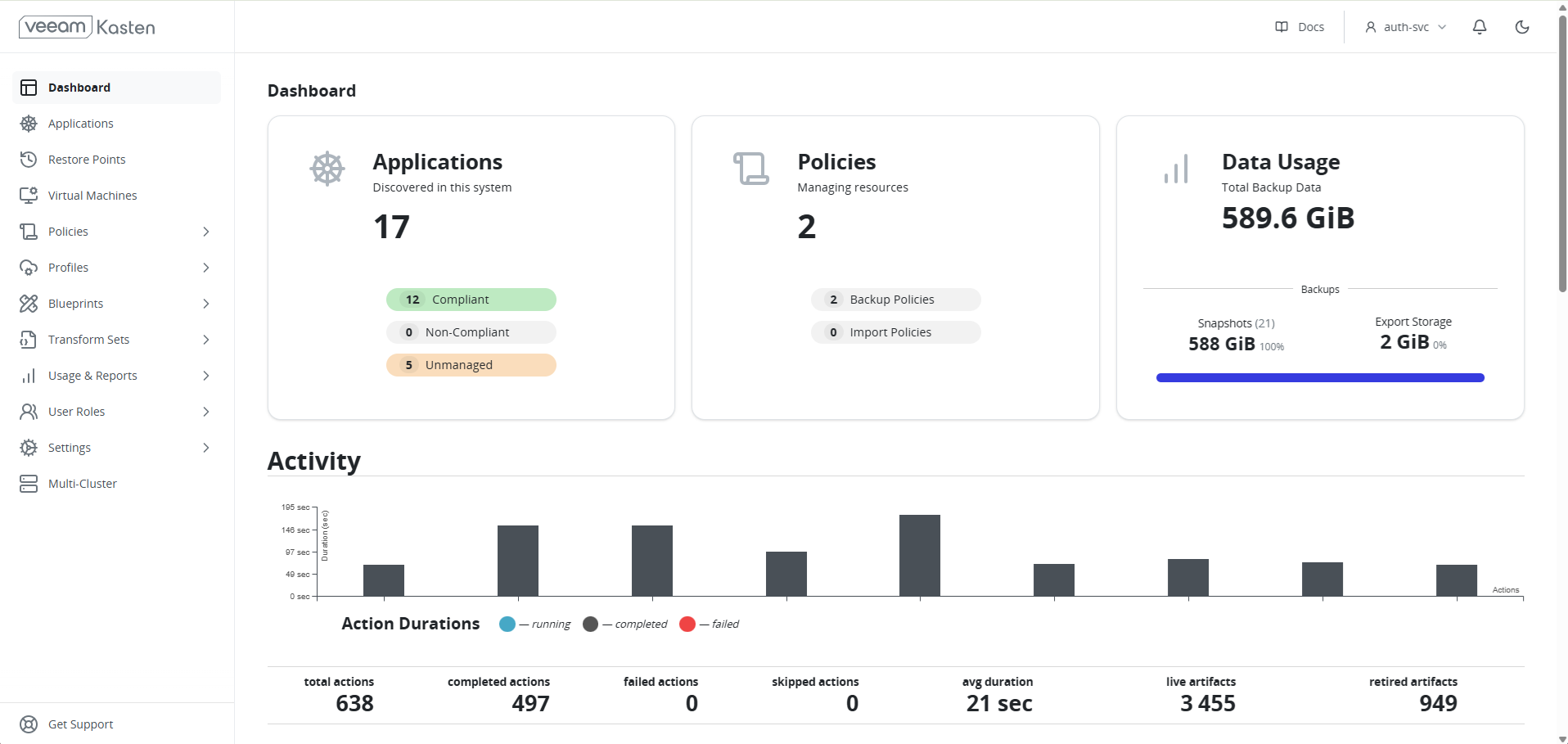
ℹ️[Guida rapida integrata] La console Kasten include una guida rapida interattiva nella sua pagina iniziale. Sentiti libero di seguirla per un primo utilizzo direttamente dall'interfaccia.
2. Comprendere l'archiviazione dei backup
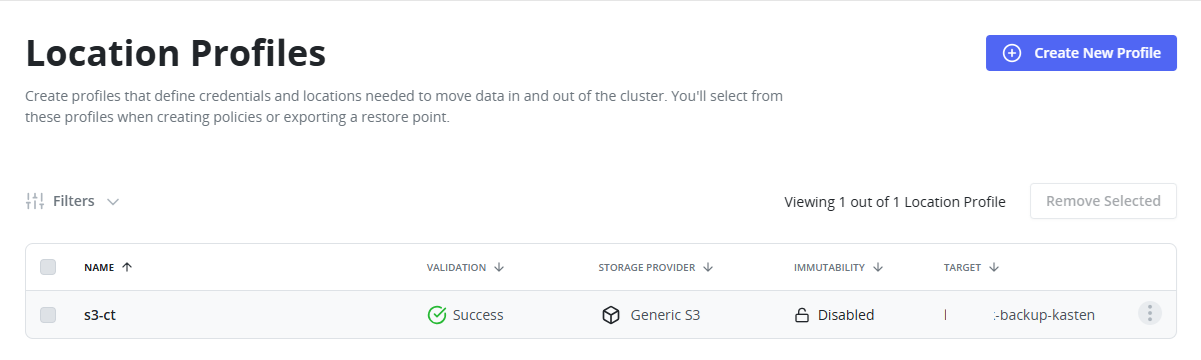
Per impostazione predefinita, Kasten è preconfigurato per utilizzare il servizio di storage oggetto (S3) di Cloud Temple per archiviare i tuoi backup in modo sicuro e duraturo.
Non è necessaria alcuna configurazione. La posizione di archiviazione è già impostata nella dashboard di Kasten, sotto Settings > Locations. Questa configurazione garantisce che i tuoi dati siano archiviati su un'infrastruttura sovrana.
ℹ️[Modello di costo] Il servizio Veeam Kasten è incluso nel prodotto Managed Kubernetes. L'archiviazione dei backup sul nostro S3 sovrano è fatturata in base all'utilizzo. Consulta i tariffari pubblici sul sito Cloud Temple per maggiori dettagli.
3. Creare una policy di backup
Una policy di backup (Policy) è un insieme di regole che definiscono quando e come eseguire il backup delle tue applicazioni.
⚠[Policy di backup esistente] Una policy di backup denominata infra-backups è già configurata nella tua istanza Kasten. Questa policy assicura il backup dei componenti essenziali forniti con il cluster.
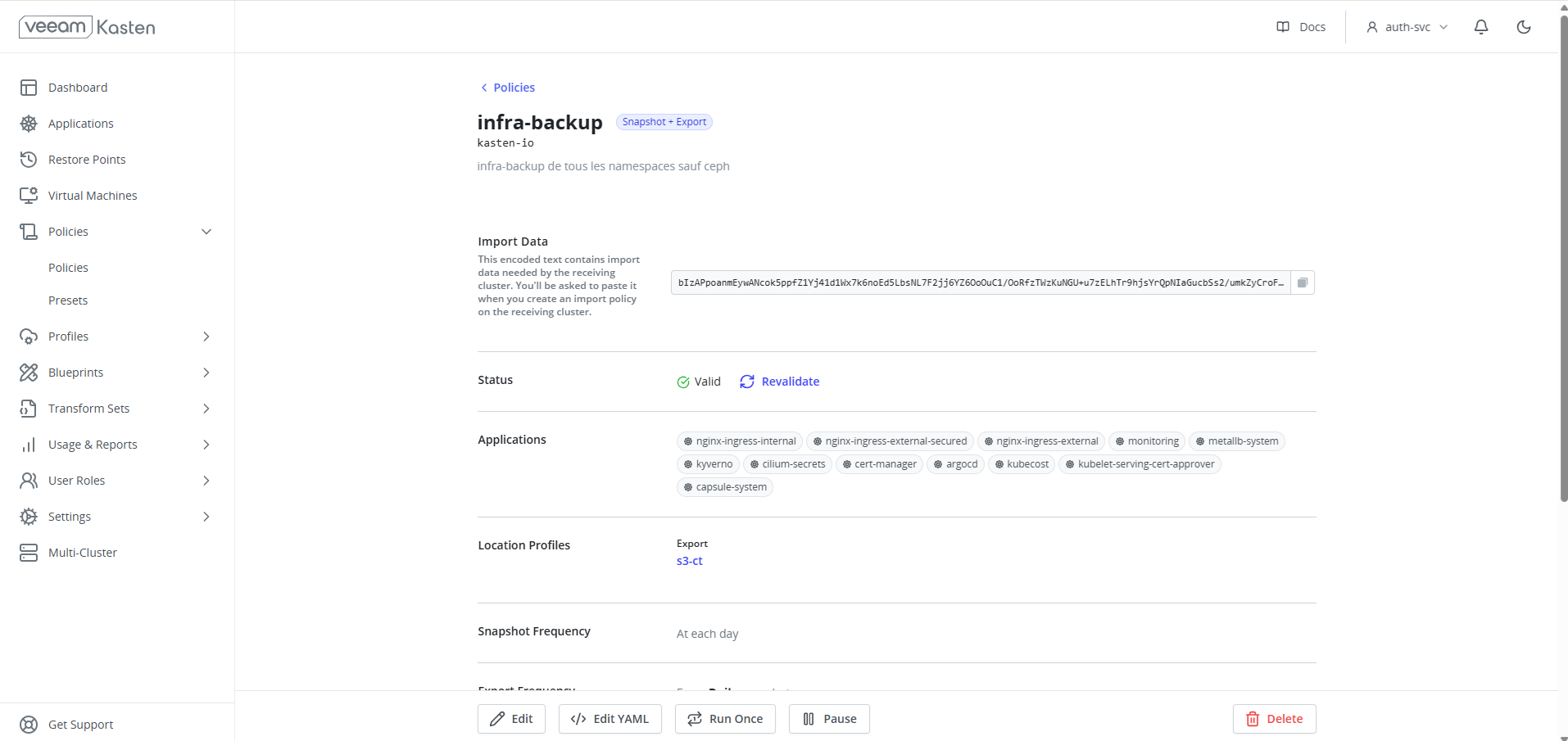
Non modificare e non eliminare questa policy.
Devi creare le tue policy per eseguire il backup delle applicazioni che distribuisce.
-
Nella dashboard di Kasten, accedi alla sezione Policies e fai clic su Create New Policy.
-
Nomina la tua policy: Assegna un nome descrittivo, ad esempio
backup-my-app-daily. -
Definisci la frequenza (Action):
- Action:
Snapshot(istantanea). - Frequency: Scegli la frequenza più adatta (ad esempio,
Dailyalle02:00).
- Action:
-
Seleziona le risorse da eseguire il backup:
- Select resources by: Puoi selezionare le applicazioni per nome (
Application Name), per namespace (Namespace) o per etichette. - Per eseguire il backup di tutte le applicazioni di un namespace, scegli
Namespacee seleziona il namespace desiderato.
- Select resources by: Puoi selezionare le applicazioni per nome (
-
Fai clic su
Create Policyper salvare.
La policy verrà eseguita automaticamente alla frequenza impostata. Puoi anche avviare un'esecuzione manuale facendo clic sul pulsante "Play" (▶️) accanto alla policy.
Policy di backup rapide
Per facilitare l'utilizzo iniziale di Kasten, Cloud-Temple ha fornito 24 policy di backup, che eseguono un backup a un'ora fissa, con una conservazione di 7 giorni su S3.
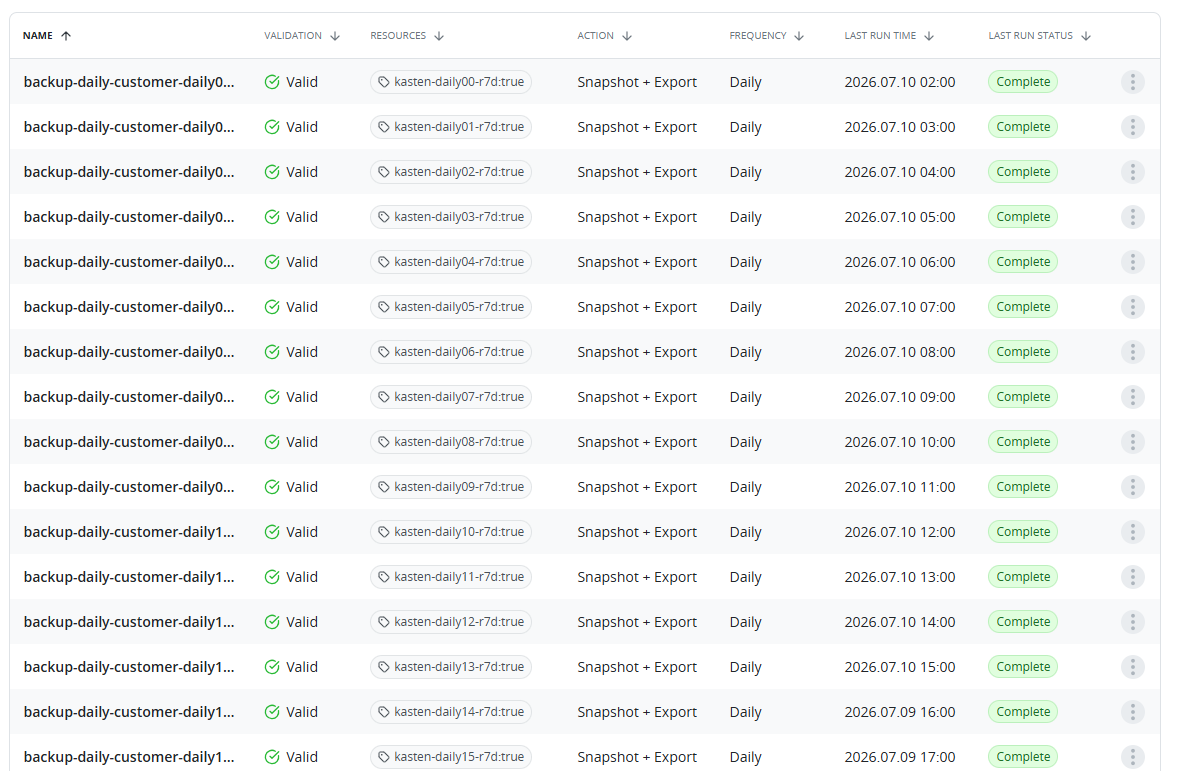
Queste policy si applicano ai namespace che dispongono di un'etichetta che indica quale/e policy applicare.
Ad esempio, un namespace con l'etichetta kasten-daily05-r7d = true verrà eseguito il backup su S3 ogni giorno alle 05:00 UTC, con una conservazione di 7 giorni.
4. Ripristinare un'applicazione
Kasten facilita il ripristino di un'applicazione al suo stato precedente a partire da un punto di ripristino.
-
Nella dashboard, vai alla sezione Applications. Vedrai l'elenco delle tue applicazioni e il loro stato di conformità rispetto alle policy di backup.
-
Seleziona l'applicazione che desideri ripristinare.
-
Scegli un punto di ripristino: La pagina dell'applicazione visualizza un elenco dei punti di ripristino disponibili. Scegli quello che desideri utilizzare e fai clic su Restore.
-
Configura il ripristino:
- Puoi scegliere di ripristinare in un nuovo namespace o di sovrascrivere l'applicazione esistente. Per questo tutorial, sovrascriveremo l'applicazione esistente.
- Fai clic su Restore per avviare il processo.
Kasten ripristinerà ora l'applicazione allo stato catturato nell'istantanea. Puoi seguire l'avanzamento nella dashboard.
5. Sicurezza dei backup
La protezione dei tuoi dati di backup è una priorità. L'integrazione di Kasten nel prodotto Managed Kubernetes rispetta i più alti standard di sicurezza.
- Crittografia: In conformità con i requisiti SecNumCloud, tutti i tuoi backup sono crittografati. I dati sono crittografati in transito verso lo storage S3 con il protocollo TLS 1.3 e a riposo nei bucket di storage con l'algoritmo AES-256.
- Gestione dei permessi: L'accesso all'interfaccia Kasten e alle sue funzionalità è controllato da un sistema di permessi basato sul RBAC di Kubernetes. Solo gli utenti autorizzati possono creare, modificare o eseguire policy di backup e ripristino, garantendo così una governance rigorosa delle tue operazioni di backup.
Conclusione
Hai imparato a utilizzare Veeam Kasten per eseguire operazioni di base di backup e ripristino nel tuo cluster Managed Kubernetes. Kasten offre molte funzionalità avanzate, come la migrazione di applicazioni tra cluster e policy di conservazione granulari, che puoi esplorare per rafforzare la tua strategia di protezione dei dati.
Per ulteriori informazioni, consulta la documentazione ufficiale di Kasten K10.