Concepts
Introduction to Red Hat OpenShift
Red Hat OpenShift is an enterprise container platform that automates the deployment, management, and scaling of containerized applications. It is a platform built around Docker, a containerization system that enables packaging an application and its dependencies into a virtual container, and Kubernetes, a container orchestration system that manages the execution and coordination of containers across a cluster of servers.
Key Features of Red Hat OpenShift
-
Automated Deployment and Management: OpenShift simplifies application deployment by automating management tasks such as scaling, container health, and lifecycle management. It provides an integrated environment for developing, testing, and deploying applications across development, testing, and production stages.
-
Support for Multiple Languages and Services: The platform supports a wide range of programming languages (such as Java, Node.js, Python, Ruby, and PHP) and includes built-in services like messaging, caching, and databases, enabling developers to focus on writing code rather than managing infrastructure.
-
Continuous Integration (CI) and Continuous Delivery (CD): OpenShift integrates CI/CD tools that automate the software development pipeline—from initial code commits to production deployment—promoting DevOps best practices.
-
Operations Management: OpenShift provides tools for monitoring, performance management, and diagnostics of applications and infrastructure, helping operators maintain system health and performance.
-
Enhanced Security: The platform is designed with built-in security, offering role-based access controls, task separation, and automated secret management to protect applications and data.
Benefits of Red Hat OpenShift
- Flexibility: Developers can work with their preferred tools, languages, and frameworks.
- Operational Efficiency: OpenShift optimizes resource utilization, reduces time to market, and enhances developer productivity.
- Scalability: The platform automatically manages application scaling to meet fluctuating demand.
- Security and Compliance: With built-in security policies, OpenShift helps maintain security and compliance standards.
Red Hat OpenShift is a comprehensive solution for developing, deploying, and managing containerized applications, providing a robust, secure, and flexible platform for enterprises adopting modern software development practices.
Red Hat OpenShift Data Foundation
Red Hat OpenShift Data Foundation (ODF) is an integrated storage and data management solution designed to seamlessly operate within the OpenShift ecosystem. It provides a persistent, secure, and highly available data infrastructure for containerized applications, supporting modern container- and microservices-oriented development environments. ODF is engineered to simplify and automate data management in hybrid and multi-cloud environments, delivering a robust foundation for mission-critical enterprise applications.
Key Features of OpenShift Data Foundation
-
Persistent Storage: ODF provides a persistent storage layer for containers, essential for enterprise applications such as databases, content management systems, and applications requiring stateful operations.
-
Multicloud and Hybrid: Designed for hybrid and multicloud environments, ODF delivers a consistent data management experience across various cloud platforms, enabling seamless application and data mobility.
-
Automation and Orchestration: Deep integration with Kubernetes and OpenShift allows ODF to automate provisioning, scaling, and lifecycle management of storage based on application requirements.
-
High Availability and Resilience: ODF leverages data replication and snapshotting to ensure high availability and data durability, critical for maintaining business continuity.
-
Data Security: The solution includes advanced security features such as encryption at rest and in transit, along with customizable security and compliance policies. Our SecNumCloud implementation ensures multi-layered protection:
- Encryption at Rest: The persistent storage provided by OpenShift Data Foundation relies on our underlying block storage infrastructure. As such, all data is encrypted at rest using the XTS-AES 256 algorithm, compliant with the FIPS 140-2 standard.
- Encryption in Transit: All access to the platform—including the API, web console, and application traffic via routes—is systematically secured and encrypted using the TLS protocol.
Advantages of OpenShift Data Foundation
-
Operational Flexibility: ODF enables enterprises to efficiently manage their data across distributed environments, providing the flexibility needed to meet the evolving demands of modern applications.
-
Simplified Data Management: By automating many data management tasks, ODF reduces complexity and frees up IT resources to focus on higher-value initiatives.
-
Cost Optimization: ODF’s ability to dynamically adapt to storage needs helps optimize costs by preventing over-provisioning and enabling more efficient use of available resources.
-
Performance Enhancement: Designed to deliver high performance for enterprise applications, ODF includes optimization capabilities tailored to various workload types.
Red Hat OpenShift Data Foundation is an advanced data storage solution that enhances the efficiency, resilience, and security of enterprise applications deployed on OpenShift. By providing persistent, automated, and secure storage, ODF plays a critical role in enabling organizations to fully leverage the potential of container and hybrid cloud technologies.
General Architecture of the Platform
Overview
The Red Hat OpenShift platform from Cloud Temple is designed as a regional offering, natively deployed across three distinct Availability Zones within the same region of Cloud Temple. This three-zone architecture significantly enhances data availability and resilience.
The platform consists of a control plane and worker nodes, both managed by the Cloud Temple infrastructure. The control plane is evenly distributed across the three Availability Zones, ensuring centralized and secure management. Worker nodes, in turn, are represented by compute blades, arranged so that each Availability Zone contains one.
For worker nodes, several types of compute blades are available, enabling flexible adaptation to various operational requirements:
| Red Hat OpenShift 4 with Data Foundations - On Demand - 1 month | Unit | SKU |
|---|---|---|
| OPENSHIFT - Control Plane - 3 Nodes - Region FR1 | 1 dedicated plan | csp:fr1:paas:oshift:plan:payg:v1 |
| OPENSHIFT - WORKER NODES - TINY - 3 x (10 cores / 20 threads - 64 GB RAM - 512 GB FLASH 1500 IOPS) | 3 dedicated workers | csp:fr1:paas:oshift:wkr:tiny:payg:v1 |
| OPENSHIFT - WORKER NODES - SMALL - 3 x (20 cores / 40 threads - 128 GB RAM - 512 GB FLASH 1500 IOPS) | 3 dedicated workers | csp:fr1:paas:oshift:wkr:small:payg:v1 |
| OPENSHIFT - WORKER NODES - STANDARD - 3 x (32 cores / 64 threads - 384 GB RAM - 512 GB FLASH 1500 IOPS) | 3 dedicated workers | csp:fr1:paas:oshift:wkr:std:payg:v1 |
| OPENSHIFT - WORKER NODES - ADVANCED - 3 x (48 cores / 96 threads - 768 GB RAM - 512 GB FLASH 1500 IOPS) | 3 dedicated workers | csp:fr1:paas:oshift:wkr:adv:payg:v1 |
| OPENSHIFT - WORKER NODES - PERF - 3 x (56 cores / 112 threads - 1.5 TB RAM - 512 GB FLASH 1500 IOPS) | 3 dedicated workers | csp:fr1:paas:oshift:wkr:perf:payg:v1 |
| OPENSHIFT - WORKER NODES - GPU - 3 x (32 cores / 64 threads - 512 GB RAM - 512 GB FLASH 1500 IOPS - 2x NVIDIA L40S 48GB) | 3 dedicated workers + GPUs | csp:fr1:paas:oshift:wkr:gpu:payg:v1 |
Cloud Temple’s Red Hat OpenShift offerings are available either on a pay-as-you-go basis or via a 12-month reservation.
Notes:
-
Maintaining the control plane in operational and secure condition is the responsibility of Cloud Temple as part of its PaaS service.
-
As of June 15, 2024, version 1 of the platform is intentionally software-limited to a maximum of 30 worker nodes (regardless of worker type) and a total persistent storage capacity of 50 TiB. If these limits are restrictive for your project, please contact support.
-
Each worker node comes with 512 GB of block flash storage, resulting in 1.5 TB per unit of work (1 worker per AZ).
-
By default, a worker node can manage up to 250 pods. This limit is adjustable via the
podsPerCoreparameter—for example, with 10 pods per core on a 4-core node, the maximum would be 40 pods. For further technical details, refer to the documentation on pod management and the OpenShift limits guide. -
The OpenShift PaaS offering includes native access to the three Availability Zones—no additional subscription is required.
-
It is possible to add block storage to the OpenShift cluster at a later stage.
-
Nodes are deployed evenly across the three Availability Zones (1 node per zone). It is not possible to imbalance a cluster by assigning more nodes to a single zone.
Red Hat Offering Deployed within the OpenShift Cloud Temple Platform
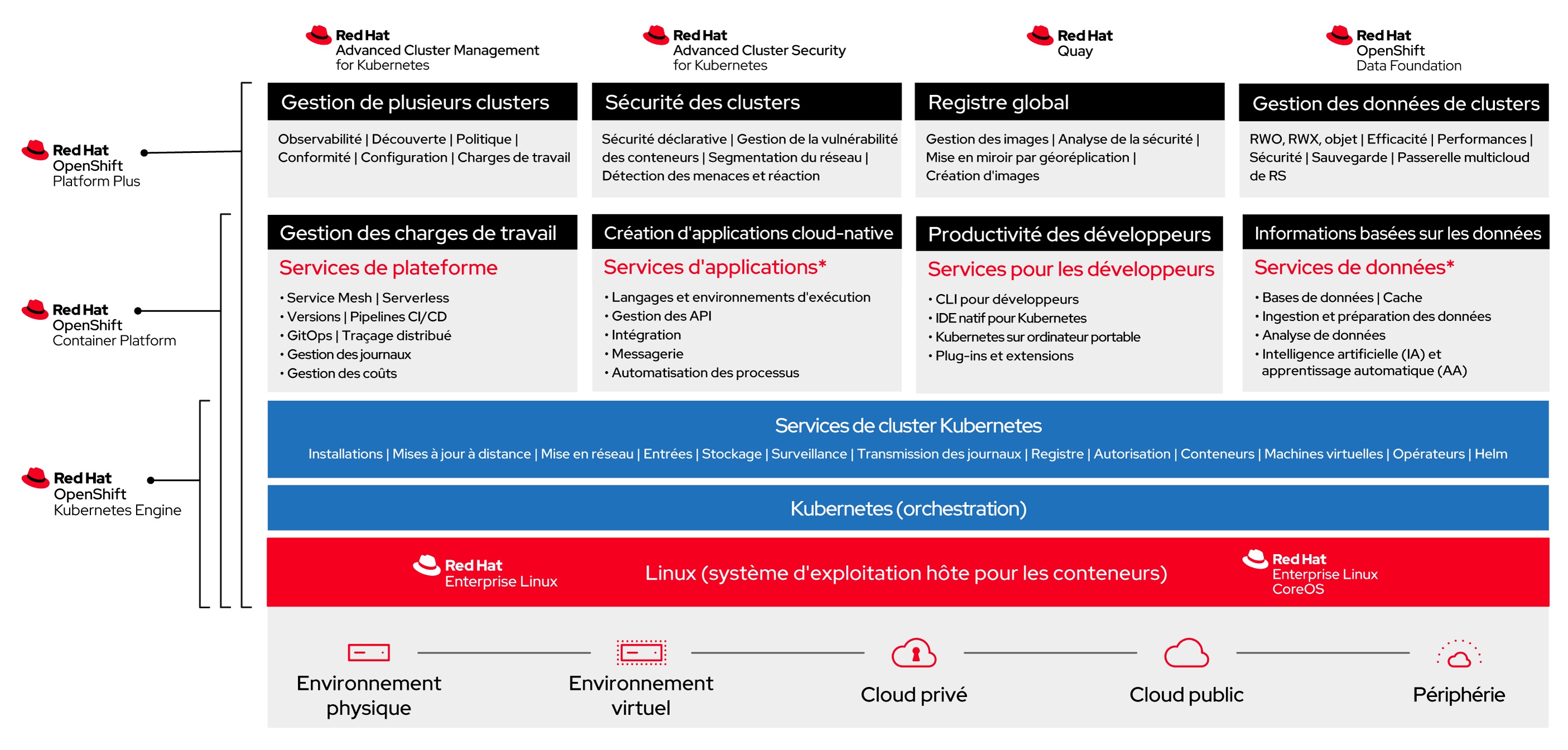
The platform is a Red Hat OpenShift 4 based on Red Hat OpenShift Platform Plus and includes OpenShift Data Foundation Essential.
Backup Strategy for Your OpenShift PaaS Platform
Backing up and restoring the OpenShift PaaS platform is the responsibility of Cloud Temple for the ETCD component, as part of platform management. Backup and restore operations for application deployments and application data are the responsibility of the Client.
Cloud Temple provides its customers with the Veeam Kasten K10 solution (Veeam Kasten K10), a platform specialized in data management for Kubernetes environments. Designed to meet data protection requirements, it offers robust capabilities for backup, restore, migration, and disaster recovery. Kasten K10 integrates natively with Kubernetes environments—whether managed on cloud clusters or on-premises—and adapts to various use cases, including cluster migrations between different Kubernetes distributions such as Kubernetes Vanilla, VMware Tanzu, Red Hat Kubernetes Engine, and Red Hat OpenShift.
One of the primary use cases for Kasten K10 is migrating clusters between different Kubernetes platforms. Whether transitioning to a more robust infrastructure or consolidating existing environments, Kasten K10 provides simple and efficient tools to manage these migrations:
-
Backup and data protection: When migrating a Kubernetes Vanilla or VMware Tanzu cluster to Red Hat Kubernetes Engine or OpenShift, the first step is to back up application data and their states. Kasten K10 seamlessly integrates with Kubernetes APIs to identify applications, their dependencies, and associated data volumes. This includes backing up persistent volumes (Persistent Volumes - PVs), databases, configurations, and secrets. Kasten K10 supports a wide range of storage providers (S3, Google Cloud Storage, Azure Blob Storage, etc.), enabling the creation of application snapshots for migration. These backups are securely stored with encryption options and granular access controls, ensuring data security throughout the process.
-
Portability and migration: Migrating between Kubernetes distributions such as Vanilla or Tanzu and Red Hat solutions like OpenShift or Kubernetes Engine can be complex due to architectural differences and platform-specific configurations. Kasten K10 simplifies this process by providing an abstraction layer for application portability. During migration, Kasten K10 replicates configurations and data from a source cluster to a target cluster while accounting for environment-specific constraints. For example, Kubernetes objects such as ConfigMaps, Secrets, PVs, and CRDs (Custom Resource Definitions) can be migrated while respecting the requirements of each Kubernetes distribution—whether it’s a Red Hat OpenShift or Kubernetes Engine cluster. The process is automated, significantly reducing the risk of manual errors. Additionally, Kasten K10 supports both phased and full migrations, depending on needs, and provides real-time visibility into migration status, facilitating effective management and monitoring of the transition.
-
Multi-cloud and multi-distribution compatibility: Kasten K10 is designed to operate in hybrid and multi-cloud environments, making it ideal for organizations looking to migrate applications from Tanzu or Vanilla clusters to Red Hat environments in the cloud (Cloud Temple, Amazon EKS, Azure AKS, Google GKE) or on-premises infrastructures. This ensures maximum flexibility and allows DevOps teams to choose the best environment based on business needs or infrastructure modernization strategies.
-
Simplified management and automation: Kasten K10 offers an intuitive user interface that enables administrators to easily manage backup and migration operations without requiring deep expertise in each individual Kubernetes platform. The solution also includes automation features that allow users to define recurring backup and migration policies, integrating seamlessly into CI/CD pipelines for continuous operations. Users can schedule migrations or restorations during maintenance windows, perform validation tests after migration, and automate failover processes in case of issues on the source cluster.
-
Security and compliance: In the context of migrating to critical environments such as Red Hat OpenShift or Kubernetes Engine, data security and compliance with standards (ISO, SOC, GDPR, etc.) are essential. Kasten K10 ensures encryption of data in transit and at rest, while also providing audit trails and traceability for backup and restore operations. These capabilities are crucial to guaranteeing the security of migrated data, whether in production or test environments. Kasten K10 is an indispensable solution for enterprises aiming to efficiently and securely migrate Kubernetes Vanilla or VMware Tanzu clusters to Red Hat Kubernetes Engine or OpenShift.
Billing is based on the number of worker nodes.
| Redhat OpenShift 4 with Data Foundations - Worker Node Backup Solution | Unit | SKU |
|---|---|---|
| VEEAM - KASTEN K10 - Kubernetes data protection and application mobility | 3 workers | csp:fr1:paas:kasten:3wkr:v1 |
Note: Please note that the required disk capacity for proper backup operation must be planned in the backup target environment—typically S3 storage. This is not included in the OpenShift or Kasten service units.
(1) OADP is not installed natively in the cluster. Only Kasten is enabled for managing migrations, backups, and restores.
Load Balancers
The SecNumCloud OpenShift environment provides load balancing solutions tailored to multiple functional domains, ensuring secure and optimized traffic management.
Load balancers cover four distinct domains, leveraging different layers of the OSI model:
- Access to administration tools (API server and OpenShift console)
- Public HTTP/HTTPS traffic
- Private HTTP/HTTPS traffic
- Specialized traffic requiring advanced customization
Administrative Tools Access
Access to administrative tools is secured by dedicated load balancers. These are protected by enhanced security controls, including a manageable whitelist accessible via the Cloud Temple console, ensuring strict access management.
Public HTTP/HTTPS Traffic
Public LoadBalancers, based on HAProxy, operate at Layer 4 of the OSI model. They enable exposing your workloads over HTTP/HTTPS via routes and ingresses, ensuring efficient and high-performance distribution of incoming traffic.
Private HTTP/HTTPS Traffic (Interconnection with your SNC IaaS Services)
Private LoadBalancers enable communication with your SNC IaaS services without public exposure. Like their public counterparts, they distribute HTTP/HTTPS traffic while maintaining a secure and isolated environment.
Specific Traffic
Specific traffic is managed through the LoadBalancer MetalLB, which supports advanced requirements demanding fine-grained customization, for example:
- Connecting to a database via TCP
- Handling UDP streams for real-time or low-latency applications
- Routing advanced protocols such as QUIC or MQTT-SN, providing enhanced flexibility
This solution enables support for your specific traffic flows, whether for private interconnections or public exposure needs.
Routing is performed using dedicated public and private IP addresses. By default, you are assigned the following IP addresses for service exposure:
- 4 public IP addresses
- 254 private IP addresses
If these resources are insufficient to support your workloads, you may request additional IP addresses—either public or private—from our support team.
Note: The built-in LoadBalancers do not function as a WAF. A WAF as a Service solution will be available shortly.
Rights and Permissions
Here are the main permissions implemented:
| Group | API | Resource Permissions |
|---|---|---|
| Core | ("")/Apps | ConfigMaps, Endpoints, PersistentVolumeClaims, Pods, ReplicationControllers, Secrets, Services, DaemonSets, Deployments, ReplicaSets, StatefulSets, Create, Get, List, Watch, Update, Patch, Delete |
| Core | ("") | Secrets Create |
| config.kio.kasten.io | Profiles | Get, List, Watch, Create, Update, Patch, Delete |
| config.kio.kasten.io | PolicyPresets, | TransformSets, BlueprintBindings, StorageSecurityContexts, StorageSecurityContextBindings Get, List |
| config.kio.kasten.io | All | all resources (*) Get, List |
| Batch | CronJobs, | Jobs Create, Get, List, Watch, Update, Patch, Delete |
| Autoscaling | HorizontalPodAutoscalers | Create, Get, List, Watch, Update, Patch, Delete |
| Networking | Ingresses, | NetworkPolicies Create, Get, List, Watch, Update, Patch, Delete |
| Policy | PodDisruptionBudgets | Create, Get, List, Watch, Update, Patch, Delete |
| Route | (OpenShift) | Routes Create, Get, List, Watch, Update, Patch, Delete |
| Build | (OpenShift) | BuildConfigs, Builds, BuildLogs Create, Get, List, Watch, Update, Patch, Delete |
| Image | (OpenShift) | ImageStreams, ImageStreamTags Create, Get, List, Watch, Update, Patch, Delete |
| Apps | (OpenShift) | DeploymentConfigs Create, Get, List, Watch, Update, Patch, Delete |
| Template | (OpenShift) | Templates, TemplateInstances Create, Get, List, Watch, Update, Patch, Delete |
| Authorization | Roles, | RoleBindings Create, Get, List, Watch, Update, Patch, Delete |
| RBAC | Roles, | RoleBindings Create, Get, List, Watch, Update, Patch, Delete |
| Project | (OpenShift) | Projects Get, Delete, Update, Patch |
| Operators | Subscriptions, | ClusterServiceVersions, CatalogSources, InstallPlans, OperatorGroups Create, Get, List, Watch, Update, Patch, Delete |
| Cert-Manager | Certificates, | CertificateRequests, Issuers, ClusterIssuers Create, Get, List, Watch, Update, Patch, Delete |
| Logging | (OpenShift) | ClusterLogForwarders, ClusterLoggings Create, Get, List, Watch, Update, Patch, Delete |
| Storage | VolumeSnapshots | Get, List, Watch, Create, Update, Patch, Delete |
| Ceph | (Rook) | CephClusters, CephBlockPools, CephFilesystems, CephObjectStores Create, Get, List, Watch, Update, Patch, Delete |
| NooBaa | BackingStores, | BucketClasses, NooBaaAccounts Create, Get, List, Watch, Update, Patch, Delete |
| ObjectBucket | ObjectBucketClaims, | ObjectBuckets Create, Get, List, Watch, Update, Patch, Delete |
| OCS | (OpenShift) | StorageClusters, StorageConsumers Create, Get, List, Watch, Update, Patch, Delete |
| Local | Storage | LocalVolumes, LocalVolumeDiscoveries Create, Get, List, Watch, Update, Patch, Delete |
| CSI | Addons | CSIAddonsNodes, NetworkFences Create, Get, List, Watch, Update, Patch, Delete |
| Metrics | Pods, | Nodes Get |
| Security | PodSecurityPolicyReviews | Create |
| Custom | Resources | Various custom resources related to Kasten K10, Keycloak, etc. Create, Get, List, Watch, Update, Patch, Delete |
Security Restrictions and Requirements on OpenShift SecNumCloud
Dedicated Control Plane
Running workloads on the control plane is strictly prohibited. This restriction ensures the security and stability of the OpenShift platform on SecNumCloud by limiting access to critical resources.
Prohibition of Privileged Containers (Rootless)
To comply with the security requirements of the SecNumCloud reference framework, only rootless containers are permitted. This approach enhances security by preventing any privileged access to containers.
Applications requiring elevated privileges must be adapted, as their deployment will not be allowed. This restriction also applies to Helm Charts and operators using non-rootless images, making their use incompatible with the infrastructure.
Restrictions on ClusterRoles
In our OpenShift offering, access management at the cluster level is strictly governed to ensure security and compliance with SecNumCloud.
This entails restrictions on ClusterRoles, limiting global privileges. While these restrictions may require technical adjustments, they are essential for enhancing the resilience and stability of the environment.
Our support team is available to assist you in adapting your configurations and advise you on possible alternatives.
Restrictions on Security Context Constraints (SCC)
Security Context Constraints (SCC) are enforced and cannot be modified by users. As a result, container runtime parameters (such as access privileges, Linux capabilities, etc.) are predefined and non-customizable.
This restriction aims to prevent unauthorized access to critical cluster resources. Applications requiring specific security contexts must be adapted to comply with the existing SCCs.
From an operational standpoint, this may require architectural adjustments and modifications to deployment processes, particularly for Helm Charts and operators that do not adhere to these constraints.
Limitations on Custom Resource Definitions (CRDs)
To ensure SecNumCloud compliance, the use of Custom Resource Definitions (CRDs) and custom controllers is restricted.
This measure, tied to cluster-level permissions, prevents the deployment of unauthorized resources that could impact the stability and security of the infrastructure. It also applies to operators and Helm Charts, with limitations on RBAC permissions.
Non-certified CRDs may be rejected to maintain cluster integrity. Only CRDs from certified operators or Helm Charts are allowed after validation by our services.
Our support team can guide you through this process and advise on best practices to follow.
Removal of Support for Dynamic IP Addresses for Runners
OpenShift SecNumCloud runners must be configured with static IP addresses.
This requirement ensures secure access to OpenShift APIs, administration interfaces, and access management tools in the Cloud Temple console.
Dynamic IP addresses are not supported, requiring appropriate configuration to ensure connectivity and security of the components.
Useful Information
• If hardware components at the platform level become obsolete and a migration to new compute resources is required, Cloud Temple handles all hardware migrations at no additional cost and without service disruption.
• To test OpenShift, Cloud Temple does not provide a dedicated environment, but you can use RedHat's test platforms.
• For infrastructure automation, prefer the official OpenShift Terraform provider.