Using a GPU on Managed Kubernetes
This tutorial shows you how to deploy a pod that uses a GPU resource on a Managed Kubernetes cluster configured with "Bare Metal" nodes equipped with NVIDIA GPUs.
Prerequisites
- A Managed Kubernetes cluster with at least one "Bare Metal" type worker node with a GPU.
Example Pod Manifest
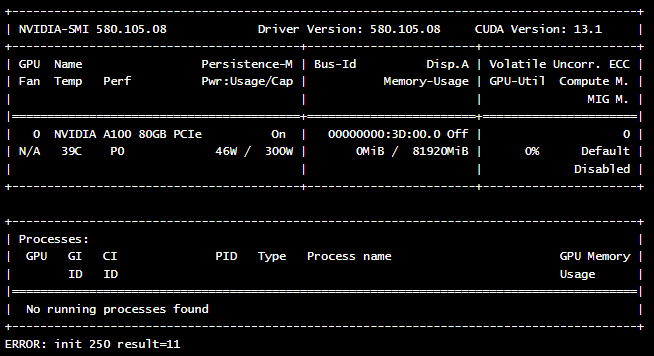
Here is an example of a pod manifest that runs the nvidia-smi command to verify the presence and status of the GPU.
apiVersion: v1
kind: Pod
metadata:
  name: nvidia-cuda-check
spec:
  runtimeClassName: nvidia  # Clé pour Talos NVIDIA
  restartPolicy: Never
  containers:
  - name: nvidia-version-check
    image: "nvidia/cuda:13.1.0-devel-ubuntu24.04"
    imagePullPolicy: Always
    command: ["nvidia-smi"]
Manifest Explanation
runtimeClassName: nvidia: This is the most important part. It instructs Kubernetes to use the NVIDIA runtime. The NVIDIA toolkit then handles injecting the NVIDIA drivers directly into the pod, allowing the container to access the GPU.restartPolicy: Never: Since this pod is just a verification command, we do not want it to restart after execution.image: "nvidia/cuda:...": We use an image provided by NVIDIA that contains the necessary tools to interact with the GPU.command: ["nvidia-smi"]: This is the command that will be executed inside the container.nvidia-smiis a command-line tool that provides information about NVIDIA GPUs.
For more information on how the NVIDIA toolkit works, you can consult the official documentation on GitHub.
Deployment and Verification
-
Deploy the pod using the
kubectl applycommand:kubectl apply -f nvidia-smi.yaml -
Check the pod logs to view the output of the
nvidia-smicommand:kubectl logs nvidia-cuda-check
If everything is configured correctly, you should see an output similar to this, showing the details of your GPU card: