Using Cilium Gateway API
Introduction
The Gateway API is the new Kubernetes standard for managing incoming traffic. It succeeds the traditional Ingress resource by offering more flexibility, features (advanced routing, load balancing, etc.), and a better separation of responsibilities.
In your Cloud Temple Managed Kubernetes cluster, Cilium is used as the CNI and natively implements Gateway API support.
ℹ️[Supported Versions] This documentation applies to clusters using Cilium 1.8.4 or higher. The Gateway API CRDs version 1.4 are preinstalled on your cluster.
Objectives
This tutorial will guide you through:
- Understand the core Gateway API resources (GatewayClass, Gateway, HTTPRoute).
- Deploy a test application.
- Expose this application via a Cilium Gateway.
- Test access.
Prerequisites
- An operational Managed Kubernetes Cloud Temple cluster.
- The
kubectltool configured to access your cluster. - The
ciliumtool.
Key Concepts
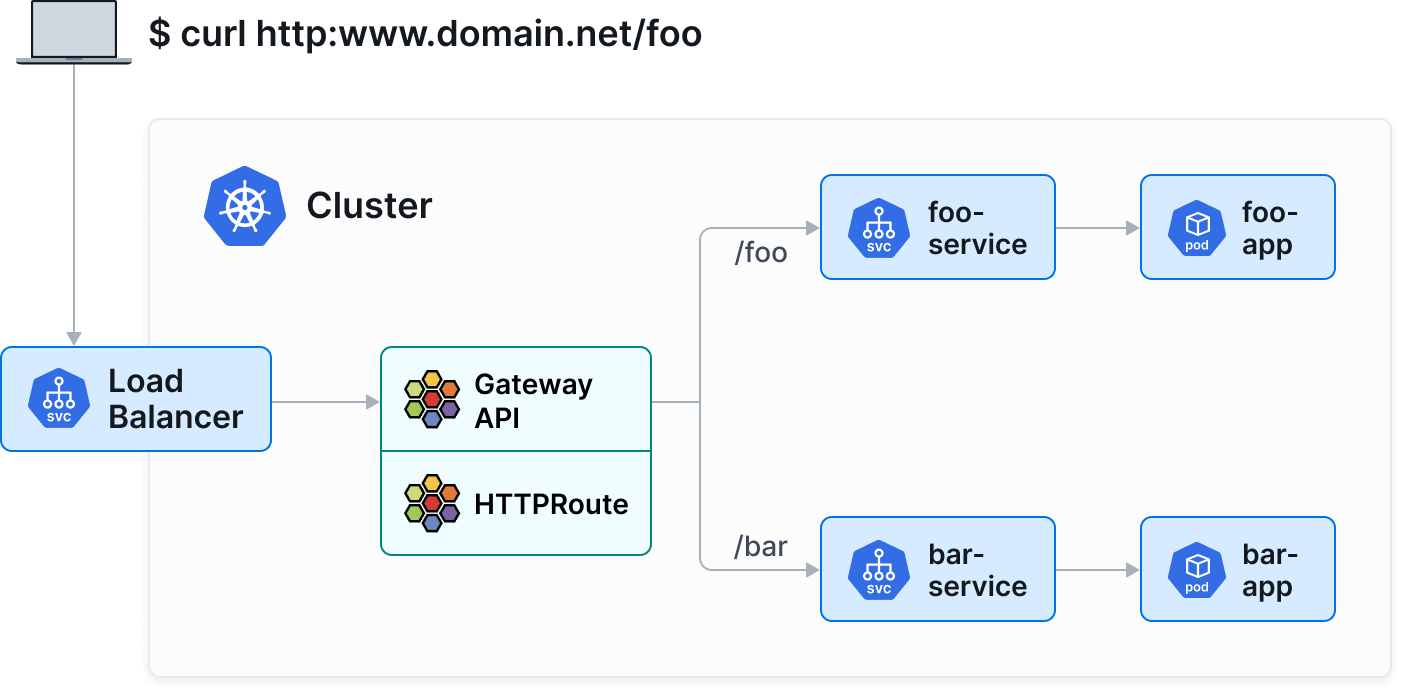
Gateway API breaks down network configuration into three main resources:
- GatewayClass : Defines the controller type (here,
io.cilium/gateway). - Gateway : Instantiates a network entry point (load balancer).
- HTTPRoute : Defines routing rules (paths, headers) to Kubernetes Services.
Step 1: Check the version and GatewayClass
You can verify that your cluster is using a compatible version of Cilium (1.8.4+) using the following commands:
cilium status
cilium config view | grep -w "enable-gateway-api"
Then, ensure that the Cilium GatewayClass is available on your cluster:
kubectl get gatewayclass
You should see output similar to:
NAME      CONTROLLER           ACCEPTED   AGE
cilium    io.cilium/gateway    True       2d
ℹ️If no GatewayClass is listed, ensure that the Gateway API feature is enabled in your Cilium installation.
Step 2: Deploy a demo application
We will deploy a simple application that returns information about the pod (echo-server).
Create an apps.yaml file:
apiVersion: apps/v1
kind: Deployment
metadata:
  name: echo-server
  labels:
    app: echo-server
spec:
  replicas: 2
  selector:
    matchLabels:
      app: echo-server
  template:
    metadata:
      labels:
        app: echo-server
    spec:
      containers:
      - name: echo-server
        image: ealen/echo-server:latest
        ports:
        - containerPort: 80
---
apiVersion: v1
kind: Service
metadata:
  name: echo-service
  labels:
    app: echo-server
spec:
  selector:
    app: echo-server
  ports:
  - port: 80
    targetPort: 80
Apply the configuration:
kubectl apply -f apps.yaml
Step 3: Create the Gateway
The Gateway will request the creation of a LoadBalancer to receive traffic.
Create a gateway.yaml file:
apiVersion: gateway.networking.k8s.io/v1
kind: Gateway
metadata:
  name: my-gateway
spec:
  gatewayClassName: cilium
  listeners:
  - protocol: HTTP
    port: 80
    name: web-gw
    allowedRoutes:
      namespaces:
        from: Same
Apply the configuration:
kubectl apply -f gateway.yaml
Verify that the Gateway has obtained an IP address (this may take a few moments for the LoadBalancer to be provisioned by the Cloud Temple infrastructure):
kubectl get gateway my-gateway
Wait for the PROGRAMMED field to be True and for ADDRESS to display an IP.
Step 4: Create an HTTPRoute
Now that we have an "entry point" (Gateway), we need to route traffic to our service.
Create a httproute.yaml file:
apiVersion: gateway.networking.k8s.io/v1
kind: HTTPRoute
metadata:
  name: echo-route
spec:
  parentRefs:
  - name: my-gateway
  rules:
  - matches:
    - path:
        type: PathPrefix
        value: /
    backendRefs:
    - name: echo-service
      port: 80
Apply the configuration:
kubectl apply -f httproute.yaml
Step 5: Test Access
Retrieve the IP address of your Gateway:
kubectl get gateway my-gateway -o jsonpath='{.status.addresses[0].value}'
Send a request to this IP to test:
curl http://10.200.205.2
You should receive a JSON response from the echo-server application indicating the details of the pod that responded.
Advanced Features (Example: Canary Release)
Gateway API greatly facilitates advanced deployment scenarios, such as Canary Release (weighted traffic splitting).
Suppose we have a v2 of our application. We can split traffic 90% to v1 and 10% to v2 simply by adjusting the weights in backendRefs :
apiVersion: gateway.networking.k8s.io/v1
kind: HTTPRoute
metadata:
  name: echo-route-canary
spec:
  parentRefs:
  - name: my-gateway
  rules:
  - backendRefs:
    - name: echo-service
      port: 80
      weight: 90
    - name: echo-service-v2
      port: 80
      weight: 10
Conclusion
You have set up a modern service exposure infrastructure using the Cilium Gateway API. This standardized approach, semantically richer than Ingress, is recommended to leverage the advanced capabilities of Kubernetes networking.