Concepts
Our Managed Kubernetes Offerings
Cloud Temple offers two distinct plans to meet your container orchestration needs:
- Managed Core Kubernetes : A minimalist product that provides you with a robust and secure Kubernetes foundation, based on cutting-edge open-source components. It is ideal for expert teams who wish to build their own custom platform.
- Managed Kubernetes : A comprehensive, out-of-the-box solution that includes a full stack of tools for networking, security, storage, continuous deployment, observability, backup, and cost management.
Offer Comparison Table
| Component | Managed Core Kubernetes | Managed Kubernetes |
|---|---|---|
| OS | ✅Talos | ✅Talos |
| CNI | ✅Cilium | ✅Cilium |
| Load Balancer | ✅MetalLB | ✅MetalLB |
| Distributed Storage | ✅Rook-Ceph | ✅Rook-Ceph |
| Local Storage | 🔵TopoLVM | 🔵TopoLVM |
| CNI Observability | ❌ | ✅Hubble |
| Ingress | ❌ | ✅Ingress Nginx |
| Observability | ❌ | ✅Prometheus, Grafana, Loki |
| Backup and Migration | ❌ | ✅Veeam Kasten |
| Governance and Security | ❌ | ✅Kyverno, Capsule |
| Certificate Management | ❌ | ✅Cert-Manager |
| Continuous Deployment (GitOps) | ❌ | 🔵ArgoCD |
| Container Registry | ❌ | 🔵Harbor |
| SSO Authentication | ❌ | 🔵OIDC Integration |
| Pod Autoscaling | ❌ | 🔵Keda |
| Cost Management (FinOps) | ❌ | 🔵OpenCost |
| Observability (profiling) | ❌ | 🔵Pyroscope + LLM |
✅ : included 🔵 : optional/disablable ❌ : not included
Overview of Managed (Core) Kubernetes Products
Managed Core Kubernetes is based on Talos Linux (https://www.talos.dev/), a lightweight and secure operating system dedicated to Kubernetes. It is immutable, with no shell or SSH access, and configured exclusively in a declarative manner via the gRPC API.
The standardized installation includes a set of components, mostly Open Source and CNCF-certified:
-
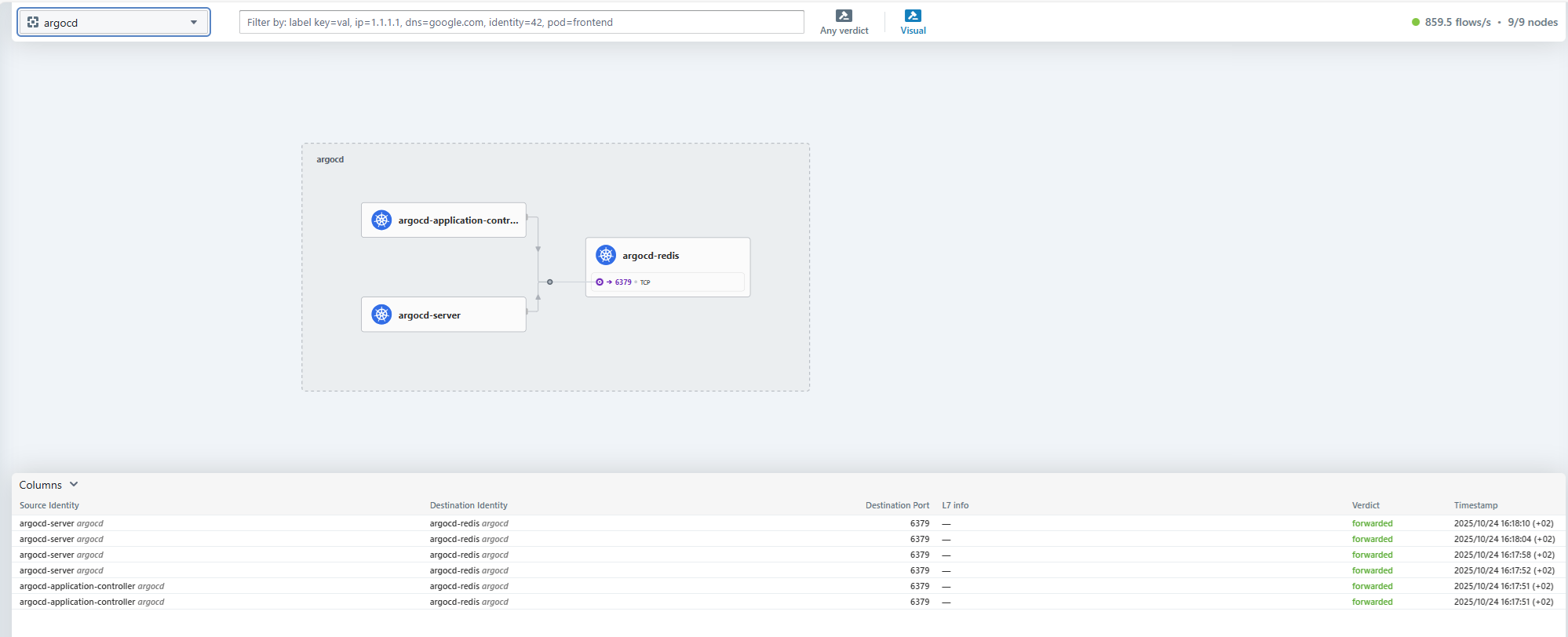
CNI Cilium, with observability interface (Hubble): Cilium is a networking solution for Kubernetes containers (Container Network Interface). It handles security, load balancing, service mesh, observability, encryption, etc. It is a fundamental networking component found in most Kubernetes distributions (OpenShift, AKS, GKE, EKS,...). In Managed Kubernetes, we have included the Hubble GUI for visualizing Cilium traffic flows.
-
MetalLB and nginx: For exposing web applications, 3 nginx ingress-classes are integrated by default:
-
nginx-external-secured: exposure on a public IP, filtered at the firewall to only allow known IPs (used for the GUIs of various products, and the Kubernetes API)
-
nginx-external: exposure on a second unfiltered public IP (or client-specific filtering)
-
nginx-internal: exposure on an internal IP only
For "non-web" services, a MetalLB load balancer allows exposing services internally or on public IPs. (ce qui permet de déployer des autres ingresses, comme par exemple un WAF)
-
Note: we use the open-source version of nginx maintained by F5 Networks. (pas la version d'origine, opensource, qui est deprecated)
-
Rook-Ceph distributed storage: for persistent volume (PV) storage, open-source distributed Ceph storage is integrated into the platform. It allows using the storage-classes ceph-block (Block, répliqué multi-zones), ceph-block-norepl (Block, non répliqué), and ceph-filesystem (File, répliqué multi-zones). Storage with 7500 IOPS is used, enabling high performance. In production deployments (sur 3 AZ), storage nodes are dedicated (1 noeud par AZ); in non-production deployments (1 AZ), storage is shared with worker nodes.
-
TopoLVM local storage: for persistent volume (PV) storage, open-source local TopoLVM storage can be added (en option) to the platform. It allows using the storage-class topolvm-ssd to store data locally, on the Worker nodes. This option is useful for deployments that use built-in application replication (Kafka, MongoDB, PostgreSQL, ...) and benefit from ultra-fast storage with reduced latency. This option is typically used to dedicate Worker nodes to a specific workload.
-
Cert-Manager: the open-source certificate manager Cert-Manager is natively integrated into the platform.
-
ArgoCD is available for your automated deployments via a CI/CD pipeline. (optionnel)
-
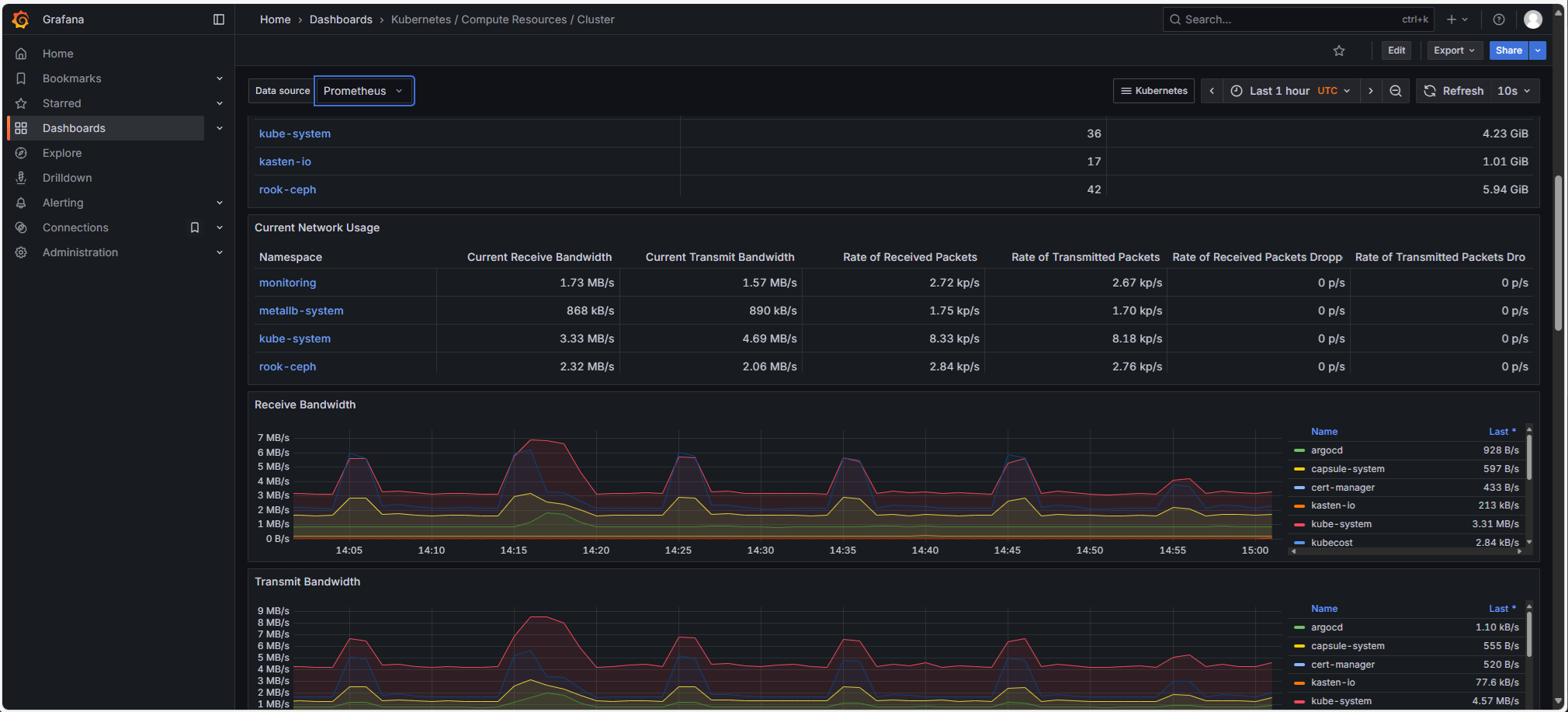
Prometheus Stack (Prometheus, Grafana, Loki): Managed Kubernetes clusters are delivered by default with a complete open-source Prometheus stack for observability, including:
-
Prometheus, for metrics collection
-
Grafana, with numerous dashboards
-
Loki: platform logs are exported to Cloud-Temple S3 storage (et intégrés dans Grafana).
-
Pyroscope: (optionnel) continuous profiling platform, queryable via LLM.
-
-
Harbor is a Container registry that allows you to store your container images or Helm charts directly within the cluster. It performs vulnerability scans on your images. Harbor also supports synchronization with other registries. (https://goharbor.io/) (optionnel)
-
OpenCost (https://github.com/opencost/opencost) is a cost management (Finops) tool for Kubernetes. It allows you to closely track Kubernetes resource consumption and perform sub-billing/chargeback by project/namespace. (optionnel)
-
Advanced security strategies with Kyverno and Capsule:
- Kyverno (https://kyverno.io/) is an admission controller for Kubernetes that allows applying policies. It is an essential tool for governance and security in Kubernetes.
- Capsule (https://projectcapsule.dev/) is a permission management tool that simplifies rights management in Kubernetes. It introduces the concept of a tenant, which allows centralizing and delegating permissions across multiple namespaces. Through Capsule, users of the Managed Kubernetes platform therefore have rights restricted to their own namespaces only.
-
Veeam Kasten (aka 'k10') is a solution for backing up Kubernetes workloads.
It allows backing up a complete deployment: manifests, volumes, etc., to Cloud-Temple S3 object storage. Kasten uses Kanister to enable consistent application-level backups, for example for databases (https://docs.kasten.io/latest/usage/blueprints/).
Kasten is a cross-platform tool that can work with other Kubernetes clusters (OpenShift, Hyperscalers, etc.). It can therefore be used for reversibility or migration scenarios (K10 handles potential adaptations via transformations, par exemple un changement d'ingress-class), as well as for "refresh" scenarios (exemple : restauration planifiée d'un environnement de production en pré-production).
-
SSO Authentication with an External OIDC Identity Provider (Microsoft Entra, FranceConnect, Okta, AWS IAM, Google, Salesforce, ...) (optionnel)
-
KEDA enables pod autoscaling via advanced metrics, such as the number of HTTP connections. (optionnel)
SLA & Support Information
- Guaranteed Availability (production 3 AZ) : 99.95 %
- Support : N1/N2/N3 included for the core scope (infrastructure and standard operators).
- Recovery Time Objective (ETR) : per Cloud Temple master agreement.
- Maintenance (MCO) : regular patching of Talos / Kubernetes / standard operators by MSP, with no service interruption (rolling upgrade).
Response and recovery times depend on the incident severity, in accordance with the support matrix (P1 to P4).
Versioning Policy & Lifecycle
- Supported Kubernetes: N-2 (3 major releases per year, approximately every 4 months). Each release is officially supported for 12 months, ensuring a Cloud Temple support window of ~16 months maximum per version.
- Talos OS: aligned with stable Kubernetes versions.
- Each branch is maintained for approximately 12 months (security patches included).
- Recommended upgrade cadence: 3 times per year, in alignment with Kubernetes upgrades.
- Critical patches (CVE, kernel) are applied via rolling upgrade, without service interruption.
- Updates:
- Major (Kubernetes N+1, Talos X+1): scheduled 3 times/year, via rolling update.
- Minor: applied automatically within 30 to 60 days.
- Deprecation: version N-3 → end of support within 90 days after the release of N.
Kubernetes Nodes
Production (multi-zonal)
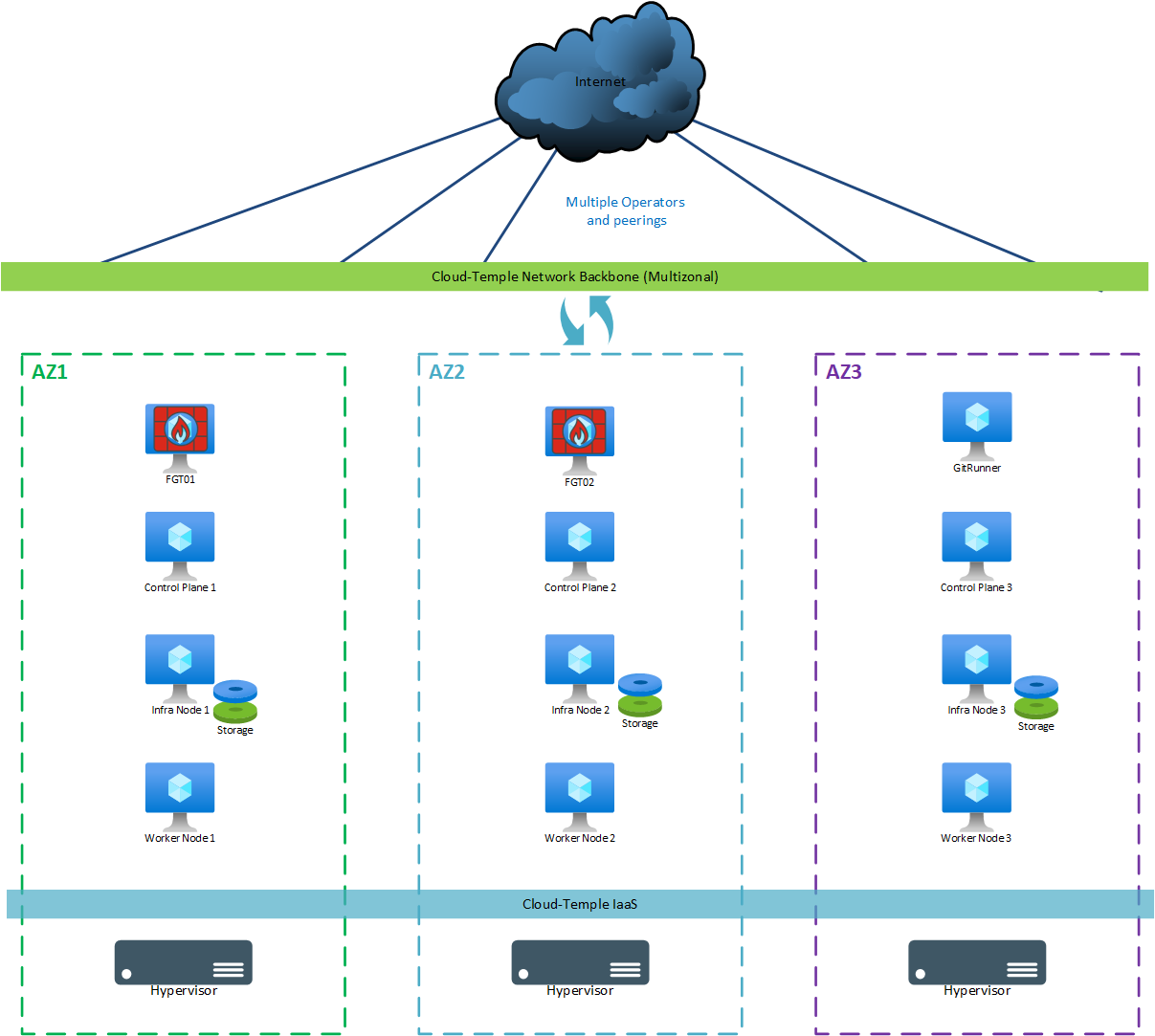
For a "production" deployment (multi-zonal), the following machines are used:
| AZ | Machine | vCores | RAM | Local Storage |
|---|---|---|---|---|
| AZ07 | Git Runner | 4 | 8 GB | OS: 256 GB |
| AZ05 | Control Plane 1 | 8 | 12 GB | OS: 64 GB |
| AZ06 | Control Plane 2 | 8 | 12 GB | OS: 64 GB |
| AZ07 | Control Plane 3 | 8 | 12 GB | OS: 64 GB |
| AZ05 | Storage Node 1 (**) | 12 | 24 GB | OS: 64 GB + Ceph 500 GB minimum (***) |
| AZ06 | Storage Node 2 (**) | 12 | 24 GB | OS: 64 GB + Ceph 500 GB minimum (***) |
| AZ07 | Storage Node 3 (**) | 12 | 24 GB | OS: 64 GB + Ceph 500 GB minimum (***) |
| AZ05 | Worker Node 1 (*) | 12 | 24 GB | OS: 64 GB |
| AZ06 | Worker Node 2 (*) | 12 | 24 GB | OS: 64 GB |
| AZ07 | Worker Node 3 (*) | 12 | 24 GB | OS: 64 GB |
(*) : The size and number of Worker Nodes can be adjusted based on the client's compute capacity requirements. The minimum number of Worker Nodes is 3 (1 per AZ), and we recommend increasing their number in batches of 3 to maintain a consistent multi-zonal distribution. The size of Worker Nodes can be adjusted, with a minimum of 12 cores and 24 GB of RAM; the upper limit per Worker Node is determined by the size of the hypervisors used (potentially 112 cores/1536 GB of RAM with Performance 3 blades). The number of Worker Nodes is limited to 100. The CNCF recommends using Worker Nodes of identical size. The limit on the number of pods per Worker Node is 110.
(**) : The size of Storage Nodes can be increased based on the size of the associated Ceph storage. (for example: 24c/128GB for 10 TB of Ceph)
(***) : Each storage node comes with a minimum of 500 GB of disk space, providing 500 GB of usable distributed Ceph storage (data is replicated across each AZ, hence x3). The free space available to the client is approximately 350 GB. This initial size can be increased at provisioning time, or later, as needed. Quotas are applied on Ceph, with a Block/File allocation.
Dev/test (single or dual zone)
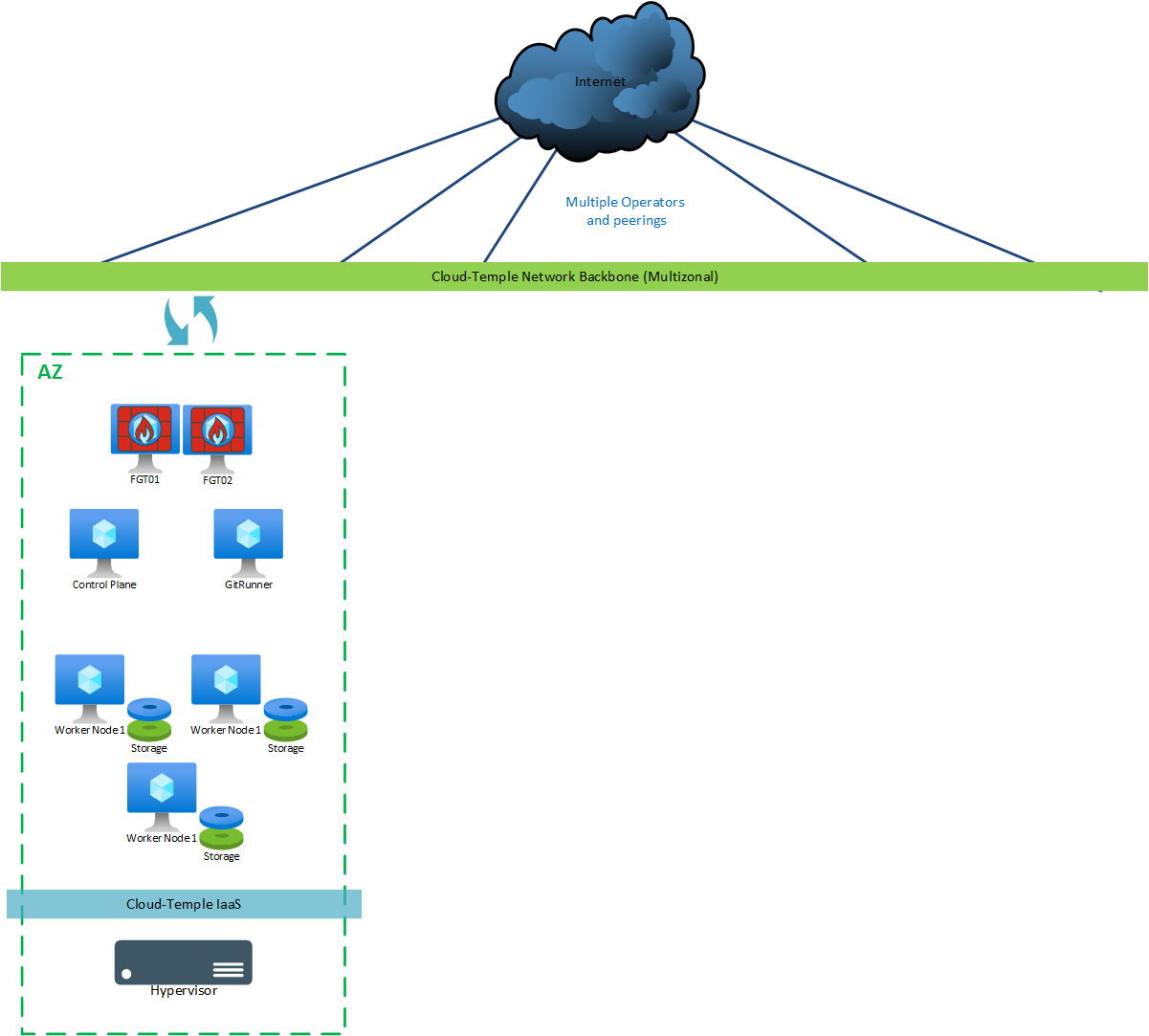
For a "dev/test" version, the following machines are deployed:
| AZ | Machine | vCores | RAM | Local Storage |
|---|---|---|---|---|
| AZ0n | Git Runner | 4 | 8 GB | OS: 256 GB |
| AZ0n | Control Plane | 8 | 12 GB | OS: 64 GB |
| AZ0n | Worker Node 1 (*) | 12 | 24 GB | OS: 64 GB + Ceph 300 GB minimum (**) |
| AZ0n | Worker Node 2 (*) | 12 | 24 GB | OS: 64 GB + Ceph 300 GB minimum (**) |
| AZ0n | Worker Node 3 (*) | 12 | 24 GB | OS: 64 GB + Ceph 300 GB minimum (**) |
(*) : The size and number of Worker Nodes can be adjusted according to the client's compute capacity requirements. The minimum number of Worker Nodes is 3 (due to storage replication). The size of the Worker Nodes can be adjusted, with a minimum of 12 cores and 24 GB of RAM; the upper limit per Worker Node is determined by the size of the hypervisors used (thus potentially 112 cores/1536 GB of RAM with Performance 3 blades). The number of Worker Nodes is limited to 250. The CNCF recommends having worker nodes of identical size. The limit on the number of pods per Worker Node is 110.
(**) : 3 Worker Nodes are used as Storage Nodes and are delivered with a minimum of 300 GB of disk space, providing 300 GB of usable distributed storage (data is replicated three times). The free space available to the client is approximately 150 GB. This initial size can be increased at the time of deployment, or later, depending on requirements.
RACI
Architecture & Infrastructure
| Activity | Client | Cloud Temple |
|---|---|---|
| Define the overall architecture of the Kubernetes service | C | RA |
| Size the Kubernetes service (number of nodes, resources) | C | RA |
| Install the Kubernetes service with a default configuration | I | RA |
| Kubernetes service configuration | C | RA |
| Configure the base network of the Kubernetes service | I | RA |
| Deployment of the initial identity and access configuration | C | RA |
| Define the scaling and high availability strategy | C | RA |
Project and Business Application Management
| Activity | Client | Cloud Temple |
|---|---|---|
| Create and manage Kubernetes projects | RA | I* |
| Deploy and manage applications in Kubernetes | RA | I* |
| Configure CI/CD pipelines | RA | I* |
| Manage container images and registries | RA | I* |
*may change to "C" depending on the managed services contract
Monitoring and Performance
| Activity | Client | Cloud Temple |
|---|---|---|
| Monitor Kubernetes service performance | I | RA* |
| Monitor application performance | RA | |
| Manage alerts related to the Kubernetes service | I | RA* |
| Manage alerts related to applications | RA |
(*) : Production Managed Kubernetes cluster only. In Dev/Test and Core versions, the client is fully autonomous and responsible.
Infrastructure Maintenance and Updates
| Activity | Client | Cloud Temple |
|---|---|---|
| Update Kubernetes/OS service | C | RA |
| Apply security patches to Kubernetes | C | RA |
| Update deployed applications (operators*) | C | RA |
*Operator package included on Managed Kube - see chapters: Managed Helm Packages
Security
| Activity | Client | Cloud Temple |
|---|---|---|
| Manage Kubernetes service security | RA | RA* |
| Configure and manage pod security policies | RA | I |
| Manage SSL/TLS certificates for the Kubernetes service | C | RA* |
| Manage SSL/TLS certificates for applications | RA | I |
| Implement and manage basic role-based access control (RBAC) | C | R* |
| Implement and manage client role-based access control (RBAC) | RA | I |
(*) : Production Managed Kubernetes cluster only. In Dev/Test and Core versions, the client is fully autonomous and responsible.
Backup and Disaster Recovery
| Activity | Client | Cloud Temple |
|---|---|---|
| Define the backup strategy for the Kubernetes service | I | RA |
| Implement and manage Kubernetes service backups | I | RA |
| Define the backup strategy for applications | RA* | I* |
| Implement and manage application backups | RA* | I* |
| Test disaster recovery procedures for the Kubernetes service | CI | RA |
| Test disaster recovery procedures for applications | RA* | CI* |
*may change to "CI | RA" depending on the managed services contract
Support and Troubleshooting
| Activity | Client | Cloud Temple |
|---|---|---|
| Provide level 1 support for infrastructure | I | RA |
| Provide level 2 and 3 support for infrastructure | I | RA |
| Resolve Kubernetes service-related issues | C | RA |
| Resolve application-related issues | RA | I |
Capacity Management and Evolution
Production Managed Kubernetes cluster only. In Dev/Test and Core versions, the client is fully autonomous and responsible.
| Activity | Client | Cloud Temple |
|---|---|---|
| Monitor Kubernetes resource usage | C | RA |
| Plan service capacity evolution | RA | C |
| Implement capacity changes | I | RA |
| Manage application and resource evolution | RA | I |
Documentation and Compliance
| Activity | Client | Cloud Temple |
|---|---|---|
| Maintain Kubernetes product documentation | I | RA |
| Maintain application documentation | RA | I |
| Ensure Kubernetes service compliance | I | RA |
| Ensure application compliance | RA | I |
| Conduct Kubernetes service audits | I | RA |
| Conduct application audits | RA | I |
Kubernetes Operators/CRD Management (included in the product)
| Activity | Client | Cloud Temple |
|---|---|---|
| Provisioning of the default Operators catalog | CI | RA |
| Operators updates | CI | RA |
| Monitoring Operators status | CI | RA |
| Troubleshooting Operators issues | CI | RA |
| Operators permissions management | CI | RA |
| Operators resources management (addition/removal) | CI | RA |
| Backup of Operators resources data | CI | RA |
| Monitoring Operators resources | CI | RA |
| Restoration of Operators resources data | CI | RA |
| Operators security audit | CI | RA |
| Operators support | CI | RA |
| Operators licensing management | CI | RA |
| Management of specific support plans for Operators | CI | RA |
*Operator package included on Managed Kube - see chapters: Managed Helm Packages
Management of Kubernetes applications/operators/CRDs (du client)
Managed Kubernetes Production Cluster only. In Dev/Test and Core versions, the client is fully autonomous and responsible.
| Activity | Client | Cloud Temple |
|---|---|---|
| Deployment of CRDs | I* | RA* |
| Update of Operators | RA | I |
| Monitoring of Operator status | RA | I |
| Troubleshooting Operator-related issues | RA | I |
| Management of Operator permissions | RA | I |
| Management of Operator resources (ajout/suppression) | RA | I |
| Backup of Operator resource data | RA | I |
| Monitoring of Operator resources | RA | I |
| Restoration of Operator resource data | RA | I |
| Security audit of Operators | RA | I |
| Operator support | RA | I |
| License management for operators | RA | I |
| Management of specific support plans for operators | RA | I |
Certain operator services may be covered depending on the managed services contract.
*may change to "A | RC" depending on the managed services contract
Application Support
| Activity | Client | Cloud Temple |
|---|---|---|
| Application support (external service) | RA | I |
Application support can be provided through an additional service.
RACI (summary)
- Cloud Temple : Responsible and Actor (RA) for the Core Kubernetes foundation and additional Managed Kubernetes services (security, backup, monitoring)
- Client : Responsible and Actor (RA) for application projects, business operators, CI/CD pipelines, application backups.
- "Gray" zone : adaptations and extensions (IAM, specific operators, cluster compliance/security hardening) - billed on a project basis.