LLMaaS Tutorials
The identifiers used illustrate integrations. Check their availability with GET /v1/models, their capabilities, and their lifecycle. Adapt the configuration to your use case; an old name may be redirected to a successor.
Overview
These tutorials present integration examples with LLMaaS. The scope of LangChain example checks is specified below; results and demonstration data do not constitute service performance metrics.
🚀 LangChain Integrations and Frameworks
LangChain Prerequisites
LangChain examples 1 to 4 and those from the API reference were verified on September 7, 2026, with Python 3.13.15 and the following versions. Install them in a dedicated environment:
python3 -m venv .venv
source .venv/bin/activate
python -m pip install \
  langchain-classic==1.0.8 langchain-core==1.6.2 langchain-openai==1.6.0 \
  langchain-community==0.4.2 langchain-text-splitters==1.1.2 \
  langchain-qdrant==1.1.0 qdrant-client==1.19.0 faiss-cpu==1.15.0 \
  pydantic==2.13.5 python-dotenv==1.2.3 requests==2.34.2 httpx==0.28.1
These versions establish a reference environment; re-evaluate the examples before updating dependencies.
The legacy chains LLMChain, RetrievalQA, and the ReAct agent in these tutorials use langchain-classic, in accordance with the LangChain migration guide. This choice preserves the structure of existing examples; some classes emit deprecation warnings. For a new project, consult the current interfaces recommended by LangChain.
Checks performed: loading examples, invoking the wrapper, search and generation with FAISS and Qdrant in memory, running a tool by the agent, chat and embeddings from the API reference. LLMaaS HTTP responses were simulated and network access blocked. These checks do not validate production models or connection to a remote Qdrant server.
1. Basic Integration with LangChain
This first example shows how to integrate our LLMaaS API with the popular LangChain framework by creating a custom "wrapper". A wrapper is a class that "wraps" our API to make it compatible with LangChain's internal mechanisms.
Code Explained
The code below defines a CloudTempleLLM class that inherits from LangChain's base LLM class. This allows us to define custom behavior while remaining compatible with the LangChain ecosystem (chains, agents, etc.).
CloudTempleLLM(LLM): Our class inherits fromLLM, which requires us to implement certain methods, notably_call._call(self, prompt: str, ...): This is the core of our wrapper. Whenever LangChain needs to call our language model, it will invoke this method. Inside, we format a standard HTTP POST request with the correct headers (Authorization) and thepayloadexpected by our/v1/chat/completionsAPI.exemple_langchain_wrapper(): This demonstration function shows how to use our wrapper. We instantiate it, create aPromptTemplateto structure our request, and combine them in anLLMChain. When we run the chain (chain.invoke(...)), LangChain internally calls the_callmethod we defined.
This approach is useful if you want total control over how LangChain interacts with the API, but it is more verbose than using the ChatOpenAI client (see API Reference).
# Installation des dépendances
# Voir les versions validées dans les prérequis LangChain ci-dessus.

from langchain_core.language_models.llms import LLM
from typing import Optional, List, Any
from pydantic import Field
import requests
import json
import os

# --- Configuration ---
# Il est recommandé de stocker votre clé API dans une variable d'environnement
API_KEY = os.getenv("LLMAAS_API_KEY", "votre-clé-api-ici")
BASE_URL = "https://api.ai.cloud-temple.com/v1"

class CloudTempleLLM(LLM):
    """
    Wrapper LangChain personnalisé pour l'API LLMaaS de Cloud Temple.
    Cette classe permet d'utiliser notre API comme un LLM standard dans LangChain.
    """

    api_key: str = Field(default="")
    model_name: str = Field(default="gpt-oss:120b")
    temperature: float = Field(default=0.7)
    max_tokens: int = Field(default=1000)

    @property
    def _llm_type(self) -> str:
        """Identifiant unique pour notre type de LLM."""
        return "cloud_temple_llmaas"

    def _call(self, prompt: str, stop: Optional[List[str]] = None) -> str:
        """
        La méthode principale qui effectue l'appel à l'API LLMaaS.
        LangChain utilise cette méthode pour chaque requête au modèle.
        """
        headers = {
            "Authorization": f"Bearer {self.api_key}",
            "Content-Type": "application/json"
        }

        payload = {
            "model": self.model_name,
            "messages": [{"role": "user", "content": prompt}],
            "temperature": self.temperature,
            "max_tokens": self.max_tokens
        }

        if stop:
            payload["stop"] = stop

        # Exécution de la requête POST vers l'API
        response = requests.post(
            f"{BASE_URL}/chat/completions",
            headers=headers,
            json=payload,
            timeout=60
        )

        response.raise_for_status()  # Lève une exception en cas d'erreur HTTP
        result = response.json()

        # Retourne le contenu du message de l'assistant
        return result['choices'][0]['message']['content']

# --- Exemple d'utilisation ---
from langchain_classic.chains import LLMChain
from langchain_core.prompts import PromptTemplate

def exemple_langchain_wrapper():
    """Démontre l'utilisation du wrapper LLM avec une chaîne LangChain."""

    # 1. Initialisation de notre LLM personnalisé
    llm = CloudTempleLLM(
        api_key=API_KEY,
        model_name="gpt-oss:120b"
    )

    # 2. Création d'un template de prompt pour structurer les requêtes
    template = """
    Tu es un expert en {domaine}.
    Réponds à cette question de manière détaillée et professionnelle :

    Question: {question}

    Réponse:
    """
    prompt = PromptTemplate(
        input_variables=["domaine", "question"],
        template=template
    )

    # 3. Création d'une chaîne qui combine le prompt et le LLM
    chain = LLMChain(llm=llm, prompt=prompt)

    # 4. Exécution de la chaîne avec des variables spécifiques
    result = chain.invoke({
        "domaine": "cybersécurité",
        "question": "Quelles sont les meilleures pratiques pour sécuriser une API REST ?"
    })

    return result["text"]

# --- Lancement du test ---
if __name__ == "__main__":
    if API_KEY == "votre-clé-api-ici":
        print("Veuillez configurer votre LLMAAS_API_KEY dans vos variables d'environnement.")
    else:
        reponse = exemple_langchain_wrapper()
        print("Réponse de l'expert en cybersécurité :\n")
        print(reponse)
2. RAG (Retrieval-Augmented Generation) with the LLMaaS API
RAG is a powerful technique that allows an LLM to answer questions by relying on an external knowledge base. This tutorial guides you through creating a simple RAG pipeline using our API for embeddings and generation, and FAISS, a vector similarity library, to create an in-memory index.
Code explained
The pipeline breaks down into several logical steps:
- Configuration: We import the necessary libraries and load our API key from environment variables. We define the models to use:
granite-embedding:278mfor vectorization andgpt-oss:120bfor generation. OpenAIEmbeddings: The standard client sends texts to LLMaaS withcheck_embedding_ctx_length=Falseand requests numerical vectors withencoding_format="float". Document splitting is performed before the call; see embeddings settings.setup_rag_pipeline: This function orchestrates the creation of the pipeline.- Document Loading:
DirectoryLoaderloads text files from our knowledge base. - Chunking:
RecursiveCharacterTextSplittersplits documents into smaller pieces. This is essential for the embedding model to process text efficiently and for similarity search to be accurate. - Vectorization and Indexing:
FAISS.from_documentsis a key step. It takes the text chunks, uses theOpenAIEmbeddingsclient to call the API and obtain corresponding vectors, and then stores these vectors in an in-memory FAISS index. - LLM Configuration: We use
ChatOpenAI, which is natively compatible with our API for the response generation part. - Creating the
RetrievalQAChain: This is the LangChain chain that ties everything together. When asked a question, it: a. Uses theretriever(based on our FAISS index) to find the most relevant text chunks. b. "Stuffs" these chunks into a prompt along with the question. c. Sends this enriched prompt to the LLM to generate a contextual response.
- Document Loading:
- Execution: The
mainfunction simulates real-world usage by creating temporary knowledge files, building the pipeline, and asking a question.
import os
import tempfile
import shutil
from pathlib import Path
from dotenv import load_dotenv

# --- Imports LangChain ---
from langchain_openai import ChatOpenAI, OpenAIEmbeddings
from langchain_community.document_loaders import DirectoryLoader, TextLoader
from langchain_text_splitters import RecursiveCharacterTextSplitter
from langchain_community.vectorstores import FAISS
from langchain_classic.chains import RetrievalQA

# --- Configuration ---
# Charge les variables d'environnement (ex: LLMAAS_API_KEY)
load_dotenv()
API_KEY = os.getenv("LLMAAS_API_KEY")
BASE_URL = os.getenv("API_URL", "https://api.ai.cloud-temple.com/v1")
EMBEDDING_MODEL = "granite-embedding:278m"
LLM_MODEL = "gpt-oss:120b"

# --- Pipeline RAG ---
def setup_rag_pipeline(documents_path: str):
    """Configuration complète du pipeline RAG avec les outils LLMaaS."""
    print("1. Chargement et division des documents...")
    loader = DirectoryLoader(documents_path, glob="*.txt", loader_cls=TextLoader, loader_kwargs={'encoding': 'utf-8'})
    documents = loader.load()
    text_splitter = RecursiveCharacterTextSplitter(chunk_size=1000, chunk_overlap=200)
    splits = text_splitter.split_documents(documents)
    print(f"   -> {len(documents)} document(s) chargé(s) et divisé(s) en {len(splits)} chunks.")

    print(f"2. Création des embeddings via LLMaaS (modèle: {EMBEDDING_MODEL})...")
    embeddings = OpenAIEmbeddings(
        api_key=API_KEY,
        base_url=BASE_URL,
        model=EMBEDDING_MODEL,
        check_embedding_ctx_length=False,
        model_kwargs={"encoding_format": "float"},
    )

    print("3. Création de l'index vectoriel en mémoire (FAISS)...")
    vectorstore = FAISS.from_documents(splits, embeddings)
    print("   -> Index FAISS créé avec succès.")

    print(f"4. Configuration du LLM (modèle: {LLM_MODEL})...")
    llm = ChatOpenAI(
        api_key=API_KEY,
        base_url=BASE_URL,
        model=LLM_MODEL,
        temperature=0.3,
        max_tokens=300
    )

    print("5. Création de la chaîne de Question/Réponse (RAG)...")
    qa_chain = RetrievalQA.from_chain_type(
        llm=llm,
        chain_type="stuff",
        retriever=vectorstore.as_retriever(),
        return_source_documents=True
    )
    print("   -> Pipeline RAG prêt.")
    return qa_chain

# --- Exécution ---
def main():
    """Fonction principale pour exécuter le pipeline RAG de bout en bout."""
    if not API_KEY:
        print("Erreur: La variable d'environnement LLMAAS_API_KEY n'est pas définie.")
        return

    # Créer des documents de test temporaires
    temp_dir = tempfile.mkdtemp()
    print(f"\nCréation de documents de test dans: {temp_dir}")
    try:
        documents_content = {
            "overview.txt": "Cloud Temple est un fournisseur de cloud souverain français qualifié SecNumCloud.",
            "pricing.txt": "Consultez le catalogue tarifaire officiel : https://www.cloud-temple.com/en/our-public-rates/"
        }
        for filename, content in documents_content.items():
            with open(Path(temp_dir) / filename, 'w', encoding='utf-8') as f:
                f.write(content)

        # Configurer et exécuter le pipeline
        rag_chain = setup_rag_pipeline(temp_dir)

        print("\n--- Interrogation du Pipeline RAG ---")
        question = "Quel est le tarif des tokens en sortie sur l'API LLMaaS de Cloud Temple ?"
        result = rag_chain.invoke({"query": question})

        print(f"\nQuestion: {question}")
        print(f"Réponse: {result['result']}")
        print("\nSources utilisées pour la réponse:")
        for source in result["source_documents"]:
            print(f"- Fichier: {os.path.basename(source.metadata['source'])}")
            print(f"  Contenu: \"{source.page_content}\"")

    finally:
        # Nettoyer le répertoire temporaire
        print(f"\nNettoyage du répertoire temporaire: {temp_dir}")
        shutil.rmtree(temp_dir)

if __name__ == "__main__":
    main()
3. Integration with a Vector Database (Qdrant)
For production RAG applications, using a dedicated vector database like Qdrant is recommended. Unlike FAISS, which operates in memory, Qdrant offers data persistence, advanced search capabilities, and better scalability.
Code explained
This tutorial adapts the previous RAG pipeline to use Qdrant.
- Prerequisites: The first step is to launch a Qdrant instance. The easiest way is to use Docker.
setup_qdrant_rag_pipeline:- Embeddings and Documents: The creation of embeddings and documents remains identical to the previous example.
- Connecting to Qdrant: Instead of creating a FAISS index, we use
QdrantVectorStore.from_documents. This LangChain method handles several steps: a. It connects to your Qdrant instance via the provided URL. b. It creates a new "collection" (equivalent to a table in a SQL database) if it doesn't exist. c. It calls theOpenAIEmbeddingsclient to vectorize the documents. d. It inserts the documents and their vectors into the Qdrant collection. force_recreate=True: For this tutorial, we use this parameter to ensure the collection is empty on each run. In production, you would set it toFalseto preserve your data.
- The rest of the pipeline (LLM configuration, creation of the
RetrievalQAchain) is identical, demonstrating LangChain's flexibility: simply changing the source of theretriever(the information seeker) allows switching from FAISS to Qdrant.
For this tutorial, you will need a Qdrant instance. You can launch it easily with Docker:
# 1. Télécharger la dernière image de Qdrant
docker pull qdrant/qdrant

# 2. Démarrer le conteneur Qdrant
docker run -p 6333:6333 -p 6334:6334 qdrant/qdrant
The code below shows how to adapt the RAG pipeline to use Qdrant as the vector database. The demonstration documents are short; for your own documents, apply prior splitting as in the FAISS tutorial.
import os
from dotenv import load_dotenv
from langchain_openai import ChatOpenAI, OpenAIEmbeddings
from langchain_classic.chains import RetrievalQA
from langchain_qdrant import QdrantVectorStore
from langchain_core.documents import Document
from langchain_text_splitters import RecursiveCharacterTextSplitter

# --- Configuration ---
load_dotenv()
API_KEY = os.getenv("LLMAAS_API_KEY")
BASE_URL = os.getenv("API_URL", "https://api.ai.cloud-temple.com/v1")
EMBEDDING_MODEL = "granite-embedding:278m"
LLM_MODEL = "gpt-oss:120b"
QDRANT_URL = os.getenv("QDRANT_URL", "http://localhost:6333")
QDRANT_COLLECTION_NAME = "tutorial_collection"

def setup_qdrant_rag_pipeline():
    """Configure et retourne un pipeline RAG utilisant Qdrant."""
    print("1. Initialisation du client d'embedding LLMaaS...")
    embeddings = OpenAIEmbeddings(
        api_key=API_KEY,
        base_url=BASE_URL,
        model=EMBEDDING_MODEL,
        check_embedding_ctx_length=False,
        model_kwargs={"encoding_format": "float"},
    )

    print("2. Préparation des documents...")
    documents_content = [
        "Cloud Temple est un fournisseur de cloud souverain français avec la qualification SecNumCloud.",
        "Les tarifs publics Cloud Temple sont disponibles sur https://www.cloud-temple.com/en/our-public-rates/",
    ]
    documents = [Document(page_content=d) for d in documents_content]

    print(f"3. Connexion à Qdrant et peuplement de la collection '{QDRANT_COLLECTION_NAME}'...")
    vectorstore = QdrantVectorStore.from_documents(
        documents,
        embeddings,
        url=QDRANT_URL,
        collection_name=QDRANT_COLLECTION_NAME,
        force_recreate=True, # Assure une collection propre pour le tutoriel
    )
    print("   -> Collection créée et peuplée avec succès.")

    print(f"4. Configuration du LLM ({LLM_MODEL})...")
    llm = ChatOpenAI(
        api_key=API_KEY,
        base_url=BASE_URL,
        model=LLM_MODEL,
        temperature=0.3
    )

    print("5. Création de la chaîne RAG...")
    qa_chain = RetrievalQA.from_chain_type(
        llm=llm,
        retriever=vectorstore.as_retriever(),
        return_source_documents=True
    )
    print("   -> Pipeline RAG avec Qdrant prêt.")
    return qa_chain

# --- Exécution ---
def main_qdrant():
    """Fonction principale pour exécuter le pipeline RAG avec Qdrant."""
    if not API_KEY:
        print("Erreur: La variable d'environnement LLMAAS_API_KEY n'est pas définie.")
        return

    try:
        rag_chain = setup_qdrant_rag_pipeline()
        question = "Quels sont les tarifs de l'API LLMaaS de Cloud Temple ?"

        print(f"\n--- Interrogation du pipeline ---")
        result = rag_chain.invoke({"query": question})

        print(f"\nQuestion: {question}")
        print(f"Réponse: {result['result']}")
        print("\nSources utilisées pour la réponse:")
        for source in result["source_documents"]:
            print(f"- Contenu: \"{source.page_content}\"")

    except Exception as e:
        print(f"\nUne erreur est survenue: {e}")
        print("Veuillez vous assurer que le conteneur Qdrant est bien en cours d'exécution.")

if __name__ == "__main__":
    main_qdrant()
4. LangChain Agents with Tools
An agent is an LLM that does more than just answer a question; it can use a set of tools (functions, APIs, etc.) to construct a more complex response. It can reason, break down a problem, choose a tool, execute it, observe the result, and repeat this cycle until it obtains a final answer.
Code explained
This example builds a simple agent capable of using two tools: one to query a (simulated) Cloud Temple API and another to perform calculations.
- Tool Definition: The
CloudTempleAPIToolandSimpleCalculatorToolclasses inherit fromBaseTool. Each tool has:- A
name: a simple and descriptive name. - A
description: crucial, this is what the LLM reads to decide which tool to use. It must be very clear about what the tool does and when to use it. - A
_runmethod: the code that is actually executed when the agent selects this tool.
- A
create_agent_with_tools:- LLM Initialization: We use our
CloudTempleLLMwrapper defined in the first tutorial. - Tool List: We provide the agent with the list of tools it is allowed to use.
- Agent Prompt: The prompt is very specific. It is a "reasoning prompt" that instructs the LLM on how to think (
Thought), choose an action (Action), provide input to that action (Action Input), and observe the result (Observation). This is the central mechanism of the ReAct (Reasoning and Acting) framework used here. - Agent Creation:
create_react_agentassembles the LLM, tools, and prompt to create the agent. AgentExecutor: This is the engine that runs the agent in a loop until it produces aFinal Answer. Theverbose=Trueparameter is very useful for seeing the agent's "inner dialogue" (its thoughts, actions, etc.).
- LLM Initialization: We use our
from langchain_classic.agents import AgentExecutor, create_react_agent
from langchain_core.tools import BaseTool
from langchain_core.prompts import PromptTemplate
import requests
import json
import os

# (La classe CloudTempleLLM est la même que dans le premier exemple)

# --- Définition des Outils ---

class CloudTempleAPITool(BaseTool):
    """Un outil qui simule un appel à une API interne pour obtenir des informations sur les services."""
    name: str = "cloud_temple_api_checker"
    description: str = "Utile pour obtenir des informations sur les services, produits et offres de Cloud Temple."

    def _run(self, query: str) -> str:
        # Dans un cas réel, ceci appellerait une véritable API.
        print(f"--- Outil CloudTempleAPITool appelé avec la requête: '{query}' ---")
        if "service" in query.lower():
            return "Cloud Temple propose les services suivants : IaaS, PaaS, LLMaaS, Sécurité Managée."
        return "Information non trouvée."

    async def _arun(self, query: str) -> str:
        # Implémentation asynchrone non nécessaire pour cet exemple.
        raise NotImplementedError("L'outil API ne supporte pas l'exécution asynchrone.")

class SimpleCalculatorTool(BaseTool):
    """Un outil simple pour effectuer des calculs mathématiques."""
    name: str = "simple_calculator"
    description: str = (
        "Effectue une opération entre deux nombres, séparés par des espaces : "
        "par exemple '125 * 8'. Opérateurs autorisés : +, -, *, /. "
        "Pour un calcul composé, appeler l'outil plusieurs fois."
    )

    def _run(self, expression: str) -> str:
        import math
        import operator

        operations = {
            "+": operator.add,
            "-": operator.sub,
            "*": operator.mul,
            "/": operator.truediv,
        }
        try:
            if len(expression) > 100:
                raise ValueError("Entrée trop longue.")
            left, symbol, right = expression.split()
            if symbol not in operations:
                raise ValueError("Opérateur autorisé : +, -, * ou /.")
            left, right = float(left), float(right)
            if not (math.isfinite(left) and math.isfinite(right)):
                raise ValueError("Les nombres doivent être finis.")
            result = operations[symbol](left, right)
            if not math.isfinite(result):
                raise ValueError("Résultat hors limites.")
            return str(result)
        except (ValueError, OverflowError, ZeroDivisionError) as e:
            return f"Erreur de calcul: {e}"

    async def _arun(self, expression: str) -> str:
        raise NotImplementedError("L'outil Calculatrice ne supporte pas l'exécution asynchrone.")

# --- Création de l'Agent ---

def create_agent():
    """Configure et retourne un agent LangChain avec les outils définis."""
    print("1. Initialisation du LLM pour l'agent...")
    llm = CloudTempleLLM(api_key=os.getenv("LLMAAS_API_KEY", "votre-clé-api-ici"))

    tools = [CloudTempleAPITool(), SimpleCalculatorTool()]

    # Le template de prompt est crucial : il guide le LLM dans son raisonnement.
    template = """
    Réponds aux questions suivantes du mieux que tu peux. Tu as accès aux outils suivants :

    {tools}

    Utilise le format suivant :

    Question: la question à laquelle tu dois répondre
    Thought: tu dois toujours réfléchir à ce que tu vas faire
    Action: l'action à prendre, doit être l'un de [{tool_names}]
    Action Input: l'entrée de l'action
    Observation: le résultat de l'action
    ... (cette séquence Thought/Action/Action Input/Observation peut se répéter)
    Thought: Je connais maintenant la réponse finale.
    Final Answer: la réponse finale à la question d'origine

    Commence !

    Question: {input}
    Thought:{agent_scratchpad}
    """

    prompt = PromptTemplate.from_template(template)

    print("2. Création de l'agent avec le framework ReAct...")
    agent = create_react_agent(llm, tools, prompt)

    # L'AgentExecutor est responsable de l'exécution des cycles de l'agent.
    agent_executor = AgentExecutor(agent=agent, tools=tools, verbose=True)
    print("   -> Agent prêt.")
    return agent_executor

# --- Exécution ---

def run_agent():
    """Exécute l'agent avec différentes questions pour tester ses capacités."""
    if os.getenv("LLMAAS_API_KEY") is None:
        print("Veuillez configurer votre LLMAAS_API_KEY.")
        return

    agent_executor = create_agent()

    print("\n--- Test 1 : Question nécessitant un outil d'information ---")
    question1 = "Quels sont les services offerts par Cloud Temple ?"
    response1 = agent_executor.invoke({"input": question1})
    print(f"\nRéponse finale de l'agent: {response1['output']}")

    print("\n--- Test 2 : Question nécessitant un calcul ---")
    question2 = "Quel est le résultat de 125 * 8 + 50 ?"
    response2 = agent_executor.invoke({"input": question2})
    print(f"\nRéponse finale de l'agent: {response2['output']}")

if __name__ == "__main__":
    run_agent()
5. OpenAI SDK Integration
Configuring the OpenAI SDK for LLMaaS
This example uses calls supported by LLMaaS. To adapt an existing application, see the documented differences.
from openai import OpenAI

# Configuration pour Cloud Temple LLMaaS
def setup_cloud_temple_client():
    """Configuration client OpenAI pour Cloud Temple"""

    client = OpenAI(
        api_key="your-cloud-temple-api-key",
        base_url="https://api.ai.cloud-temple.com/v1"
    )

    return client

def test_openai_compatibility():
    """Test de compatibilité avec SDK OpenAI"""

    client = setup_cloud_temple_client()

    # Chat completion standard
    response = client.chat.completions.create(
        model="gpt-oss:120b",
        messages=[
            {"role": "system", "content": "Tu es un assistant IA professionnel."},
            {"role": "user", "content": "Explique-moi l'architecture cloud native."}
        ],
        max_tokens=300,
        temperature=0.7
    )

    print(f"Réponse: {response.choices[0].message.content}")

    # Streaming
    stream = client.chat.completions.create(
        model="gpt-oss:120b",
        messages=[
            {"role": "user", "content": "Écris un poème sur l'IA."}
        ],
        stream=True,
        max_tokens=200
    )

    print("Stream:")
    for chunk in stream:
        if chunk.choices[0].delta.content is not None:
            print(chunk.choices[0].delta.content, end="")
    print()

# Test de compatibilité
test_openai_compatibility()
5. Semantic Kernel Integration (Microsoft)
Semantic Kernel is Microsoft's open-source SDK that allows integrating LLMs into .NET, Python, and Java applications. Although it is optimized for Azure OpenAI services, its flexibility allows it to be used with any OpenAI-compatible API, including ours.
Code explained
This example does not require the full Semantic Kernel SDK. It demonstrates how the concept of a "semantic function" can be implemented by a simple call to our API. A semantic function is essentially a structured prompt sent to an LLM to accomplish a specific task.
semantic_kernel_simple(): This function simulates a "summarization function".- Structured Prompt: We use a
systemmessage to assign a role to the LLM ("You are a summarization expert.") and ausermessage containing the text to summarize. This is the core of the semantic function concept. - Direct API Call: A simple
requests.postcall to our/v1/chat/completionsendpoint is sufficient to execute the function.
This example illustrates that it is not always necessary to use a heavy framework. For simple and well-defined tasks, a direct call to the LLMaaS API is often the most efficient and performant solution.
import requests
import os
from dotenv import load_dotenv

def semantic_kernel_simulation():
    """
    Simule une "fonction sémantique" de résumé en appelant directement l'API LLMaaS.
    """
    load_dotenv()
    api_key = os.getenv("LLMAAS_API_KEY")
    if not api_key:
        print("Veuillez définir la variable d'environnement LLMAAS_API_KEY.")
        return

    headers = {
        "Authorization": f"Bearer {api_key}",
        "Content-Type": "application/json"
    }

    text_to_summarize = """
    L'intelligence artificielle (IA) transforme de nombreux secteurs industriels en automatisant les tâches,
    en optimisant les processus et en permettant des analyses prédictives avancées.
    Cloud Temple, avec son offre LLMaaS souveraine et certifiée SecNumCloud, permet aux entreprises
    d'intégrer ces capacités d'IA tout en garantissant la sécurité et la confidentialité de leurs données.
    """

    # Le prompt combine une instruction (rôle système) et des données (rôle utilisateur)
    payload = {
        "model": "gpt-oss:120b",
        "messages": [
            {"role": "system", "content": "Tu es un assistant expert en synthèse de documents techniques."},
            {"role": "user", "content": f"Résume le texte suivant en une seule phrase concise: {text_to_summarize}"}
        ],
        "max_tokens": 100,
        "temperature": 0.5
    }

    try:
        response = requests.post(
            "https://api.ai.cloud-temple.com/v1/chat/completions",
            headers=headers,
            json=payload,
            timeout=30
        )
        response.raise_for_status()
        result = response.json()
        summary = result['choices'][0]['message']['content']

        print("Texte original:\n", text_to_summarize)
        print("\nRésumé généré:\n", summary)
        return summary

    except requests.exceptions.RequestException as e:
        print(f"Une erreur d'API est survenue: {e}")

if __name__ == "__main__":
    semantic_kernel_simulation()
6. Haystack Framework
Haystack is another powerful open-source framework for building semantic search, RAG, and agent applications. As with Semantic Kernel, our API can be integrated directly.
Code explained
This example simulates a basic Haystack "pipeline" for answer retrieval within a given context (Question Answering).
process_with_context: This function represents the core of a QA pipeline. It takes acontext(e.g., a document paragraph) and aquestion.- Contextual Prompt: The prompt is carefully structured to include both the context and the question. This is a fundamental technique in RAG: providing the LLM with relevant information so it can formulate a factual response.
- API Call: Again, a simple
requests.postcall to our API is sufficient. The LLM receives the context and the question, and its task is to synthesize a response based only on the provided information.
This example illustrates the flexibility of the LLMaaS API, which can serve as a building block for text generation in any framework, even those without official integration.
import requests
import os
from dotenv import load_dotenv

def haystack_simulation():
    """
    Simule un pipeline de Question-Answering de type Haystack
    en utilisant un appel direct à l'API LLMaaS.
    """
    load_dotenv()
    api_key = os.getenv("LLMAAS_API_KEY")
    if not api_key:
        print("Veuillez définir la variable d'environnement LLMAAS_API_KEY.")
        return

    headers = {
        "Authorization": f"Bearer {api_key}",
        "Content-Type": "application/json"
    }

    # Le contexte est l'information que le LLM est autorisé à utiliser.
    context = """
    Un cloud souverain est une infrastructure de cloud computing qui est entièrement contenue
    dans les frontières d'un pays spécifique et soumise à ses lois.
    Les principaux avantages sont la garantie de la résidence des données, la conformité avec
    les réglementations locales (comme le RGPD en Europe), et une protection accrue contre
    l'accès par des entités étrangères en vertu de lois extraterritoriales comme le CLOUD Act américain.
    """

    question = "Quels sont les avantages d'un cloud souverain ?"

    # Le prompt guide le LLM pour qu'il base sa réponse sur le contexte fourni.
    prompt = f"""
    En te basant uniquement sur le contexte suivant, réponds à la question.

    Contexte:
    ---
    {context}
    ---

    Question: {question}
    """

    payload = {
        "model": "gpt-oss:120b",
        "messages": [{"role": "user", "content": prompt}],
        "max_tokens": 200,
        "temperature": 0.2 # Température basse pour une réponse factuelle
    }

    try:
        response = requests.post(
            "https://api.ai.cloud-temple.com/v1/chat/completions",
            headers=headers,
            json=payload,
            timeout=30
        )
        response.raise_for_status()
        result = response.json()
        answer = result['choices'][0]['message']['content']

        print(f"Question: {question}")
        print("\nRéponse générée:\n", answer)
        return answer

    except requests.exceptions.RequestException as e:
        print(f"Une erreur d'API est survenue: {e}")

if __name__ == "__main__":
    haystack_simulation()
7. LlamaIndex Integration
LlamaIndex is a framework specialized in building RAG applications. It offers high-level components for data ingestion, indexing, and querying. Our API, being compatible with the OpenAI interface, integrates very easily.
Code explained
This example shows how to configure LlamaIndex to use the LLMaaS API for text generation, while using a local embedding model for vectorization.
setup_and_run_llamaindex: This single function orchestrates the entire process.- LLM Configuration: LlamaIndex provides an
OpenAILikeclass that allows connecting to any API conforming to the OpenAI format. You just need to provide ourapi_baseand anapi_key. This is the simplest method to make our LLM compatible. - Embedding Configuration: For this example, we use a local embedding model (
HuggingFaceEmbedding). This demonstrates LlamaIndex's flexibility, which allows mixing components. Settings: The LlamaIndexSettingsobject is a convenient way to configure default components (LLM, embedding model, chunk size, etc.) that will be used by other LlamaIndex objects.- Data Ingestion:
SimpleDirectoryReaderloads documents from a folder. - Index Creation:
VectorStoreIndex.from_documentsis LlamaIndex's high-level method. It automatically handles chunking, vectorizing the chunks (using theembed_modelconfigured inSettings), and creating the in-memory index. - Query Engine:
.as_query_engine()creates a simple interface for asking questions to our index. When you call.query(), the engine vectorizes your question, finds the most relevant documents in the index, and sends them to the LLM (configured inSettings) along with the question to generate a response.
- LLM Configuration: LlamaIndex provides an
# Dépendances:
# pip install llama-index llama-index-llms-openai-like llama-index-embeddings-huggingface

import os
from dotenv import load_dotenv
from llama_index.core import VectorStoreIndex, SimpleDirectoryReader, Settings
from llama_index.llms.openai_like import OpenAILike
from llama_index.embeddings.huggingface import HuggingFaceEmbedding
from tempfile import TemporaryDirectory

def setup_and_run_llamaindex():
    """
    Configure et exécute un pipeline RAG simple avec LlamaIndex et l'API LLMaaS.
    """
    load_dotenv()
    api_key = os.getenv("LLMAAS_API_KEY")
    if not api_key:
        print("Veuillez définir la variable d'environnement LLMAAS_API_KEY.")
        return

    # 1. Configuration du LLM pour utiliser l'API LLMaaS via l'interface OpenAILike
    print("1. Configuration du LLM pour pointer vers l'API LLMaaS...")
    llm = OpenAILike(
        api_key=api_key,
        api_base="https://api.ai.cloud-temple.com/v1",
        model="gpt-oss:120b",
        is_chat_model=True,
        # Il est parfois nécessaire d'ajouter des paramètres de contexte pour certains modèles
        # context_window=3900,
    )

    # 2. Configuration du modèle d'embedding (local dans cet exemple pour la simplicité)
    print("2. Configuration du modèle d'embedding local...")
    embed_model = HuggingFaceEmbedding(
        model_name="sentence-transformers/all-MiniLM-L6-v2"
    )

    # 3. Application des configurations globales via l'objet Settings de LlamaIndex
    Settings.llm = llm
    Settings.embed_model = embed_model
    print("   -> LLM et modèle d'embedding configurés.")

    # 4. Création d'une base de connaissances simple dans un répertoire temporaire
    print("4. Création et chargement d'une base de connaissances temporaire...")
    with TemporaryDirectory(prefix="llmaas_llamaindex_") as temp_dir:
        knowledge_file = os.path.join(temp_dir, "knowledge.txt")
        with open(knowledge_file, "w", encoding="utf-8") as f:
            f.write("L'offre LLMaaS de Cloud Temple est une solution d'IA générative souveraine, "
                    "entièrement opérée en France et qualifiée SecNumCloud par l'ANSSI.")

        documents = SimpleDirectoryReader(temp_dir).load_data()
        print(f"   -> {len(documents)} document(s) chargé(s).")
    # Les documents sont en mémoire ; le dossier temporaire est supprimé,
    # y compris si l'écriture ou le chargement échoue.

    # 5. Création de l'index vectoriel. LlamaIndex gère le chunking et l'embedding.
    print("5. Création de l'index vectoriel...")
    index = VectorStoreIndex.from_documents(documents)
    print("   -> Index créé.")

    # 6. Création du moteur de requête et interrogation de la base de connaissances
    print("6. Création du moteur de requête et interrogation...")
    query_engine = index.as_query_engine()
    question = "Quelles sont les garanties de souveraineté de l'offre LLMaaS ?"
    response = query_engine.query(question)

    print(f"\nQuestion: {question}")
    print(f"Réponse: {response}")


if __name__ == "__main__":
    setup_and_run_llamaindex()
8. Configuring the CLINE Extension for VSCode
This tutorial guides you through configuring the CLINE extension in Visual Studio Code to use Cloud Temple's language models directly from your editor.
Configuration Steps
-
Open CLINE Settings: In VSCode, open the settings for the CLINE extension.
-
Create a New Model: Add a new model configuration.
-
Fill in the Fields: Configure the fields as follows, based on the image below.
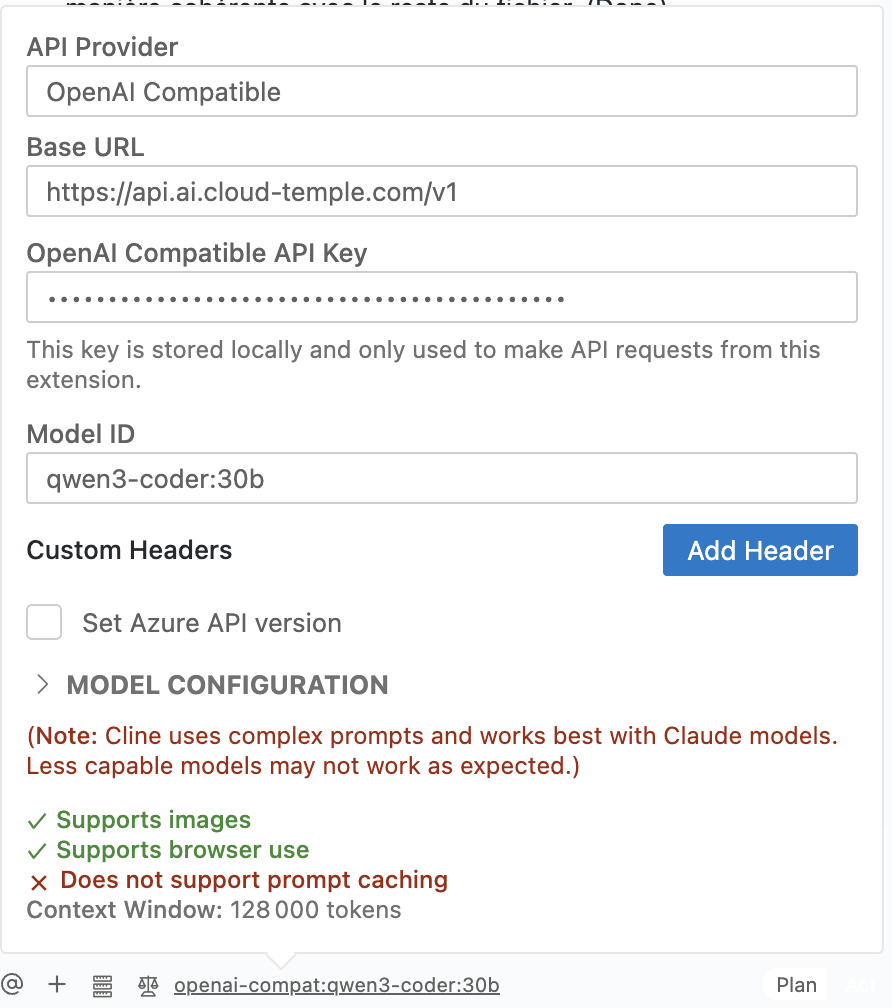
- API Provider: Select
OpenAI Compatible. - Base URL: Enter the Cloud Temple LLMaaS API endpoint:
https://api.ai.cloud-temple.com/v1. - OpenAI Compatible API Key: Paste the API key you generated from the Cloud Temple console.
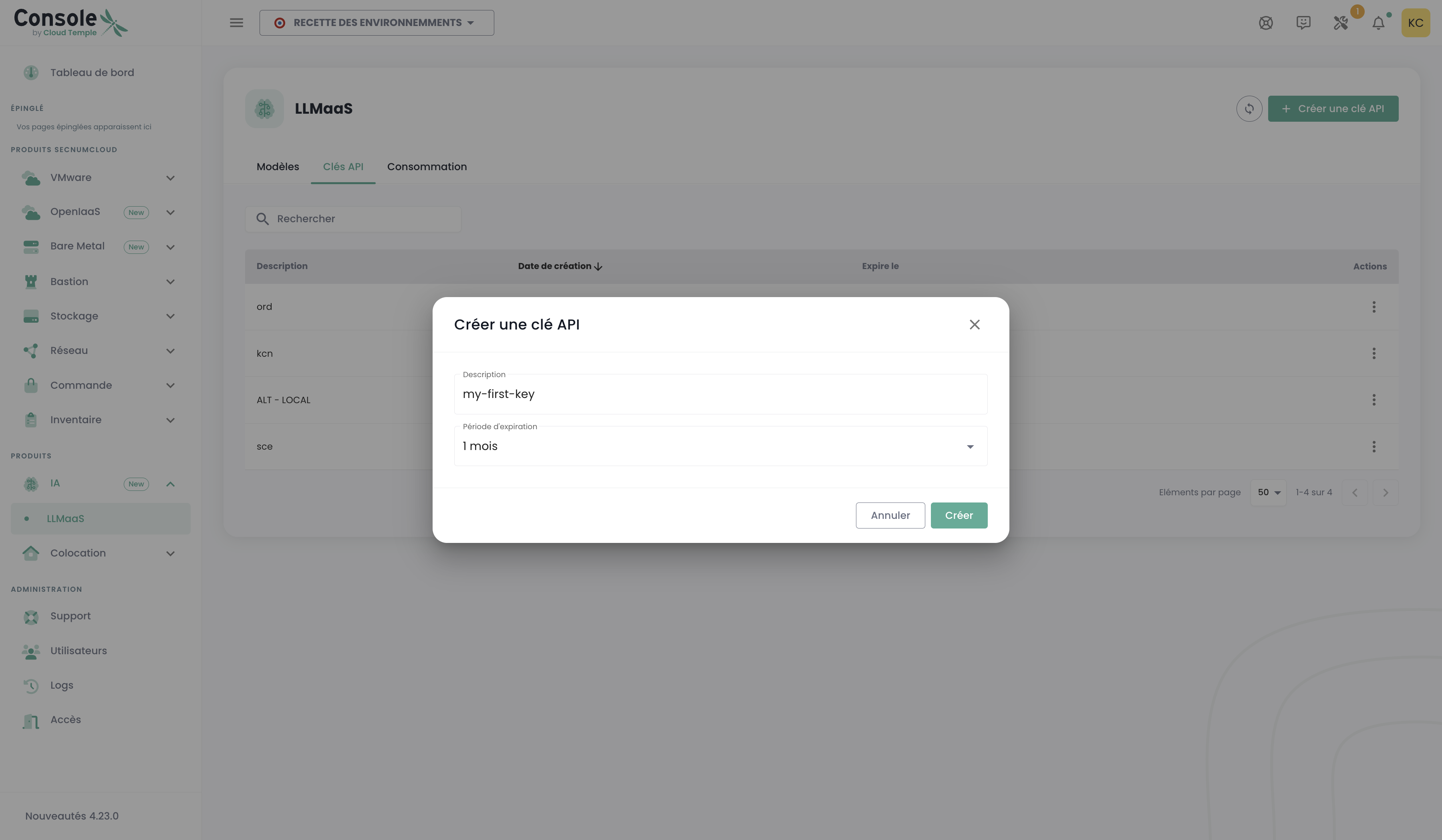
API Key GenerationTo generate your API key, go to the Cloud Temple console, under the LLMaaS > API Keys section, and click on "Create API Key".
- Model ID: Specify the model you wish to use, for example
qwen3.6:35b. You can find the list of available models in the Models section. - Model Configuration:
- Supports Images: Check this box if the model supports images.
- Supports browser use: Check this box.
- Context Window Size: Specify the model's context window size (e.g.,
128000). - Max Output Tokens: Leave as
-1for unlimited output by default. - Temperature: Set the temperature according to your needs (e.g.,
0).
- API Provider: Select
You can now select a model in CLINE and use it to generate code, answer questions, etc.
💡 Advanced Examples
You will find in the GitHub repository below a collection of code examples and scripts demonstrating the various features and use cases of Cloud Temple's LLM as a Service (LLMaaS) offering:
Cloud-Temple/product-llmaas-how-to
You will find practical guides for:
-
Information Extraction and Text Analysis: Ability to analyze documents to extract structured data such as entities, events, relationships, and attributes, leveraging domain-specific ontologies (e.g., legal, HR, IT).
-
Conversational Interaction and Chatbots: Development of conversational agents capable of dialoguing, maintaining conversation history, using system instructions (system prompts), and invoking external tools.
-
Audio Transcription (Speech-to-Text): Conversion of audio content into text, including for large files, using chunking, normalization, and batch processing techniques.
-
Text Translation: Translation of documents from one language to another, managing context across multiple segments to improve consistency.
-
Model Management and Evaluation: Listing available language models via the API, reviewing their specifications, and running tests to compare their performance.
-
Real-Time Response Streaming: Demonstration of the ability to receive and display model responses progressively (token by token), essential for interactive applications.
-
RAG Pipeline with In-Memory Knowledge Base: Educational RAG demonstrator to illustrate how Retrieval-Augmented Generation works. Uses the LLMaaS API for embedding and generation, with vectors stored in memory (FAISS) for a clear understanding of the process.
-
RAG Pipeline with Vector Database (Qdrant): Complete and containerized RAG demonstrator using Qdrant as the vector database. The LLMaaS API is used for document embedding and augmented response generation.
-
OCR & Document Analysis (DeepSeek-OCR): Comprehensive guide and demonstration tool to convert images and PDFs into structured Markdown, extract tables, and transcribe mathematical formulas. See the dedicated documentation.