Guide: Mastering OCR with DeepSeek
This guide details the usage of the DeepSeek-OCR model, a state-of-the-art solution for optical context compression and document analysis.
This guide describes the integration of DeepSeek-OCR. Before using it, verify that the model is exposed by GET /v1/models and consult the catalog and lifecycle. If it is not available, select a suitable vision model and use the corresponding request format; the specific parameters in this guide are not universal.
Architecture and Operation
Unlike traditional OCR, DeepSeek-OCR is an end-to-end Vision-Language model designed to visually "read" and "understand" documents.
Technical Architecture
It combines two innovative components:
- DeepEncoder (380M): A hybrid visual encoder that combines SAM-base (for local perception) and CLIP-large (for global knowledge), connected by a 16x convolutive compressor. This allows processing high-resolution images with very few visual tokens.
- MoE Decoder (3B): Based on DeepSeek3B-MoE (570M active parameters), it generates structured text from the compressed visual tokens.
Resolution Modes and Consumption
The model adapts its token consumption to the image resolution. The larger the image, the more tokens it consumes, but the better the accuracy.
| Mode | Resolution (px) | Vision Tokens | Recommended Usage |
|---|---|---|---|
| Tiny | 512 x 512 | 64 | Slides, very large text |
| Small | 640 x 640 | 100 | Simple documents, receipts |
| Base | 1024 x 1024 | 256 | Standard A4 pages |
| Large | 1280 x 1280 | 400 | Dense documents, small fonts |
| Gundam | Dynamic | ~800 | Newspapers, blueprints, complex scans |
To optimize your costs and latency, resize your images to the minimum resolution required for the text to remain readable.
Multilingual Support
The model was trained on a vast corpus of multilingual documents and supports recognition of nearly 100 languages (including French, English, Chinese, Arabic, etc.), with or without layout preservation.
Prompt Guide (Prompt Engineering)
The quality of the result depends directly on the prompt used. DeepSeek-OCR responds to specific instructions to activate its various capabilities.
1. Standard OCR (Markdown)
To extract text with its structure (headings, paragraphs, tables).
Prompt:
Convert the document to markdown.
Result: Structured text, formatted tables, preserved layout.
2. "Deep parsing" (Figures, charts, formulas)
To analyze the semantic content of charts, chemical or geometric formulas.
Prompt:
Parse the figure.
Capabilities:
- Charts (Bar/Line/Pie): Converts to HTML or Markdown table.
- Chemical Formulas: Converts to SMILES format.
- Geometry: Describes geometric elements.
3. Grounding (localization)
To find the coordinates of a specific element in the image.
Prompt:
Locate <|ref|>element to find<|/ref|> in the image.
Example: Locate <|ref|>Total<|/ref|> in the image.
Result: Returns the bounding box coordinates of the element.
4. Object Detection
To list and locate all visible objects.
Prompt:
Identify all objects in the image and output them in bounding boxes.
Implementation Tutorial (Python)
Here is a complete example showing how to structure your API call to use these capabilities.
Prerequisites: Image format and dependencies
- Format: JPEG or PNG.
- Mode: RGB (no Alpha transparency).
- PDF: Must be converted to images beforehand (150-300 DPI).
- Size: It is recommended to resize very high-resolution images to avoid size limit errors (413 Payload Too Large).
Install the necessary libraries:
pip install requests Pillow
Code: Document Analysis (OCR)
Let's take the example of this Swiss receipt:
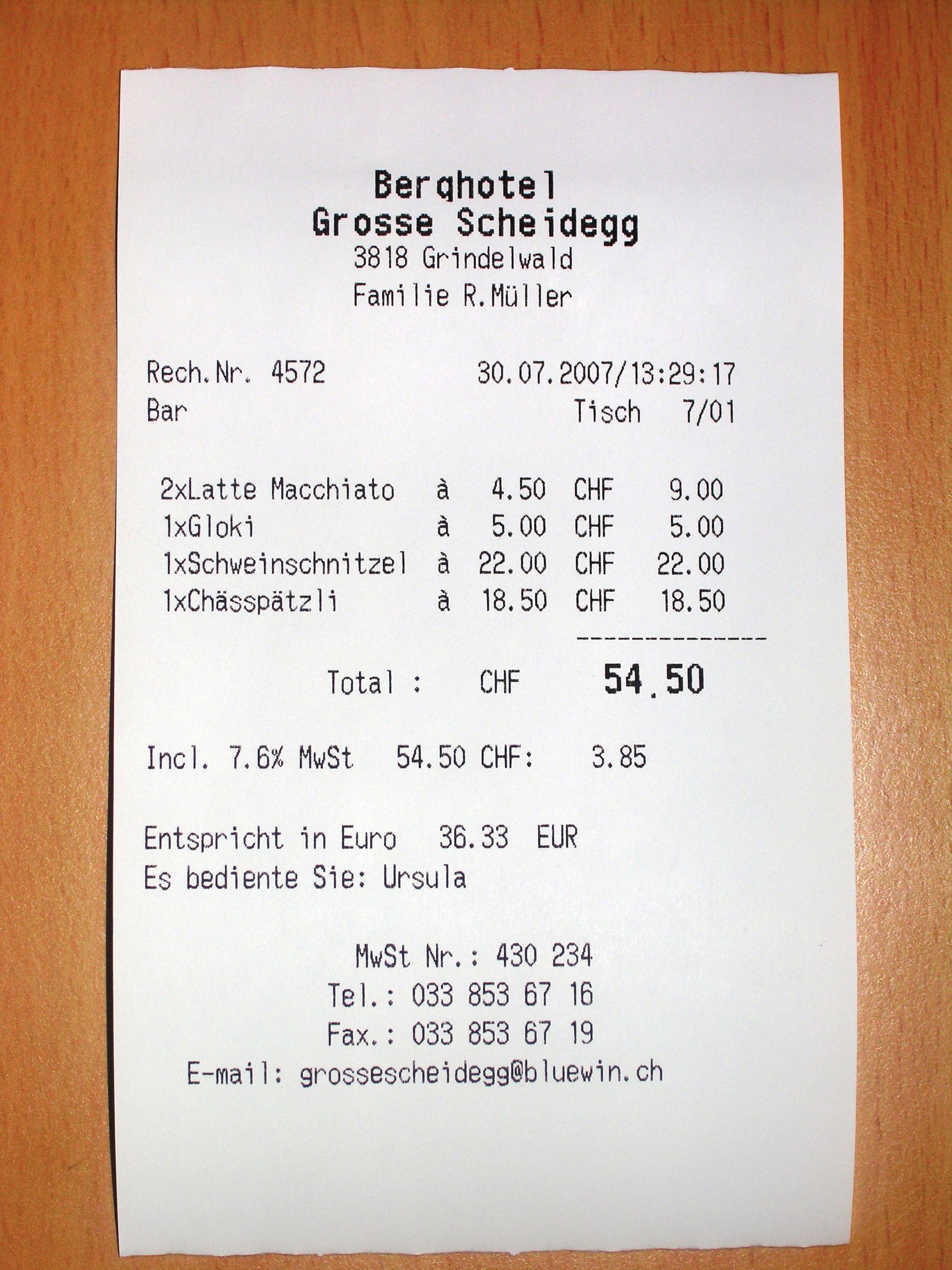
Here is a robust script that handles image resizing and optimal encoding:
import base64
import io
import requests
from PIL import Image

# Configuration
API_KEY = "VOTRE_TOKEN_API"
API_URL = "https://api.ai.cloud-temple.com/v1/chat/completions"
IMAGE_PATH = "ReceiptSwiss.jpg" # Assurez-vous que l'image est dans le dossier courant

def encode_image_optimized(path):
    """
    Optimise l'image (redimensionnement + compression JPEG) pour l'API.
    """
    with Image.open(path) as img:
        # 1. Conversion RGB (pour éviter problèmes PNG/Alpha)
        if img.mode != 'RGB':
            img = img.convert('RGB')

        # 2. Redimensionnement intelligent si trop grand (> 2048px)
        # Cela évite l'erreur 413 (Payload Too Large) et accélère le traitement
        max_size = 2048
        if max(img.size) > max_size:
            img.thumbnail((max_size, max_size))

        # 3. Compression JPEG en mémoire
        buffer = io.BytesIO()
        img.save(buffer, format="JPEG", quality=85)

        return base64.b64encode(buffer.getvalue()).decode('utf-8')

# 1. Construction du message multimodal
encoded_image = encode_image_optimized(IMAGE_PATH)

payload = {
    "model": "deepseek-ai/DeepSeek-OCR",
    "messages": [
        {
            "role": "user",
            "content": [
                {
                    "type": "text",
                    "text": "Convert the document to markdown." # Prompt OCR Standard
                },
                {
                    "type": "image_url",
                    "image_url": {
                        "url": f"data:image/jpeg;base64,{encoded_image}"
                    }
                }
            ]
        }
    ],
    "temperature": 0.0, # CRUCIAL : 0.0 pour la fidélité
    "max_tokens": 4096
}

# 2. Envoi
print("Envoi de la requête...")
response = requests.post(
    API_URL,
    headers={"Authorization": f"Bearer {API_KEY}"},
    json=payload
)

# 3. Résultat
if response.status_code == 200:
    print("\n--- Résultat OCR ---\n")
    print(response.json()['choices'][0]['message']['content'])
else:
    print(f"Erreur {response.status_code}: {response.text}")
Example Output:
# Berghotel
**Grosse Scheidegg**
3818 Grindelwald
Familie R. Müller

Rech. Nr.  4572
Bar    Tisch   7/01

2xLatte Macchiato    à   4.50 CHF   9.00
1xGloki    à   5.00 CHF   5.00
...

**Total :** CHF **54.50**
**Incl. 7.6% MwSt** 54.50 CHF: 3.85
Code: Chart Analysis (deep parsing)
To analyze a financial chart in a report, simply change the prompt text in the payload above:
# ... dans le payload ...
"text": "Parse the figure."
# ...
The model will return a textual or tabular representation of the chart data.
Advanced Use Cases
Complex Table Extraction
DeepSeek-OCR excels at converting tables, even without clear demarcation lines.
Input Image — fictional technical inventory:

These data illustrate table extraction; they do not define Cloud Temple commercial templates.
Expected Markdown Output:
| Équipement | Quantité | vCPU | RAM (Gio) |
|---|---|---|---|
| Serveur web | 2 | 4 | 16 |
| Serveur de calcul | 1 | 8 | 32 |
| Serveur de test | 3 | 2 | 8 |
For public service prices, consult the Cloud Temple official pricing catalog.
Mathematical Formulas (LaTeX)
Ideal for academic documents. The model recognizes equations and outputs them in standard LaTeX syntax.
Input Image:
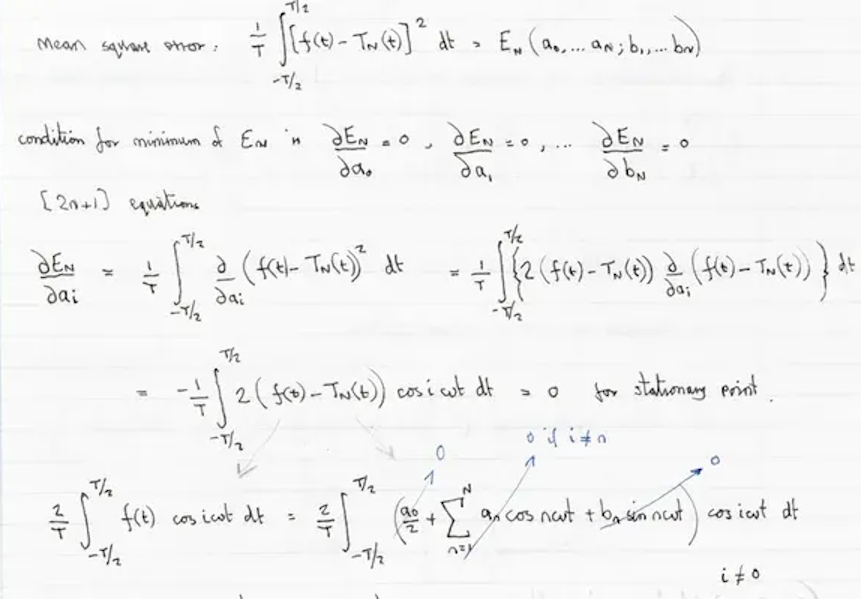
Model Output (Prompt: "Convert to latex.") :
Here is the mathematical rendering of the OCR result:
Mean square error:
Condition for minimum of in:
(2n+1) equations:
Known Limitations
- Orientation: The model does not handle automatic rotation. Ensure your images are properly oriented (horizontal text).
- Handwritten Text: While effective, the error rate is higher on complex cursive handwriting than on printed text.
- Very High Resolution: Images exceeding the dimensions of the "Gundam" mode (~2000x2000) are resized, which may make microscopic text unreadable. Split very large plans into multiple images.