LLMaaS Concepts and Architecture
Overview
Cloud Temple's LLMaaS (Large Language Models as a Service) provides secure and sovereign access to the most advanced artificial intelligence models, with the SecNumCloud qualification from ANSSI.
🏗️ Technical Architecture
Cloud Temple Infrastructure
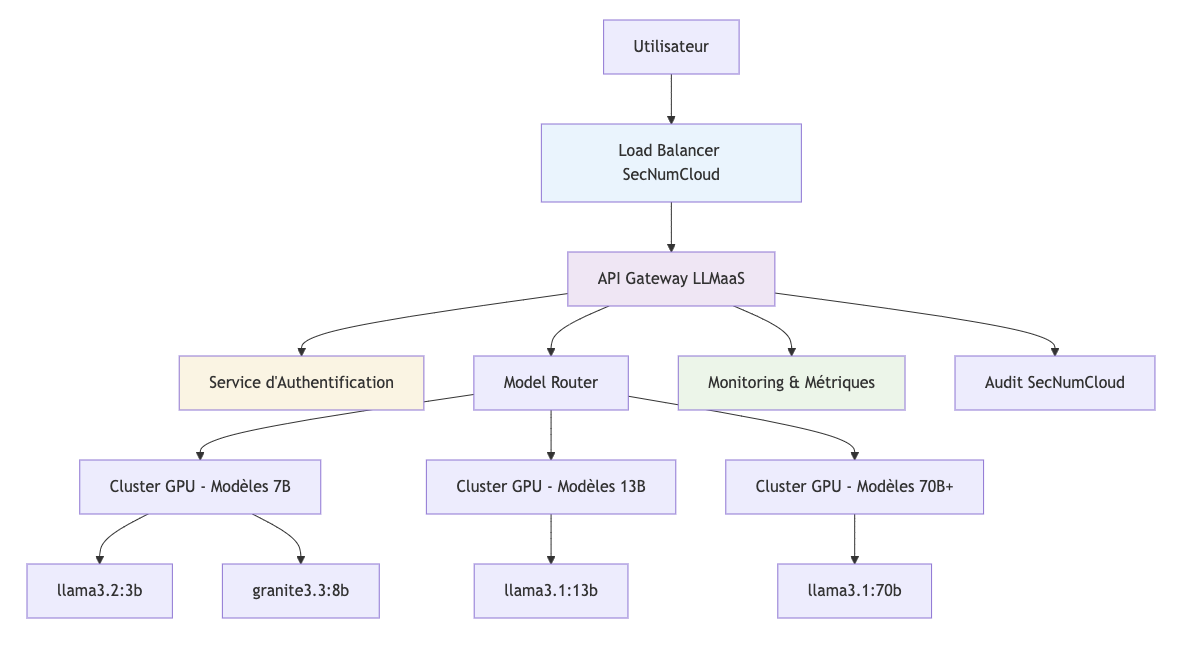
Key Components
1. LLMaaS API Gateway
- OpenAI Compatible : Seamless integration with existing ecosystems
- Rate Limiting : Quota management by billing tier
- Load Balancing : Distribution of requests across inference resources
- Monitoring : Real-time metrics and alerting
2. Authentication Service
- API Keys : Creation, rotation, and revocation under the client's responsibility. See the responsibility sharing (RACI).
- Access Control : Granular permissions per model
- Audit trails : Complete traceability of access
🤖 Models and Tokens
Model Catalog
Consult the catalog and lifecycle and the selection guide.
Token Management
Token Types
- Input tokens : Your prompt and context
- Output tokens : Model-generated response
- System tokens : Metadata and instructions
Cost Calculation
To find current public prices and create your estimate, consult the Cloud Temple official pricing catalog.
The cost depends on consumed volumes (tokens, documents, or audio duration) and applicable billing units.
Optimization
- Context window : Reuse conversations to save costs
- Appropriate models : Choose the size based on complexity
- Max tokens : Limit response length
Tokenization
# Exemple d'estimation de tokens
def estimate_tokens(text: str) -> int:
    """Estimation approximative : 1 token ≈ 4 caractères"""
    return len(text) // 4

prompt = "Expliquez la photosynthèse"
response_max = 200  # tokens max souhaités

estimated_input = estimate_tokens(prompt)  # ~6 tokens
print(f"Tokens estimés : {estimated_input}; limite de sortie : {response_max}")
🔒 Security and Compliance
SecNumCloud Qualification
The LLMaaS service runs on a technical infrastructure that benefits from the SecNumCloud 3.2 qualification from ANSSI, guaranteeing:
Data Protection
- End-to-end encryption : TLS 1.3 for all exchanges
- Secure storage : Encrypted data at rest (AES-256)
Digital Sovereignty
- France hosting : Certified Cloud Temple datacenters
- French law : Native GDPR compliance
- No exposure : No transfers to foreign clouds
Audit and Traceability
- Complete logs : All interactions traced
- Retention : Retention according to legal policies
- Compliance : Audit reports available
Security Controls

Prompt Security
The LLMaaS platform does not apply automatic content filtering of prompts against injections or attempts to bypass instructions (jailbreaks).
Content controls must be implemented in your application according to your use case. You can explicitly call a security model from the catalog to evaluate inputs or responses. These models are not automatically executed on requests addressed to other models.
Define filtering criteria and result processing with your business teams, then test them on your data, particularly to measure false positives. The responsibility sharing specifies the roles of the client and Cloud Temple.
📈 Performance and Scalability
Real-Time Monitoring
Access via Cloud Temple Console:
- Usage metrics per model
- Latency and throughput graphs
- Alerts on performance thresholds
- Request history
🌐 Integration and Ecosystem
OpenAI Compatibility
The LLMaaS service is compatible with the OpenAI API:
# Migration transparente
from openai import OpenAI

# Avant (OpenAI)
client_openai = OpenAI(api_key="sk-...")

# Après (Cloud Temple LLMaaS)
client_ct = OpenAI(
    api_key="votre-token-cloud-temple",
    base_url="https://api.ai.cloud-temple.com/v1"
)

# Code identique !
response = client_ct.chat.completions.create(
    model="gpt-oss:120b",  # Modèle Cloud Temple
    messages=[{"role": "user", "content": "Bonjour"}]
)
Supported Ecosystem
AI Frameworks
- ✅ LangChain : Native integration
- ✅ Haystack : Document pipelines
- ✅ Semantic Kernel : Microsoft orchestration
- ✅ AutoGen : Conversational agents
Development Tools
- ✅ Jupyter : Interactive notebooks
- ✅ Streamlit : Quick web apps
- ✅ Gradio : AI user interfaces
- ✅ FastAPI : Backend APIs
No-Code Platforms
- ✅ Zapier : Automations
- ✅ Make : Visual integrations
- ✅ Bubble : Web applications
🔄 Model Lifecycle
The model lifecycle publishes statuses, deadlines, and recommended migrations. Consult it before choosing a model and during your application's operation.
Reading the Lifecycle
- DMP : production release date.
- DSP : production end date (end of support) announced for the model.
- LTS (Long Term Support) : model benefiting from extended support; check the published date for the relevant model.
- Production : model indicated as in production in the catalog.
- Deprecated : deprecated model for which a migration must be prepared. This status does not necessarily mean that API calls are already interrupted.
- Planned : announced model, whose availability must be verified before use.
Announcements of additions, redirections, and withdrawals are published in the service changelog. For specific stability or support needs, contact support to clarify applicable terms.
Redirections and Legacy Identifiers
Some legacy identifiers are redirected to a successor model. A request may therefore continue to work while being processed by a different model. API call continuity does not guarantee identical responses, nor the same capabilities, latencies, or context limits.
Migration to Another Model
- Identify the relevant model, deadline, and recommended successor in the lifecycle.
- Verify the successor's identifier with
GET /v1/modelsand its capabilities: vision, tool calls, reasoning, and context according to your usage. - Test the successor on a representative sample of your requests: quality, output formats, tools, latency, and consumption.
- Update the
modelparameter in your application's configuration after validation, then monitor results. - For embeddings, plan to recalculate vectors and rebuild the index if the model changes.
Deprecated Models
The list and migration destinations are available in the lifecycle catalog. If no migration is indicated, contact support before the deadline to choose a suitable solution.
💡 Best Practices
To get the most out of the LLMaaS API, it is essential to adopt cost, performance, and security optimization strategies.
Cost Optimization
Cost control relies on intelligent use of tokens and models.
-
Model Selection : Compare multiple models on representative examples of your usage. Select the one that meets your quality and latency requirements, then measure its token consumption. Consult the lifecycle catalog to identify available models and their successors. Billing depends on the applicable rate and consumed volumes; model size alone does not determine the billed cost.
-
Context Management : Conversation history (
messages) is sent back with each call, consuming input tokens. For long conversations, consider summarization or windowing strategies to retain only relevant information.# For a long conversation, we can summarize the first exchanges.messages = [{"role": "system", "content": "You are an AI assistant."},{"role": "user", "content": "Summary of the first 10 exchanges..."},{"role": "assistant", "content": "Ok, I have the context."},{"role": "user", "content": "Here is my new question."}] -
Output Token Limitation : Always use the
max_tokensparameter to avoid excessively long and costly responses. Set a reasonable limit based on your expectations.# Request a summary of max 100 words.response = client.chat.completions.create(model="gpt-oss:120b",messages=[{"role": "user", "content": "Summarize this document..."}],max_tokens=150, # Safety margin for ~100 words)
Performance
Your application's responsiveness depends on how you manage API calls.
-
Asynchronous Requests : To process multiple requests without waiting for each to finish, use asynchronous calls. This is particularly useful for backend applications handling a large volume of simultaneous requests.
import asynciofrom openai import AsyncOpenAIclient = AsyncOpenAI(api_key="...", base_url="...")async def process_prompt(prompt: str):# Process a single request asynchronouslyresponse = await client.chat.completions.create(model="gpt-oss:120b", messages=[{"role": "user", "content": prompt}])return response.choices[0].message.contentasync def batch_requests(prompts: list):# Launch multiple tasks in parallel and wait for their completiontasks = [process_prompt(p) for p in prompts]return await asyncio.gather(*tasks) -
Streaming for User Experience (UX) : For user interfaces (chatbots, assistants), streaming is essential. It allows displaying the model's response word by word, giving an impression of immediate responsiveness instead of waiting for the complete response.
# Display the response in real-time in a user interfaceresponse_stream = client.chat.completions.create(model="gpt-oss:120b",messages=[{"role": "user", "content": "Tell me a story."}],stream=True)for chunk in response_stream:if chunk.choices[0].delta.content:# Display the text chunk in the UIprint(chunk.choices[0].delta.content, end="", flush=True)
Security
The security of your application is paramount, especially when handling user inputs.
-
Input Validation and Sanitization: Never trust user inputs. Before sending them to the API, sanitize them to remove any potentially malicious code or "prompt injection" instructions. Also, limit their size to prevent abuse.
def sanitize_input(user_input: str) -> str:# Simple example: remove code delimiters and limit length.# More robust libraries can be used for advanced sanitization.cleaned = user_input.replace("`", "").replace("'", "").replace("\"", "")return cleaned[:2000] # Limit size to 2000 characters -
Robust Error Handling: Always wrap your API calls in
try...exceptblocks to handle network errors, API errors (e.g., 429 Rate Limit, 500 Internal Server Error), and provide a degraded but functional user experience.from openai import APIError, APITimeoutErrortry:response = client.chat.completions.create(...)except APITimeoutError:# Handle the case where the request takes too longreturn "The service is taking longer than expected, please try again."except APIError as e:# Handle specific API errorslogger.error(f"LLMaaS API Error: {e.status_code} - {e.message}")return "Sorry, an error occurred with the AI service."except Exception as e:# Handle all other errors (network, etc.)logger.error(f"An unexpected error occurred: {e}")return "Sorry, an unexpected error occurred."