GPU auf Managed Kubernetes verwenden
Dieses Tutorial zeigt Ihnen, wie Sie einen Pod bereitstellen, der eine GPU-Ressource auf einem Managed-Kubernetes-Cluster verwendet, der mit "Bare-Metal"-Knoten konfiguriert ist, die mit NVIDIA-GPUs ausgestattet sind.
Voraussetzungen
- Ein Managed-Kubernetes-Cluster mit mindestens einem Worker-Knoten vom Typ "Bare Metal" mit GPU.
Beispiel-Pod-Manifest
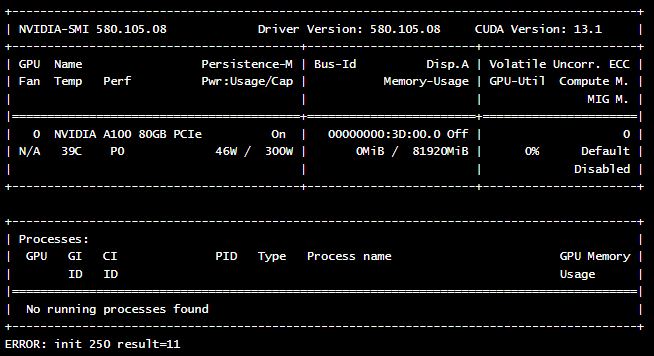
Dies ist ein Beispiel für ein Pod-Manifest, das den Befehl nvidia-smi ausführt, um das Vorhandensein und den Status der GPU zu überprüfen.
apiVersion: v1
kind: Pod
metadata:
  name: nvidia-cuda-check
spec:
  runtimeClassName: nvidia  # Clé pour Talos NVIDIA
  restartPolicy: Never
  containers:
  - name: nvidia-version-check
    image: "nvidia/cuda:13.1.0-devel-ubuntu24.04"
    imagePullPolicy: Always
    command: ["nvidia-smi"]
Erklärung des Manifests
runtimeClassName: nvidia: Dies ist der wichtigste Teil. Sie weist Kubernetes an, die NVIDIA-Laufzeitumgebung zu verwenden. Das NVIDIA-Toolkit kümmert sich dann darum, die NVIDIA-Treiber direkt in den Pod zu injizieren, wodurch der Container auf die GPU zugreifen kann.restartPolicy: Never: Da dieser Pod lediglich einen Überprüfungsbefehl ausführt, soll er nach seiner Ausführung nicht neu gestartet werden.image: "nvidia/cuda:...": Wir verwenden ein von NVIDIA bereitgestelltes Image, das die erforderlichen Tools zur Interaktion mit der GPU enthält.command: ["nvidia-smi"]: Dies ist der Befehl, der innerhalb des Containers ausgeführt wird.nvidia-smiist ein Befehlszeilen-Tool, das Informationen über NVIDIA-GPUs bereitstellt.
Weitere Informationen zur Funktionsweise des NVIDIA-Toolkits finden Sie in der offiziellen Dokumentation auf GitHub.
Bereitstellung und Überprüfung
-
Stellen Sie das Pod bereit mit dem Befehl
kubectl apply:kubectl apply -f nvidia-smi.yaml -
Überprüfen Sie die Logs des Pods, um die Ausgabe des Befehls
nvidia-smianzuzeigen :kubectl logs nvidia-cuda-check
Wenn alles korrekt konfiguriert ist, sollten Sie eine ähnliche Ausgabe sehen, die die Details Ihrer GPU-Karte anzeigt :