Cilium Gateway API verwenden
Einführung
Die Gateway API ist der neue Kubernetes-Standard für die Verwaltung des eingehenden Traffics. Sie löst die traditionelle Ingress-Ressource ab und bietet mehr Flexibilität, Funktionen (erweitertes Routing, Lastverteilung usw.) sowie eine bessere Trennung der Verantwortlichkeiten.
In Ihrem Cloud Temple Managed Kubernetes-Cluster wird Cilium als CNI verwendet und implementiert nativ die Unterstützung der Gateway API.
ℹ️[Unterstützte Versionen] Diese Dokumentation gilt für Cluster, die Cilium 1.8.4 oder höher verwenden. Die Gateway API CRDs in Version 1.4 sind auf Ihrem Cluster vorinstalliert.
Ziele
Dieses Tutorial führt Sie durch folgende Schritte:
- Die grundlegenden Ressourcen der Gateway API (GatewayClass, Gateway, HTTPRoute) verstehen.
- Eine Testanwendung bereitstellen.
- Diese Anwendung über ein Cilium-Gateway freigeben.
- Den Zugriff testen.
Voraussetzungen
- Ein betriebsbereiter Managed Kubernetes Cloud Temple-Cluster.
- Das Tool
kubectl, das für den Zugriff auf Ihren Cluster konfiguriert ist. - Das Tool
cilium.
Schlüsselkonzepte
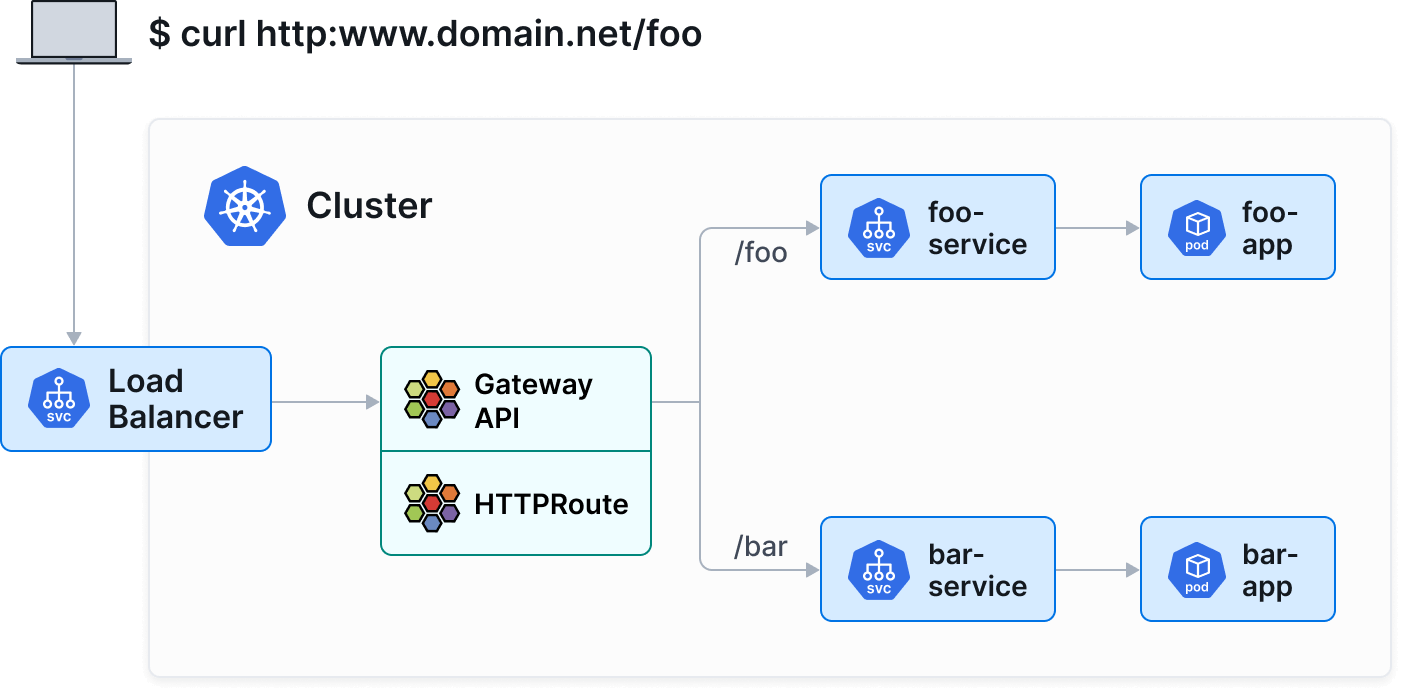
Die Gateway API unterteilt die Netzwerkkonfiguration in drei Hauptressourcen:
- GatewayClass : Definiert den Controller-Typ (hier
io.cilium/gateway). - Gateway : Instanziert einen Netzwerkeinstiegspunkt (Load Balancer).
- HTTPRoute : Definiert die Routing-Regeln (Pfade, Header) zu Kubernetes-Diensten.
Schritt 1: Version und GatewayClass überprüfen
Sie können mit folgenden Befehlen überprüfen, ob Ihr Cluster eine kompatible Version von Cilium (1.8.4+) verwendet:
cilium status
cilium config view | grep -w "enable-gateway-api"
Stellen Sie anschließend sicher, dass die Cilium-GatewayClass in Ihrem Cluster verfügbar ist:
kubectl get gatewayclass
Sie sollten eine ähnliche Ausgabe sehen:
NAME      CONTROLLER           ACCEPTED   AGE
cilium    io.cilium/gateway    True       2d
ℹ️Wenn keine GatewayClass aufgelistet ist, stellen Sie sicher, dass die Gateway-API-Funktion in Ihrer Cilium-Installation aktiviert ist.
Schritt 2 : Eine Demoanwendung bereitstellen
Wir werden eine einfache Anwendung bereitstellen, die Informationen zum Pod zurückgibt (echo-server).
Erstellen Sie eine Datei apps.yaml :
apiVersion: apps/v1
kind: Deployment
metadata:
  name: echo-server
  labels:
    app: echo-server
spec:
  replicas: 2
  selector:
    matchLabels:
      app: echo-server
  template:
    metadata:
      labels:
        app: echo-server
    spec:
      containers:
      - name: echo-server
        image: ealen/echo-server:latest
        ports:
        - containerPort: 80
---
apiVersion: v1
kind: Service
metadata:
  name: echo-service
  labels:
    app: echo-server
spec:
  selector:
    app: echo-server
  ports:
  - port: 80
    targetPort: 80
Wenden Sie die Konfiguration an :
kubectl apply -f apps.yaml
Schritt 3: Gateway erstellen
Die Gateway wird die Erstellung eines LoadBalancers anfordern, um den Datenverkehr entgegenzunehmen.
Erstellen Sie eine Datei gateway.yaml:
apiVersion: gateway.networking.k8s.io/v1
kind: Gateway
metadata:
  name: my-gateway
spec:
  gatewayClassName: cilium
  listeners:
  - protocol: HTTP
    port: 80
    name: web-gw
    allowedRoutes:
      namespaces:
        from: Same
Wenden Sie die Konfiguration an:
kubectl apply -f gateway.yaml
Stellen Sie sicher, dass die Gateway eine IP-Adresse erhalten hat (dies kann einige Augenblicke dauern, bis der LoadBalancer von der Cloud-Temple-Infrastruktur bereitgestellt wird):
kubectl get gateway my-gateway
Warten Sie, bis das Feld PROGRAMMED den Wert True aufweist und ADDRESS eine IP-Adresse anzeigt.
Schritt 4: Eine HTTPRoute erstellen
Nun, da wir ein "Eingangstor" (Gateway) haben, müssen wir den Datenverkehr zu unserem Dienst leiten.
Erstellen Sie eine Datei httproute.yaml :
apiVersion: gateway.networking.k8s.io/v1
kind: HTTPRoute
metadata:
  name: echo-route
spec:
  parentRefs:
  - name: my-gateway
  rules:
  - matches:
    - path:
        type: PathPrefix
        value: /
    backendRefs:
    - name: echo-service
      port: 80
Wenden Sie die Konfiguration an :
kubectl apply -f httproute.yaml
Schritt 5: Zugriff testen
Rufen Sie die IP-Adresse Ihres Gateways ab:
kubectl get gateway my-gateway -o jsonpath='{.status.addresses[0].value}'
Senden Sie eine Anfrage an diese IP-Adresse zum Testen:
curl http://10.200.205.2
Sie sollten eine JSON-Antwort von der Anwendung echo-server erhalten, die die Details des antwortenden Pods enthält.
Erweiterte Funktionen (Beispiel: Canary Release)
Die Gateway API erleichtert erheblich erweiterte Bereitstellungsszenarien, wie Canary Releases (gewichtete Traffic-Verteilung).
Gehen wir davon aus, dass wir eine v2 unserer Anwendung haben. Wir können den Traffic zu 90% an v1 und zu 10% an v2 verteilen, indem wir einfach die Gewichte in backendRefs anpassen:
apiVersion: gateway.networking.k8s.io/v1
kind: HTTPRoute
metadata:
  name: echo-route-canary
spec:
  parentRefs:
  - name: my-gateway
  rules:
  - backendRefs:
    - name: echo-service
      port: 80
      weight: 90
    - name: echo-service-v2
      port: 80
      weight: 10
Fazit
Sie haben eine moderne Infrastruktur zur Dienstexposition mit der Cilium Gateway API eingerichtet. Dieser standardisierte Ansatz, der semantisch reicher ist als Ingress, wird empfohlen, um die erweiterten Netzwerkfunktionen von Kubernetes zu nutzen.