ArgoCD für Ihre GitOps-Bereitstellungen verwenden
Ziele
In diesem Tutorial erfahren Sie, wie Sie ArgoCD, das in Ihrem Managed Kubernetes-Cluster integrierte GitOps-Tool für Continuous Deployment, verwenden. Am Ende dieses Leitfadens werden Sie Folgendes wissen:
- Was der GitOps-Ansatz ist.
- Wie Sie auf die ArgoCD-Oberfläche zugreifen.
- Wie Sie eine Anwendung mit ArgoCD bereitstellen, um ein Git-Repository zu synchronisieren.
Das GitOps-Prinzip mit ArgoCD
GitOps ist eine Praxis, bei der ein Git-Repository als einzige Quelle der Wahrheit verwendet wird, um den gewünschten Zustand Ihrer Infrastruktur und Anwendungen zu deklarieren.
ArgoCD ist das Tool, das dieses Prinzip umsetzt. Es überwacht kontinuierlich ein Git-Repository und vergleicht den darin definierten Zustand (über Kubernetes-Manifeste) mit dem tatsächlichen Zustand Ihres Clusters. Wenn es eine Abweichung erkennt, wendet es automatisch die Änderungen an, damit der Cluster mit dem in Git deklarierten Zustand übereinstimmt.
Die Vorteile sind vielfältig:
- Zuverlässige und reproduzierbare Bereitstellungen.
- Vollständige Nachverfolgbarkeit aller Änderungen über den Git-Verlauf.
- Schnelle Wiederherstellung nach einem Vorfall durch Zurücksetzen auf einen vorherigen Commit.
- Verbesserte Sicherheit durch Einschränkung des direkten Zugriffs auf den Cluster.
Zugriff auf die ArgoCD-Oberfläche
Die Weboberfläche von ArgoCD ist über eine interne URL Ihres Clusters erreichbar. Um darauf zuzugreifen, müssen Sie mit dem internen Netzwerk des Clusters verbunden sein (z. B. über einen Bastion-Host oder ein VPN).
Die zu verwendende URL lautet wie folgt, wobei Sie <votre-identifiant-de-cluster> ersetzen müssen:
http://argocd.internal.<votre-identifiant-de-cluster>.mk.ms-cloud-temple.com
Sie können die interne IP-Adresse des ArgoCD-Ingress mit dem folgenden Befehl abrufen:
kubectl get ingress argocd-server -n argocd
ℹ️ Das Passwort für das Konto
adminwird Ihnen von den Cloud Temple-Teams bei der Bereitstellung Ihres Clusters zur Verfügung gestellt.
Eine Anwendung mit ArgoCD bereitstellen
Wir werden nun eine Testanwendung unter Verwendung des GitOps-Ansatzes bereitstellen.
1. Das Git-Repository
ArgoCD benötigt ein Git-Repository, das die Kubernetes-Manifeste der zu deployenden Anwendung enthält. Für dieses Tutorial verwenden wir das ArgoCD-Beispiel-Repository: https://github.com/argoproj/argocd-example-apps. Wir werden die Anwendung guestbook bereitstellen, die sich in diesem Repository befindet.
2. Ziel-Namespace vorbereiten
Damit die Anwendung in einem von Capsule verwalteten Namespace bereitgestellt werden kann, müssen wir diesen Namespace zunächst erstellen und das entsprechende Tenant-Label anwenden.
Führen Sie die folgenden Befehle aus:
# Crée le namespace
kubectl create namespace guestbook

# Applique le label pour l'associer au tenant "default" de Capsule (si besoin, car le namespace a surement déjà été associé avec votre tenant lors de sa création)
kubectl label namespace guestbook capsule.clastix.io/tenant=default
3. Die Anwendung in ArgoCD erstellen
Da der Namespace jetzt bereit ist, können wir die Anwendung in ArgoCD definieren.
-
Erstellen Sie eine Datei mit dem Namen
app-guestbook.yamlmit folgendem Inhalt :apiVersion: argoproj.io/v1alpha1kind: Applicationmetadata:name: guestbooknamespace: argocdspec:project: defaultsource:repoURL: https://github.com/argoproj/argocd-example-apps.gittargetRevision: HEADpath: guestbookdestination:server: https://kubernetes.default.svcnamespace: guestbooksyncPolicy:automated:prune: trueselfHeal: trueDieses Manifest weist ArgoCD an, Folgendes durchzuführen :
- Eine Anwendung mit dem Namen
guestbookzu erstellen. - Das Repository
argocd-example-appszu überwachen. - Den Ordner
guestbookin diesem Repository zu verwenden. - Die gefundenen Manifeste im Namespace
guestbookdes lokalen Clusters zu bereitstellen. - Die Synchronisierung automatisch aufrechtzuerhalten (
automated).
- Eine Anwendung mit dem Namen
-
Sie haben zwei Möglichkeiten, die Anwendung in ArgoCD zu erstellen :
Option A : Über
kubectl(GitOps-Ansatz)Wenden Sie dieses Manifest direkt auf Ihren Cluster an. Dies ist die empfohlene Methode, da sie dem GitOps-Prinzip der deklarativen Verwaltung folgt.
kubectl apply -f app-guestbook.yamlOption B : Über die Weboberfläche von ArgoCD
Sie können die Anwendung auch direkt über die grafische Benutzeroberfläche erstellen :
- Klicken Sie in der ArgoCD-UI auf "+ NEW APP".
- Klicken Sie oben rechts im Erstellungsdialog auf "EDIT AS YAML".
- Fügen Sie den Inhalt Ihrer Datei
app-guestbook.yamlin den Editor ein. - Klicken Sie auf "CREATE".
4. Synchronisierung überprüfen
Sobald Sie das Manifest anwenden, erkennt ArgoCD diese neue Ressource Application und beginnt mit der Arbeit.
- Über die Weboberfläche:
- Melden Sie sich bei der ArgoCD-Oberfläche an.
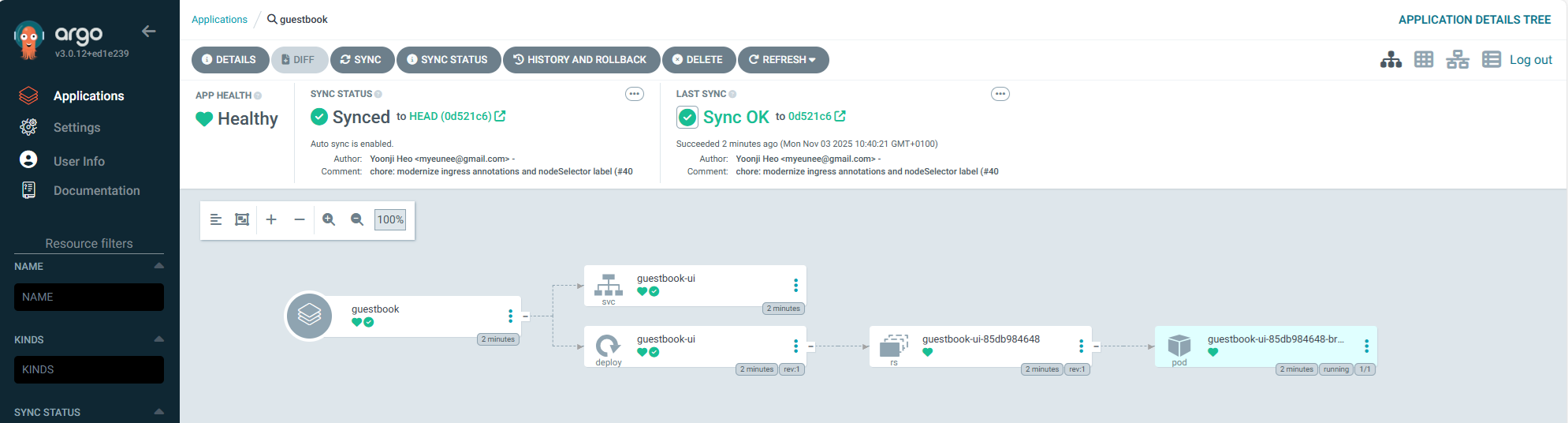
- Sie sollten eine neue Karte für die Anwendung
guestbooksehen. - Nach kurzer Zeit sollte sich ihr Status auf
HealthyundSyncedändern. - Durch Klicken auf die Karte können Sie alle erstellten Kubernetes-Ressourcen (Deployment, Service usw.) einsehen.
- Über die Befehlszeile:
-
Stellen Sie sicher, dass der Namespace
guestbookerstellt wurde:kubectl get ns guestbook -
Stellen Sie sicher, dass die Anwendungsressourcen in diesem Namespace bereitgestellt wurden:
kubectl get all -n guestbookNAME READY STATUS RESTARTS AGEpod/guestbook-ui-85db984648-br6r2 1/1 Running 0 19mNAME TYPE CLUSTER-IP EXTERNAL-IP PORT(S) AGEservice/guestbook-ui ClusterIP 10.111.160.90 <none> 80/TCP 19mNAME READY UP-TO-DATE AVAILABLE AGEdeployment.apps/guestbook-ui 1/1 1 1 19mNAME DESIRED CURRENT READY AGEreplicaset.apps/guestbook-ui-85db984648 1 1 1 19m
-
5. Der GitOps-Zyklus
Wenn Sie nun ein Manifest im Git-Repository ändern, erkennt ArgoCD die Änderung und aktualisiert die Anwendung im Cluster automatisch. Das ist die Magie von GitOps!
Bereinigung
Um die Anwendung und alle zugehörigen Ressourcen zu löschen, können Sie einfach die ArgoCD-Application-Ressource löschen.
- Über die Weboberfläche:
- Suchen Sie in der ArgoCD-UI nach der Anwendung
guestbook. - Klicken Sie auf die drei Punkte (...) , um das Menü zu öffnen, und wählen Sie "Delete" aus.
- Aktivieren Sie die Option "Foreground", um sicherzustellen, dass alle verwalteten Ressourcen (pods, services, etc.) ebenfalls kaskadierend gelöscht werden.
- Suchen Sie in der ArgoCD-UI nach der Anwendung
- Über
kubectl:-
Löschen Sie die von Ihnen erstellte Datei
app-guestbook.yaml:kubectl delete -f app-guestbook.yaml
-
ArgoCD löscht nun alle Komponenten der Anwendung guestbook. Sobald die Löschsynchronisierung abgeschlossen ist, ist der Namespace guestbook leer. Sie können ihn anschließend mit dem folgenden Befehl löschen:
kubectl delete namespace guestbook
ℹ️[Pour aller plus loin : la gestion des secrets] Dieses Tutorial verwendet ein öffentliches Repository ohne sensible Daten. Für Ihre Produktionsanwendungen ist es entscheidend, Secrets (mots de passe, clés d'API) niemals im Klartext in Ihrem Git-Repository zu speichern. >Lösungen wie Sealed Secrets oder OpenTofu lassen sich mit ArgoCD integrieren, um Ihre Secrets sicher zu verwalten.
Fazit
Sie haben Ihre erste Anwendung mit ArgoCD unter Einhaltung der GitOps-Prinzipien bereitgestellt. Dieser leistungsstarke Ansatz ermöglicht es Ihnen, Ihre Bereitstellungen deklarativ, zuverlässig und sicher zu verwalten. Wir empfehlen Ihnen, diesen Ansatz für alle Ihre Anwendungen auf Managed Kubernetes zu übernehmen.