API-Dokumentation
Introduction
Die Cloud Temple API ermöglicht es Ihnen, alle Ihre Cloud-Ressourcen programmatisch zu erstellen und zu verwalten. Alles, was Sie über die Cloud Temple-Konsole tun können, lässt sich auch über die API durchführen, von der Erstellung virtueller Maschinen bis zur Konfiguration der Identitäts- und Zugriffsverwaltung.
Diese Dokumentation führt Sie durch die Nutzung der Cloud Temple API, von der Authentifizierung über Best Practices bis hin zum Lifecycle-Management der Endpunkte.
Schnellstart: Ihre erste API-Anfrage
- 🔑 Generieren Sie Ihr PAT über die Konsole
- 🚀 Testen Sie mit curl auf
/iam/v2/roles - ✅ Analysieren Sie die JSON-Antwort
Voraussetzungen
Bevor Sie beginnen, benötigen Sie ein Cloud Temple-Konto mit den entsprechenden Berechtigungen, um API-Schlüssel zu generieren.
Schritte
-
API-Schlüssel generieren: Melden Sie sich bei der Cloud Temple-Konsole an und generieren Sie Ihren Personal Access Token (siehe Abschnitt API-Schlüssel unten).
-
Erste Anfrage testen: Führen Sie den folgenden curl-Befehl aus, indem Sie
<votre-personal-access-token>durch Ihr Token ersetzen:
curl -X GET \
  -H "Authorization: Bearer <votre-personal-access-token>" \
  -H "Content-Type: application/json" \
  "https://shiva.cloud-temple.com/api/iam/v2/roles"
- Antwort analysieren: Sie erhalten die Liste der im Tenant verfügbaren IAM-Rollen, wodurch Sie die vorhandenen Berechtigungen nachvollziehen können.
Authentifizierung
API-Schlüssel (Personal Access Token)
Der API-Schlüssel ermöglicht die Authentifizierung, wenn Sie Anfragen an die API stellen möchten. Die Generierung eines API-Schlüssels, auch als Personal Access Token (PAT) bezeichnet, ist eine sichere Methode zur Anmeldung bei der API Console ohne Verwendung einer grafischen Benutzeroberfläche. Jeder dieser Tokens ist mit einem Tenant und dem Benutzer verknüpft, der ihn erstellt hat.
Die Erstellung dieses Tokens erfolgt über Ihr Konto. Es ist möglich, mehrere Schlüssel zu generieren und für jeden einzelnen die Berechtigungen entsprechend Ihren Rechten zu konfigurieren.
API-Schlüssel erstellen
Um einen API-Schlüssel zu erstellen, klicken Sie einfach auf Ihr Profil :
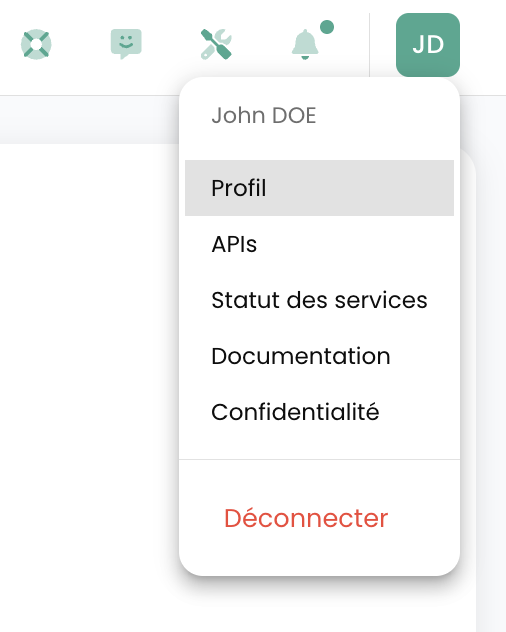
Klicken Sie im Profilmenü auf 'Persönliches Zugriffstoken'
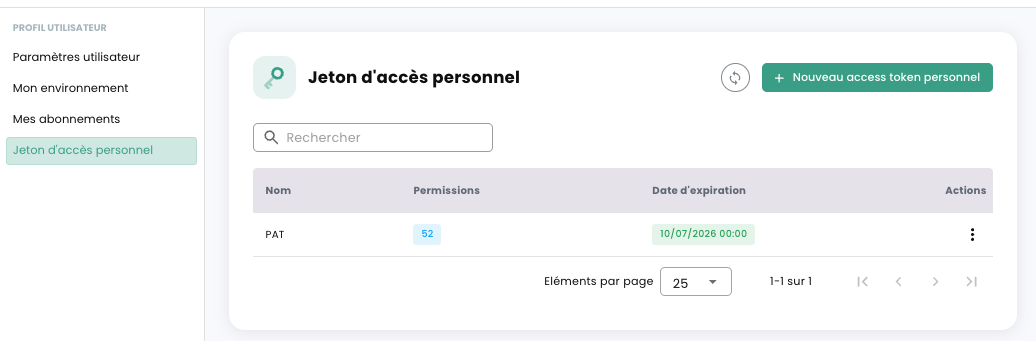
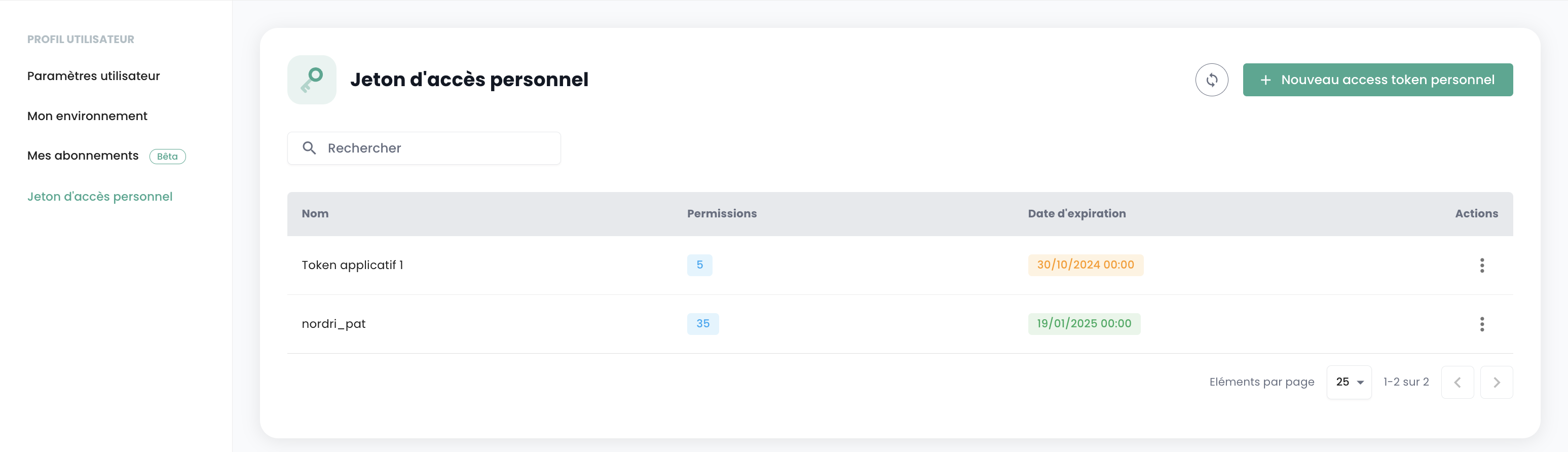
Auf dem Bildschirm werden nun alle API-Schlüssel angezeigt, die für diesen Benutzer in diesem Tenant erstellt wurden. Klicken Sie auf 'Neues persönliches Zugriffstoken'
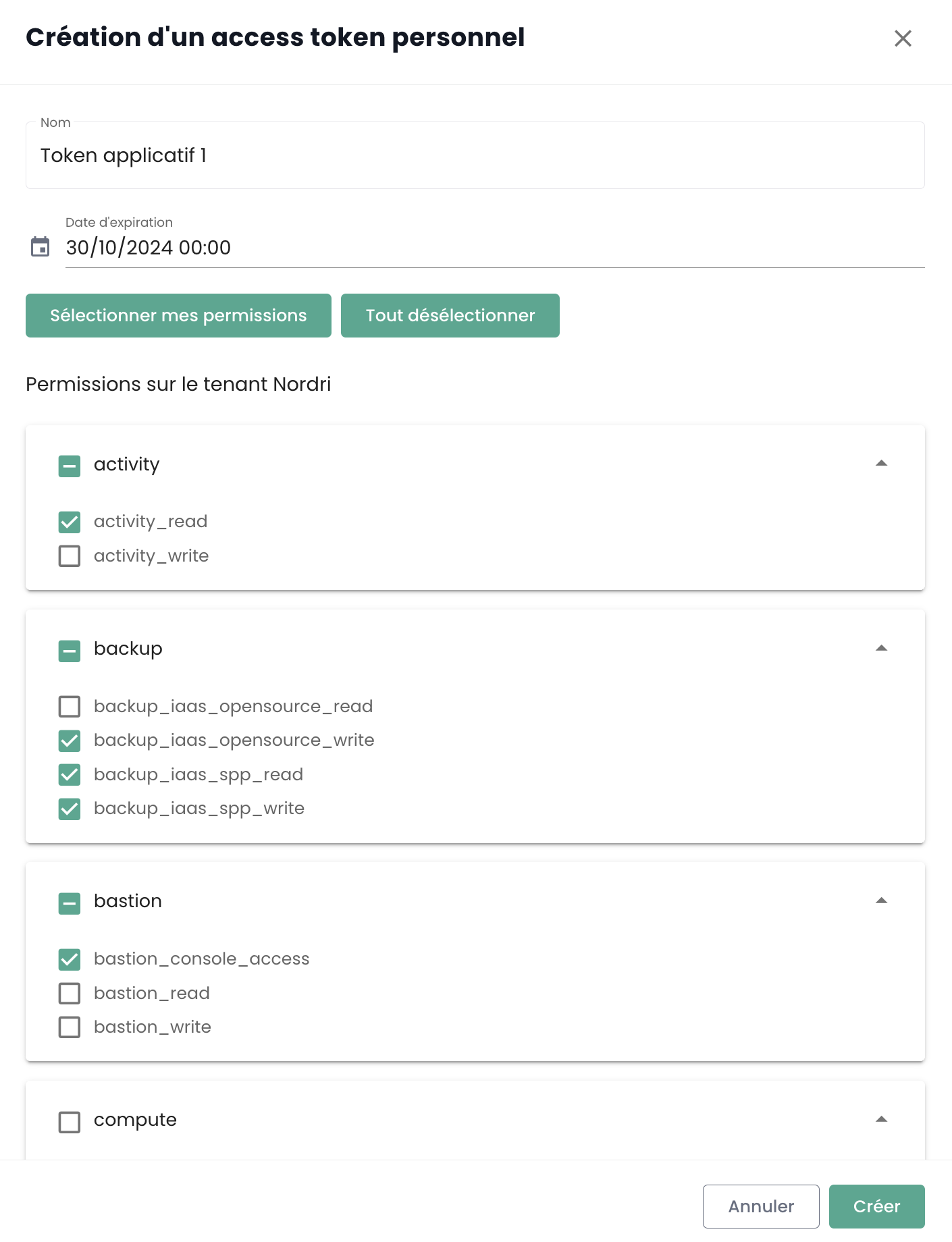
Sie müssen nun:
- Den Namen dieses neuen Tokens angeben,
- Ein Ablaufdatum angeben (maximal 12 Monate Gültigkeit),
- Die dem Token zugeordneten Berechtigungen auswählen.
Die Details zu Ihrem Token werden anschließend angezeigt. Achtung, ein nachträglicher Zugriff ist nicht mehr möglich.
Wenn Sie diese Informationen nicht notieren, müssen Sie das Token löschen und neu erstellen.
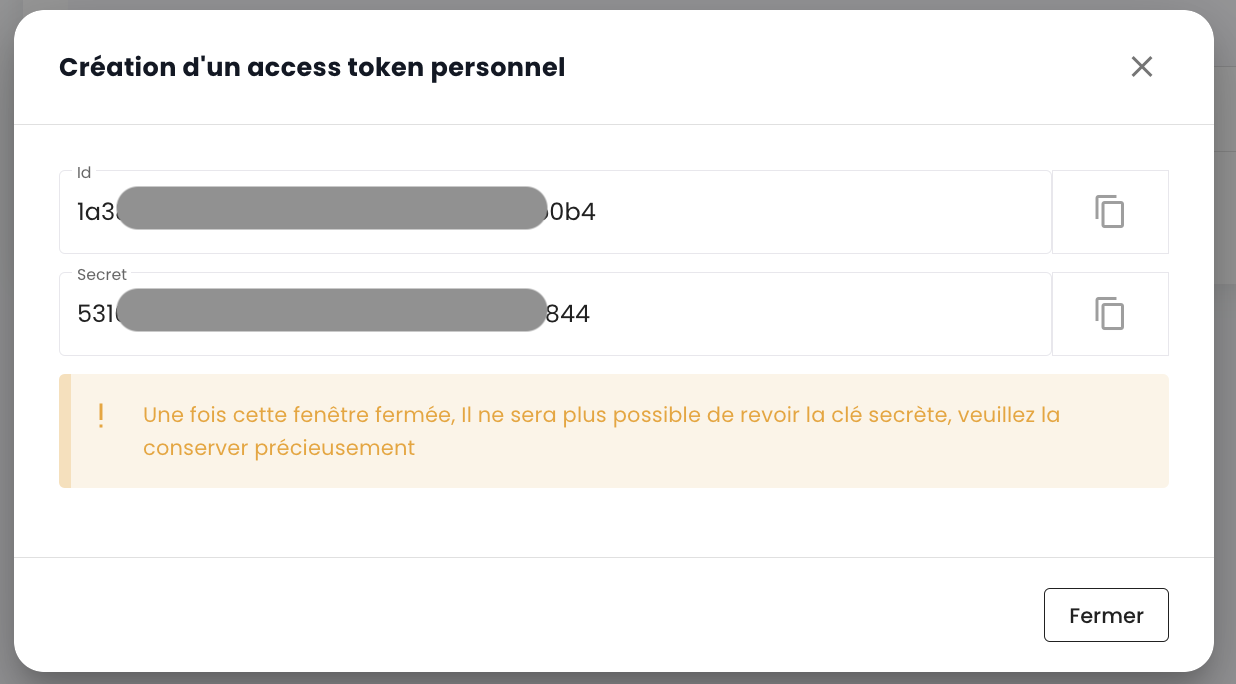
Aus Sicherheitsgründen wird empfohlen, mehrere Tokens mit jeweils spezifischem Verwendungszweck zu erstellen (ein Token pro Anwendung oder pro Geschäftsprozess), anstatt ein einzelnes Token mit allen Rechten zu erstellen.
Anschließend sehen Sie das neu erstellte Token und sein zukünftiges Ablaufdatum.
Wenn Sie Ihr Personal Access Token (PAT) zur Authentifizierung bei der API verwenden, erhalten Sie im Gegenzug ein Zugriffstoken. Es ist wichtig zu beachten, dass dieses Zugriffstoken ein JSON Web Token (JWT) mit begrenzter Lebensdauer ist.
- Lebensdauer : Jedes JWT-Token ist für 5 Minuten gültig.
- Überprüfung : Sie können das Ausstellungsdatum (
iat) und das Ablaufdatum (exp) Ihres Tokens durch Dekodierung überprüfen. Online-Tools wie jwt.io erleichtern dies.
Nach Ablauf des Tokens müssen Sie sich erneut mit Ihrem PAT authentifizieren, um ein neues zu erhalten. Es wird daher empfohlen, diesen Lebenszyklus in Ihren Skripten und Anwendungen zu verwalten, indem ein automatisches Token-Update eingeplant wird.
Zugriff auf das API-Portal
Die OpenAPI 3.0-Dokumentation (Swagger) der APIs der Cloud Temple-Konsole ist direkt in der Anwendung verfügbar:
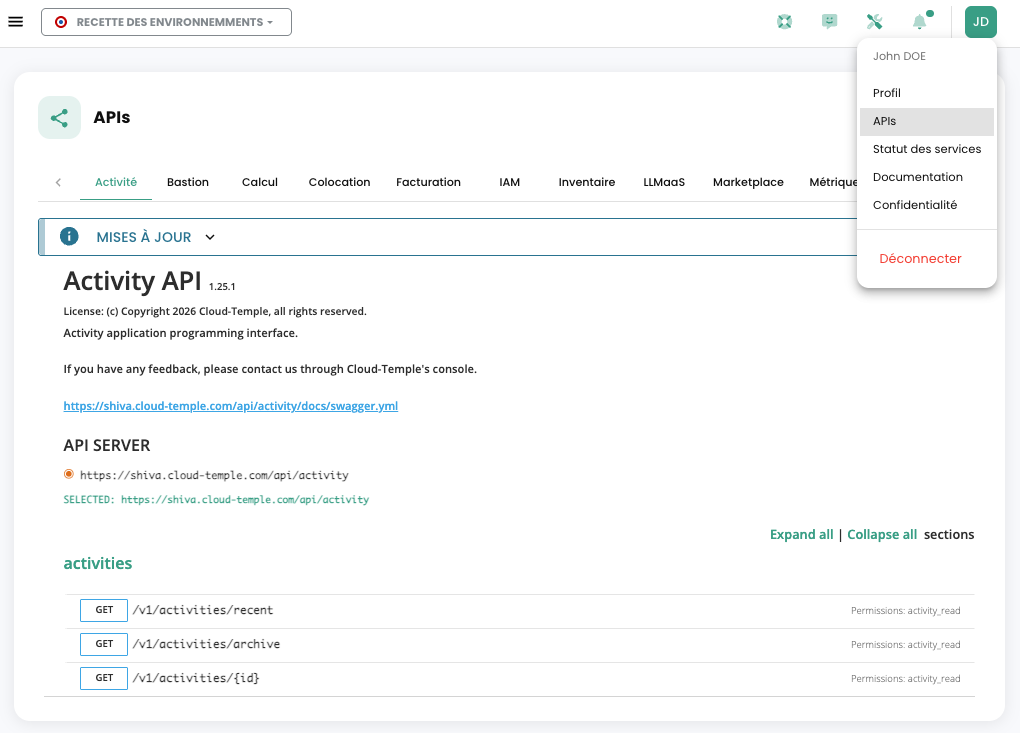
Der Zugriff auf die APIs erfordert eine Authentifizierung. Nach der Authentifizierung müssen alle Anfragen den Header 'Authorization' mit dem bei der Authentifizierung erhaltenen Bearer-Access-Token enthalten.
Die URL der Endpunkte wird direkt in Swagger angegeben (im Objekt "Servers" auf jeder API-Seite).
Interaktive Dokumentation erkunden
Das API-Portal ermöglicht es Ihnen:
- Alle verfügbaren Endpunkte pro Modul einsehen
- Anfragen direkt über die Oberfläche testen
- Datenmodelle (Schemata) für jede Ressource anzeigen
- Mögliche Antwortcodes für jeden Endpunkt einsehen
Struktur der Endpunkte
URL-Format
Die URLs der Cloud Temple API folgen einer konsistenten Struktur:
https://shiva.cloud-temple.com/api/{module}/v{version}/{ressource}
Wobei:
{module}: Das betroffene Modul (compute, iam, network, backup, etc.){version}: Die API-Version (v1, v2, etc.){ressource}: Die zu verwaltende Ressource (virtual-machines, users, networks, etc.)
Beispiele für Endpunkte
# Machines virtuelles (Compute)
GET    https://shiva.cloud-temple.com/api/compute/v1/virtual-machines
POST   https://shiva.cloud-temple.com/api/compute/v1/virtual-machines
GET    https://shiva.cloud-temple.com/api/compute/v1/virtual-machines/{id}
PATCH  https://shiva.cloud-temple.com/api/compute/v1/virtual-machines/{id}
DELETE https://shiva.cloud-temple.com/api/compute/v1/virtual-machines/{id}

# Identité et accès (IAM)
GET    https://shiva.cloud-temple.com/api/iam/v1/users
POST   https://shiva.cloud-temple.com/api/iam/v1/users
GET    https://shiva.cloud-temple.com/api/iam/v1/users/{id}

# Réseaux
GET    https://shiva.cloud-temple.com/api/network/v1/virtual-networks
POST   https://shiva.cloud-temple.com/api/network/v1/virtual-networks
Organisation nach Modulen
Die Cloud Temple API ist in funktionale Module unterteilt:
| Modul | Beschreibung | Basis-URL |
|---|---|---|
| Cloud Temple Konsole | Allgemeine Funktionen | /api/v1/ |
| Identität (IAM) | Benutzerverwaltung und Zugriff | /iam/v1/ |
| IaaS VMware | VMware Virtualisierungsressourcen | /compute/v1/ |
| OpenIaaS | Xen Orchestra-Ressourcen | /openiaas/v1/ |
| S3 | Objektspeicher | /s3/v1/ |
| OpenShift | PaaS-Plattform | /openshift/v1/ |
| Bastion | SSH/RDP-Bastion-Appliances | /bastion/v1/ |
| Netzwerk | Netzwerkverwaltung Layer 2 und 3 | /network/v1/ |
| Hosting | Colocation und Housing | /housing/v1/ |
| Marketplace | Lösungskatalog | /marketplace/v1/ |
| Support | Tickets und Support | /support/v1/ |
| Benachrichtigung | Benachrichtigungssystem | /notification/v1/ |
| LLMaaS | Künstliche Intelligenz | /llmaas/v1/ |
Die Aktivitäten
Die Nachverfolgung von Schreibanfragen (POST, PUT, PATCH, DELETE) erfolgt über die Verwaltung der Aktivitäten. Jede Anfrage dieses Typs generiert automatisch eine zugehörige Aktivität. Ein HTTP-Statuscode 201 bestätigt die erfolgreiche Erstellung der Aktivität. Die eindeutige ID dieser Aktivität wird in den Antwort-Headern unter dem Schlüssel 'Location' zurückgegeben.
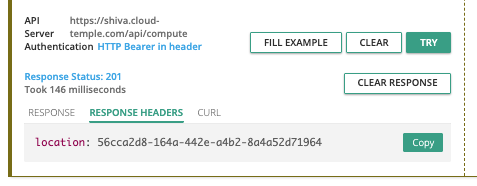
Sobald die ID abgerufen wurde, können die Details der Aktivität über die API des Activity-Moduls abgerufen werden:
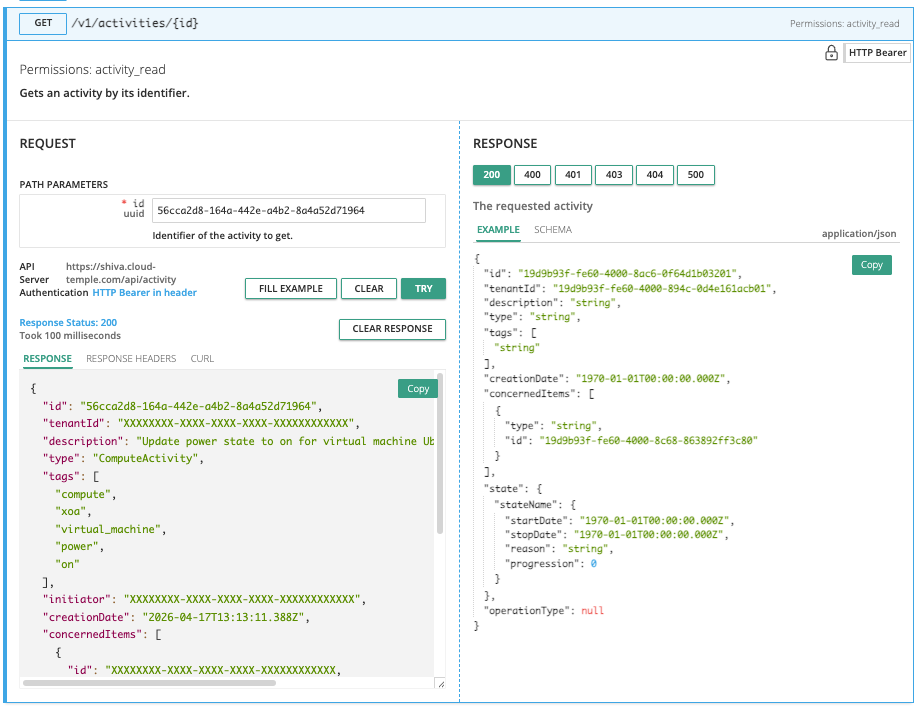
Der Inhalt der Aktivität enthält alle wesentlichen Informationen zur Identifizierung der Operation, ihres Ausführungsdatums sowie ihres Fortschrittsstatus. Nachfolgend das Modell einer Aktivität:
{
  "id": "UUIDV4",
  "tenantId": "UUIDV4",
  "description": "STRING",
  "type": "ComputeActivity" | "BackupActivity" | "IAMActivity" | "TagActivity" | "RTMSActivity" | "BastionActivity" | "SupportActivity",
  "tags": "STRING[]",
  "initiator": "UUIDV4",
  "creationDate": "DATE",
  "concernedItems": [
    {
      "type": "string",
      "id": "string"
    }
  ],
  "state": "CompletedState | RunningState | WaitingState | FailedState",
  "operationType": "read" | "write"
}
Status einer Aktivität
Das Objekt state kann je nach Status der Aktivität verschiedene Formen annehmen, nämlich:
wartend
Status vor Beginn des Vorgangs:
waiting: {}
running
Status, wenn der Vorgang ausgeführt wird:
running: {
  "status": "string",
  "startDate": "Date",
  "progression": "number"
}
fehlgeschlagen
Status, wenn der Vorgang fehlgeschlagen ist:
failed: {
  "startDate": "Date",
  "stopDate": "Date",
  "reason": "string"
}
abgeschlossen
Status, wenn der Vorgang abgeschlossen ist:
completed: {
  "startDate": "Date",
  "stopDate": "Date",
  "result": "string"
}
Die Kennung (UUIDv4) der erstellten Ressource ist im Ergebnis der Aktivität verfügbar, sobald diese abgeschlossen ist.
API-Limits
Warum Limits?
Die Cloud Temple-Konsole definiert Grenzwerte für das Anfragsvolumen, die ein Benutzer innerhalb eines bestimmten Zeitraums an die API senden kann. Die Einführung dieser Ratenbegrenzungen ist eine gängige Maßnahme im API-Management und wird aus mehreren wesentlichen Gründen ergriffen:
- Missbrauchsprävention : Diese Limits tragen zum Schutz der API-Integrität bei, indem sie missbräuchliche oder unangemessene Nutzung verhindert, die deren Funktionsweise beeinträchtigen könnte.
- Sicherstellung der Servicequalität : Durch die Steuerung des API-Zugriffs gewährleisten wir eine faire Ressourcenverteilung, sodass alle Nutzer eine stabile und performante Erfahrung machen können.
Nehmen wir das Beispiel eines schlecht konzipierten oder ineffizienten Skripts, das wiederholt API-Aufrufe versucht und dadurch Ressourcen überlastet sowie die Leistung beeinträchtigt. Durch die Festlegung von Anfragegrenzwerten verhindern wir derartige Situationen und gewährleisten einen reibungslosen und unterbrechungsfreien Service für unsere gesamte Kundschaft.
Welche Ratenbegrenzungen gelten für die API der Cloud-Temple-Konsole?
Für jedes Produkt gelten mengenbasierte Einschränkungen für die Benutzerinteraktionen mit der Konsole.
Die Limits werden in Anfragen pro Sekunde (r/s) pro Quell-IP definiert. Wird der Grenzwert überschritten, antwortet das System mit dem HTTP-Fehlercode 429, der anzeigt, dass das Limit für zulässige Anfragen überschritten wurde.
Nachfolgend finden Sie die festgelegten Limits:
| Produkt | Grenzwert |
|---|---|
| Console Cloud Temple | 25 r/s |
| Identität (IAM) | 25 r/s |
| IaaS VMware | 25 r/s |
| OpenIaaS | 25 r/s |
| S3 | 25 r/s |
| OpenShift | 25 r/s |
| Bastion | 25 r/s |
| Netzwerk | 25 r/s |
| Hosting | 25 r/s |
| Marktplatz | 25 r/s |
| Support | 25 r/s |
| Benachrichtigung | 25 r/s |
| LLMaaS | 25 r/s |
Spezifische Routen
Bestimmte API-Endpunkte, insbesondere solche im Zusammenhang mit der Authentifizierung oder sensiblen Aktionen, unterliegen strengeren Limits, um die Sicherheit zu erhöhen und die Stabilität zu gewährleisten.
| Route | Grenzwert |
|---|---|
| Authentifizierung (IAM) | 5 r/s |
| IaaS - Speicher (Datastores) | 20 r/s |
| Marketplace (Kontakt) | 1 r/min - 5 r/h |
Wie funktionieren Rate-Limits?
Wenn die Anzahl der an einen API-Endpunkt gesendeten Anfragen die zulässige Grenze überschreitet, reagiert der API-Endpunkt mit der Rückgabe von einem HTTP-Antwortcode 429. Dieser Code zeigt an, dass der Benutzer die erlaubte Anzahl an Anfragen überschritten hat. In diesem Fall liefert der API-Endpunkt zusätzlich ein JSON-Objekt als Antwort, das detaillierte Informationen zur angewendeten Begrenzung enthält:
{
  "error": {
    "status": "429 Too Many Requests",
    "message": "Too Many Requests"
  }
}
Wie vermeiden Sie zu viele Anfragen?
Es wird empfohlen, die Anzahl der von Ihrer Automatisierung durchgeführten API-Aufrufe zu begrenzen, um unter der für den Endpunkt festgelegten Ratenbegrenzung zu bleiben.
Dies tritt häufig auf, wenn mehrere Anfragen parallel mit mehreren Prozessen oder Threads ausgeführt werden.
Es gibt mehrere Möglichkeiten, die Effizienz Ihrer Automatisierung zu verbessern, insbesondere durch die Verwendung von Caching und die Implementierung eines Systems mit Wiederholungsversuchen und Backoff. Bei dieser Methode wird eine kurze Pause eingelegt, wenn ein Ratenbegrenzungsfehler auftritt, und die Anfrage anschließend erneut gesendet. Falls die Anfrage erneut fehlschlägt, wird die Pausendauer schrittweise erhöht, bis die Anfrage erfolgreich ist oder eine maximale Anzahl von Wiederholungsversuchen erreicht wird.
Dieser Ansatz bietet zahlreiche Vorteile:
- Backoff stellt sicher, dass die ersten Versuche schnell ausgeführt werden, während bei wiederholtem Fehlschlag längere Verzögerungen eingeplant werden.
- Das Hinzufügen einer zufälligen Variation zur Pause trägt dazu bei, zu verhindern, dass alle Versuche gleichzeitig stattfinden.
Es ist wichtig zu beachten, dass fehlgeschlagene Anfragen Ihr Rate-Limit nicht beeinträchtigen. Das kontinuierliche Wiederholen einer Anfrage ist jedoch möglicherweise keine langfristige Lösung, da sich dieses Verhalten in der Zukunft ändern könnte. Wir empfehlen daher, sich nicht ausschließlich auf diesen Mechanismus zu verlassen.
Die Python-Bibliotheken Backoff und Tenacity sind gute Ausgangspunkte zur Implementierung von Backoff-Strategien.
Lebenszyklus und Deprecation von Endpunkten
Deprecation-Richtlinie
Cloud Temple verpflichtet sich, die Kompatibilität seiner API langfristig zu gewährleisten. Wenn es jedoch erforderlich ist, die API weiterzuentwickeln (neue Funktionen, Optimierungen, Sicherheitsupdates), können bestimmte Endpunkte deprecated und anschließend entfernt werden.
Regel für mindestens 3 Monate
Wenn ein Endpunkt als veraltet markiert wird:
- Offizielle Ankündigung: Die Deprecation wird in den Release Notes der Konsole angekündigt
- Übergangsphase: Der Endpunkt bleibt mindestens 3 Monate nach der Ankündigung zugänglich und funktionsfähig
- Löschdatum: Ein genaues Datum für die endgültige Entfernung wird bereits bei der Ankündigung mitgeteilt
- Dokumentierte Alternative: Der neue Ersatz-Endpunkt ist dokumentiert und verfügbar
Diese 3-Monats-Regel gibt Ihnen die notwendige Zeit, Ihren Code anzupassen und zu den neuen Endpunkten zu migrieren.
Wie identifiziert man einen veralteten Endpunkt?
Im API-Portal (Swagger)
Veraltete Endpoints werden in der Swagger-Dokumentation durchgestrichen angezeigt:
POST /v1/ancien/endpoint
Die Beschreibung des Endpoints enthält:
- Das Datum der Ankündigung der Veraltung
- Das geplante Datum der Entfernung
- Der empfohlene Ersatz-Endpoint
Best Practices für den Umgang mit Deprecations
-
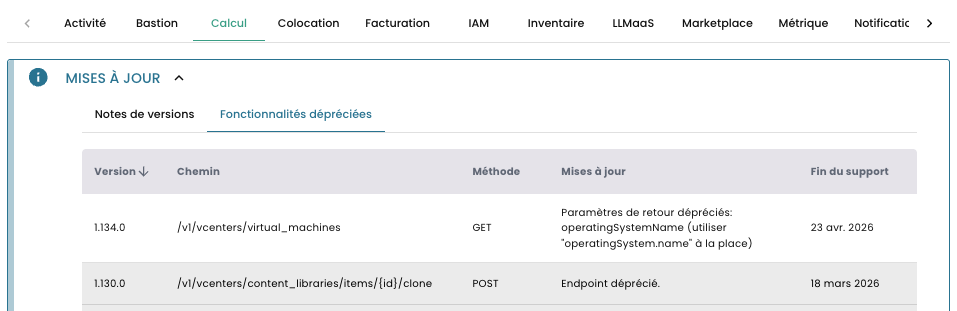
Überwachen Sie veraltete Funktionen : Prüfen Sie regelmäßig die in der Konsole aufgeführten veralteten Funktionen, um über bevorstehende Deprecations informiert zu bleiben.
-
Planen Sie Ihre Migrationen : Sobald eine Deprecation angekündigt wird, planen Sie die Migration Ihres Codes zum neuen Endpunkt innerhalb von 3 Monaten.
-
Testen Sie die neuen Endpunkte : Testen Sie die neuen Endpunkte ab deren Verfügbarkeit, auch während der Übergangsphase.
-
Dokumentieren Sie Ihre Abhängigkeiten : Führen Sie eine Liste der Endpunkte, die Ihre Anwendung verwendet, um zukünftige Migrationen zu erleichtern.
Best Practices
Token-Sicherheit
- 🚫 Tokens niemals in versioniertem Code (Git, etc.) veröffentlichen
- 🔐 Umgebungsvariablen zur Speicherung der Tokens verwenden
- 🎯 Tokens mit minimalen Berechtigungen erstellen (Prinzip der geringsten Rechte)
- 🔄 Tokens regelmäßig erneuern (maximal 12 Monate)
- ⚠️ Kompromittierte Tokens sofort widerrufen
Fehlerbehandlung
Behandeln Sie HTTP-Fehler immer in Ihrem Code. Achten Sie besonders auf die folgenden Codes:
| Code | Beschreibung | Empfohlene Maßnahme |
|---|---|---|
| 401 Unauthorized | Token abgelaufen oder ungültig | Mit Ihrem PAT neu authentifizieren |
| 403 Forbidden | Unzureichende Berechtigungen | Token-Berechtigungen überprüfen |
| 429 Too Many Requests | Ratenbegrenzung erreicht | Vor dem erneuten Versuch warten (backoff) |
| 500/503 Server Error | Temporärer Serverfehler | Später erneut versuchen |
Optimierung der API-Aufrufe
- Paginierung für umfangreiche Listen verwenden
- Daten, die sich selten ändern, zwischenspeichern
- Filter verwenden, um die zurückgegebenen Daten zu begrenzen
- Operationen nach Möglichkeit gruppieren
- Den Status asynchroner Aktivitäten verfolgen, anstatt intensives Polling durchzuführen
Retry mit exponentiellem Backoff
Um temporäre Fehler oder Rate Limiting (HTTP 429) zu behandeln, implementieren Sie eine Retry-Strategie mit exponentiellem Backoff: